
Table of Contents
- Introduction: Why Accurate Apprentice Hour Tracking Matters in 2026
- What Is Apprentice Hours Tracking Software?
- Core Features of Modern Apprentice Hours Tracking Software
- How Apprentice Hours Tracking Software Improves Efficiency & Accuracy
- Compliance, Audits, and Reporting Requirements
- Key Roles & Permissions in an Hours Tracking Platform
- Mobile Access & Everyday Apprentice Experience
- Data Security, Privacy, and System Integrations
- How to Choose the Right Apprentice Hours Tracking Software
- Implementation Roadmap: From Spreadsheets to Digital Tracking
- Why Choose Our Business for Apprentice Hours Tracking
- FAQs About Apprentice Hours Tracking Software
- Conclusion
Introduction: Why Accurate Apprentice Hour Tracking Matters in 2026
Apprenticeship program participation has surged dramatically. In the U.S., registered apprenticeship programs grew over 50% between 2020 and 2025, reaching more than 600,000 active apprentices. The UK saw similar expansion, with starts climbing from 347,000 to over 500,000 by 2025/26. This growth brings heightened accountability for everyone involved.
The stakes are concrete: wage progression depends on documented OJT hours (typically 1,000–2,000 per level), completion eligibility requires 4,000–10,000 total hours depending on the trade, and licensing boards demand verified logs for credentials. USDOL audits under 29 CFR 29.5 scrutinize both RTI and OJT ratios, with non-compliance risking program deregistration or funding clawbacks up to $100,000 per violation. Tracking apprenticeship progress ensures accurate documentation of every step in a trainee’s journey, safeguarding their path to certification and focusing on the outcomes that matter most to apprentices and programs.
Old methods—paper timesheets, spreadsheets, email chains—carry error rates as high as 20-30%. Modern apprentice hours tracking software centralizes records, automates validation, and secures data with audit trails. Online tracking transforms the cumbersome task of manual record-keeping into a streamlined digital process, minimizing errors, allowing users to efficiently track progress, and enabling real-time updates.
This article covers what this software does, who needs it, how to choose, and how our platform solves common pain points.

What Is Apprentice Hours Tracking Software?
Apprentice hours tracking software is a cloud-based system that logs, verifies, and reports RTI and OJT hours for learners across multiple occupations and locations. It serves as the central, accessible repository connecting sponsors, employers, training providers, managers, apprentices, administrators, and students, ensuring that important information and progress tracking are readily available to all stakeholders.
Effective software for tracking apprentice hours falls into two categories: specialized Apprenticeship Management Systems (AMS) designed for compliance and general Time Tracking Software focused on simple hour logging. For registered apprenticeship requirements, AMS platforms offer the compliance alignment most programs need.
Typical users include JATCs, unions, community colleges, workforce development boards, state-registered programs, and students. Data stored includes:
- Daily and weekly hours logged by task category
- Classroom attendance for RTI (e.g., fall 2026 welding classes)
- Supervisor timestamps and digital approvals
- Wage step changes triggered at milestones
- Certifications and competencies earned
Core Features of Modern Apprentice Hours Tracking Software
Not all management software delivers equal value. Key features of effective apprentice hours tracking software include real-time tracking, supervisor approval workflows, mobile access for logging, and compliance reporting for OJT. The software’s ability to quickly generate reports and provide better control over training progress sets it apart, empowering both apprentices and unions to manage and monitor advancement efficiently.
Essential capabilities for 2026:
- Mobile time entry: Native iOS/Android apps with offline mode and geofenced clock-ins preventing fraudulent logging from remote locations
- Supervisor approvals: Push notifications enable same-day sign-off; an electrical apprentice logs conduit installation hours and gets verification within minutes
- Overtime flagging: Automatic alerts when hours exceed 40/week per FLSA
- Competency tracking: Map progress against standards like NCCER or NIMS, with mentors logging evaluations tied to specific OJT hours
- Document uploads: Attach photos of completed tasks or safety certifications
- Integrated messaging: Real-time feedback between apprentices, supervisors, and coordinators
- Automated reminders: Ping apprentices for missing entries before payroll cycles
- Analytics dashboards: Many solutions provide customizable dashboards that allow users to track specific metrics relevant to their roles, focus on building skills, and monitor progress in real time, enhancing user engagement and productivity
- Support for plans: Streamline the creation and management of onboarding, On-The-Job Learning plans, and wage progression plans to facilitate structured apprenticeship development
- Automated writing features: Efficiently generate essential documents such as job descriptions, DoL registration forms, and Learning plans, reducing manual effort and saving time
- User-friendly design: Designed for accessibility, so users can get started without needing to learn complex processes or have prior technical knowledge—plain English and intuitive onboarding remove barriers to entry and ensure users of all skill levels can navigate the system easily and consistently track apprenticeship progress
- Secure APIs: Bidirectional syncs with payroll systems and LMS platforms
Digital tools help apprentices categorize their tasks, distinguishing between work processes tailored to specific competencies or industries. Real-time progress monitoring enables tracking of hours remaining to meet milestones or competency requirements, allowing all users to focus more on developing skills rather than administrative tasks.
How Apprentice Hours Tracking Software Improves Efficiency & Accuracy
Training coordinators report slashing monthly reconciliation from 10-20 hours to under one hour via automated exports. Apprenticeship tracking software often includes automated reporting features that significantly reduce administrative time, minimize paperwork, and improve efficiency for program managers.
Want to Learn More About Your Registered Apprenticeship Opportunities?
BOOK A FREE CONSULTATION
Efficiency gains include:
- Instant access to historical logs without digging through file cabinets
- Automatic reminders preventing 90% of late submissions
- Quick filtered exports for quarterly board reports by cohort, occupation, or date range
- Reduced email follow-ups by 80% through centralized communication
- Transforming a 3-hour spreadsheet merge for 50 apprentices into a 5-minute PDF download
Accuracy improves through validation rules rejecting entries outside shift windows, duplicate detection algorithms, required fields enforcing task categorization, and a dual-verification workflow that ensures record integrity by requiring approval from both the apprentice and supervisor on submitted hours. Accurate hour tracking is essential for certification, wage calculations, and career advancement.
Compliance, Audits, and Reporting Requirements
Scrutiny from USDOL, state apprenticeship agencies, and industry licensing boards intensified post-2023. In 2024, 12% of audited programs faced citations for incomplete RTI logs. Maintaining compliance with industry regulations and meeting compliance standards has historically been cumbersome, but modern apprentice hours tracking software streamlines adherence to these standards, facilitates audit readiness, and simplifies compliance management across the board.
Compliance use cases include:
- RAPIDS reporting for registered programs (compliance alignment requires RAPIDS-ready reports tracking mandatory OJT and RTI hours, ensuring compliance with federal requirements)
- State-level RTI minimums (e.g., California DIR’s 144 annual classroom hours)
- Industry certification audits for NCCER, NIMS, or healthcare boards
Automated reporting features in apprenticeship management software significantly reduce administrative burdens and ensure that all compliance requirements are met efficiently. Comprehensive reporting tools are essential for audits, providing a transparent view of apprenticeship progression and ensuring readiness for compliance checks.
Reports filter by cohort (2026 HVAC intake), occupation, employer partner, or training provider with date ranges like January–June 2026. Audit logs provide a detailed trail showing date and time stamps for every timesheet entry or edit, which is vital for audits by the Department of Labor. Effective apprenticeship management software should automatically generate reports for regulatory compliance and support audit preparation.
Consider this scenario: A Midwest JATC faced a surprise USDOL audit in 2025. Because they’d digitized records, they presented 10,000 verified apprentice-hours with timestamped approval chains in minutes. A competitor relying on paper boxes delayed review by weeks and faced citations.
Key Roles & Permissions in an Hours Tracking Platform
Robust role-based access is essential when multiple organizations collaborate across sponsors, employers, educators, unions, and employer partners. A well-designed apprenticeship management system facilitates better communication between apprentices, mentors, program administrators, and integrates seamlessly with employer partners to streamline tracking and workflow management.
Typical roles and permissions:
- Admins: Manage global settings, configure wage schedules, integrate with state databases
- Sponsors: Cross-employer visibility into all apprentices for aggregate reporting
- Employer Partners: Access and manage apprentice progress and reporting relevant to their organization, supporting streamlined collaboration and workflow integration
- Managers: Limited to their site’s logs for daily oversight
- Mentors/Journeyworkers: View and comment on mentee entries but require admin final approval
- Apprentices: Self-log hours with progress dashboards showing completion ETA
- Auditors: Read-only access to exports and compliance reports
Privacy in multi-employer setups employs granular permissions—Contractor A sees only its 20 apprentices’ data—while sponsors and employer partners maintain program-wide visibility. This flexibility ensures data security without creating silos.
Mobile Access & Everyday Apprentice Experience
Picture a typical 2026 day for an electrical apprentice: clock in at 7 AM on a solar farm site via geofenced app, log 4 hours on “Motors & Controls” with task notes and photos, receive a mid-day push notification for incomplete RTI homework, and check year-to-date progress toward the 2,000-hour milestone—all on a budget Android.
Mobile apps allow apprentices to log hours in real-time, reducing manual data entry issues. Key mobile capabilities include:
- Logging OJT hours immediately after completing tasks
- Attaching photos or notes to specific work categories
- Receiving push notifications for missing entries
- Viewing progress toward annual hour goals
- Messaging supervisors directly from the app
This contrasts sharply with legacy systems where apprentices waited until Friday to fill in paper timesheets from memory, yielding 25% inaccuracies. Effective apprenticeship software is designed to be user-friendly, ensuring that users of all skill levels can navigate the system with ease, promoting consistent and accurate tracking.

Data Security, Privacy, and System Integrations
Safeguarding personally identifiable information and wage-related data is non-negotiable by 2026, especially with stricter data protection laws like GDPR and CCPA. Security measures are specifically designed for ensuring compliance with industry standards and regulations.
Security measures include:
- AES-256 encryption at rest and in transit
- Role-based permissions limiting data access by user type
- Audit logs tracking every access and modification
- SOC 2 Type II certifications and routine penetration testing
- Multi-factor authentication for all account access
Common integrations connect the platform to:
- HR/payroll systems (ADP, QuickBooks) for automatic wage step updates
- LMS platforms (Canvas) for nightly RTI data syncs
- Student information systems at community colleges
- State and national apprenticeship databases like RAPIDS
For example, syncing completion data from an LMS into the hour tracking system nightly keeps progress current without duplicate entry, saving coordinators 5+ hours weekly.
How to Choose the Right Apprentice Hours Tracking Software
Many platforms exist in 2026, but their strengths differ for unions, colleges, large employers, and small shops.
Evaluation criteria to consider:
- Setup speed: Implementation under 4 weeks is achievable with the right system
- RTI and OJT support: Both must be tracked with configurable requirements
- Mobile usability: App store ratings of 4.5+ indicate strong UX
- Reporting strength: Custom filters, API exports, compliance templates
- Ability to scale: Can it handle hundreds or thousands of apprentices via sharding and support program growth?
- Recruiting features: Does the software include tools for recruiting, such as job posting, application management, and onboarding?
- Compliance features: RAPIDS-ready exports, state requirements alignment
- Pilot options: Free 30-60 day trials with a single cohort before full rollout
- Total cost of ownership: Compare subscription pricing ($5-15/apprentice/month) against spreadsheets’ hidden costs—errors, audit risk, staff time
Industry benchmarks show 18% audit failure rates for spreadsheet-based programs versus 1% for dedicated software users.
Implementation Roadmap: From Spreadsheets to Digital Tracking
A realistic transition takes 6-12 weeks. The complexity of managing apprenticeship programs can be alleviated by using apprentice hours tracking software that makes it easy to create apprenticeship programs and automates the writing of essential documents, such as job descriptions and compliance documentation.
Weeks 1-2: Planning
- Audit existing spreadsheets and export to CSV
- Map current workflows and match task codes to DOL standards
Weeks 3-4: Configuration
- Configure role-based permissions
- Import historical hours (bulk upload 5,000+ records)
Weeks 5-6: Pilot
- Test with one cohort or occupation
- Train via 1-hour webinars for admins and apprentices
Weeks 7-8: Full Launch
- Run dual systems briefly for validation
- Complete cut-over with 2-week parallel tracking
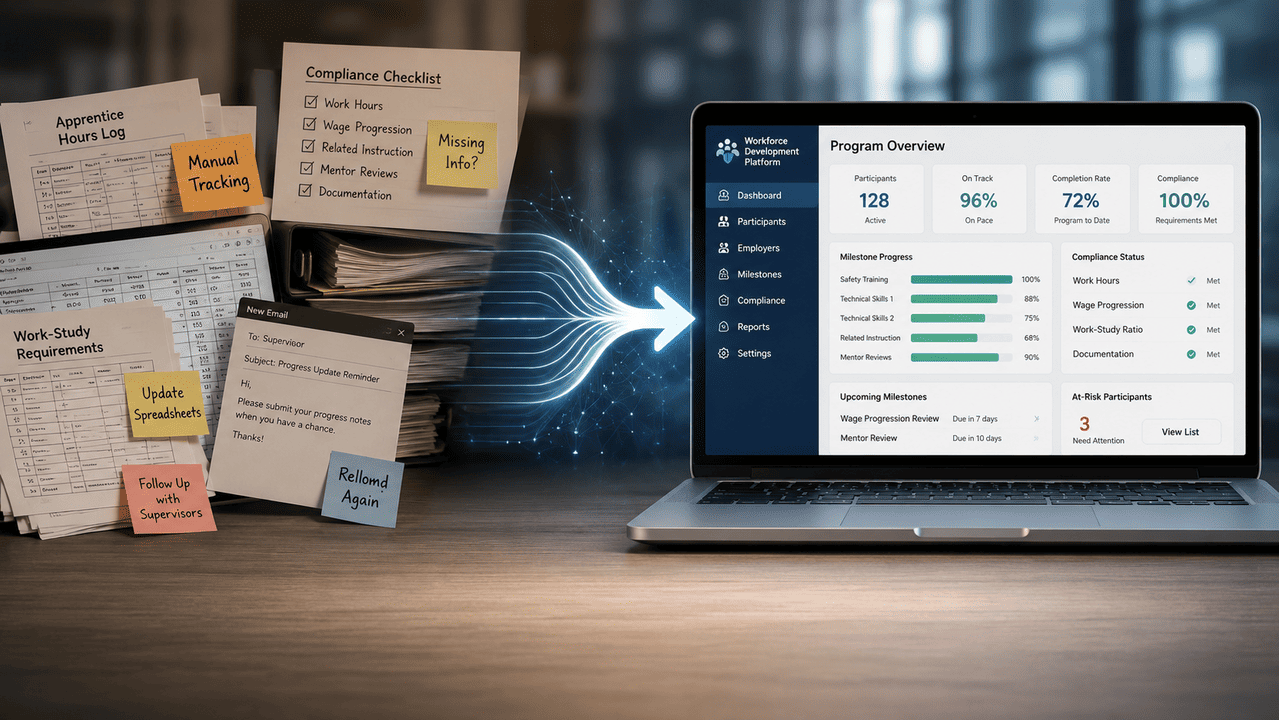
Change management matters: communicate benefits to mentors (40% admin reduction), address concerns from seasoned supervisors accustomed to paper, and provide quick reference guides reducing support tickets by 60%.
Why Choose Our Business for Apprentice Hours Tracking
Our platform specializes in apprenticeship and work-based learning programs—not generic HR tools. Effective apprenticeship program management requires a streamlined approach integrating recruitment, training, and tracking into a single platform to enhance efficiency and reduce administrative burdens, while supporting pathways to careers and the development of workforce talent.
What sets us apart:
- End-to-end apprenticeship focus built for both customized and registered programs
- Easy configuration reducing design and setup time for new apprentices
- Responsive support from specialists who understand workforce development and talent pipelines
- Regular feature updates based on sponsor and employer feedback
- Simplified RTI/OJT alignment with clean audit reports on demand
- The ability to quickly generate reports and provide better control over program management, empowering apprentices and unions to monitor progress and outcomes
One sponsor managing 200+ apprentices across three states reduced monthly administrative processes from 15 hours to 2 hours within their first quarter. Their training coordinators now have easy access to historical data and generate compliance reports in minutes instead of days.
Ready to see how it works? Contact our team to schedule a demo or begin a pilot cohort aligned with your 2026 reporting requirements.
FAQs About Apprentice Hours Tracking Software
Most platforms retain data for 7 years, exceeding DOL’s 5-year requirement. You can export DOL-formatted reports anytime. Many programs run hybrid approaches during initial pilots, then phase out paper entirely.
Expect 4-6 weeks from kickoff to full deployment. This includes data import, configuration, and training sessions for all users.
Yes. Configurable templates accommodate different tracks—electricians requiring 8,000 OJT hours plus 144 RTI hours versus healthcare roles with 4,000 clinical hours. Each occupation maintains separate requirements, and you can manage onboarding, learning, and wage progression plans for each occupation within the software.
Automated reminders ping before payroll cycles. Grace-period edits allow late entries with supervisor notes explaining the delay. Comprehensive reporting tools flag patterns requiring intervention.
Our apprentice hours tracking software generates RAPIDS-ready exports and PDFs accepted by 95% of state boards, designed to stay aligned with evolving 2024–2026 regulatory and reporting standards.
Pricing typically scales from $2,000/year for small employers (10 apprentices) to $20,000+ for large sponsors managing hundreds of learners across multiple sites.
Conclusion: Putting Apprentice Hour Tracking on Autopilot
Manual tracking creates unnecessary risk when automated solutions exist. Modern apprentice hours tracking software transforms programs from administrative headaches into efficient, audit-ready operations. Apprentices benefit from clear visibility into their progress, while sponsors and employers gain confidence in compliance.
As apprenticeship funding and scrutiny increase across industries in 2026, investing in dedicated digital tools isn’t optional—it’s essential. The future of your workforce development depends on accurate data and streamlined processes.
Schedule a demo, enroll a pilot cohort, or contact our team to map your current process into an automated workflow. Predictable, on-time completions start with the right platform.