

Paper logbooks get lost. Excel files get corrupted. Signatures get forgotten. And somewhere in that chaos, an apprentice’s career hangs in the balance. If your apprenticeship program is still relying on manual processes to track 6,000 to 8,000 hours across multiple years, you’re playing a risky game with compliance, funding, and workforce development.
This guide walks you through exactly how a dedicated tracking solution transforms administrative processes and protects everyone involved—from day-one apprentices to seasoned training providers.
Table of Contents
- Why Apprenticeship Programs Need Mobile Time Tracking Now
- How a Mobile Apprenticeship Time Tracking App Actually Works
- Core Features to Look For in a Mobile App for Apprenticeship Time Tracking
- Benefits for Apprentices, Employers, and Training Providers
- Designing Your Apprenticeship Workflow in the App
- Implementation Roadmap: Moving from Paper Logs to Mobile App
- Compliance, Audits, and Record Retention
- Why Choose Our Apprenticeship Time Tracking Solution
- Frequently Asked Questions About Mobile Apprenticeship Time Tracking
- Next Steps: Start Modernizing Your Apprenticeship Tracking
Why Apprenticeship Programs Need Mobile Time Tracking Now
Between 2024 and 2026, accurate tracking of Related Technical Instruction (RTI) and On-the-Job Training (OJT) hours has become non-negotiable. Federal funding through programs like the National Apprenticeship Act now requires verifiable progress reports, and state licensing boards are running stricter audits amid skilled labor shortages in electrical, plumbing, HVAC, and construction trades.
The pain points are familiar to anyone who’s managed an apprenticeship program:
- Paper logbooks get lost, damaged, or filled with illegible entries
- Missing journeyman signatures cause 20-30% of hours to be disputed
- Excel spreadsheets create reconciliation nightmares when apprentices rotate through 5-10 jobsites annually
- Verbal disputes near completion thresholds lead to legal challenges and delayed licensure
A dedicated mobile app for apprenticeship time tracking solves these problems by creating indisputable digital records. These apps are designed specifically for On-the-Job Training (OJT) and Related Technical Instruction (RTI) tracking, often automating reports for federal or state labor departments.
Mobile tracking protects apprentices by documenting every hour toward their career progression. It protects employers and sponsors by providing audit-ready documentation that withstands DOL or state inspections. When a typical apprenticeship journey spans 3-5 years and requires 6,000-8,000 verified training hours across multiple categories, having accurate records isn’t optional—it’s essential.

How a Mobile Apprenticeship Time Tracking App Actually Works
Picture this: an electrician apprentice arrives at a jobsite at 7:00 AM. They open the app on their phone, tap clock in, and select their task category from a dropdown—say, “Raceways & Boxes.” The system captures the timestamp and GPS coordinates automatically. Throughout the shift, they add notes about techniques learned, like conduit bending methods. At 3:30 PM, they clock out. That evening, their supervising journeyman gets a push notification, reviews the entry, and applies a digital signature from their own device.
Time tracking apps automate the process of recording when employees start and end their shifts, track breaks, and calculate total hours worked, reducing reliance on manual systems.
Here’s the step-by-step workflow:
- Account setup: Program administrators configure trade-specific templates aligned with DOL standards (up to 144 work processes for some trades)
- Role assignment: Apprentices, supervisors, and sponsors each get appropriate access levels
- Daily logging: Clock in/out with automatic timestamps and location capture
- Category selection: Choose from predefined work process categories matching your trade
- Note-taking: Document skills learned, tasks completed, or job training specifics
- Supervisor review: Digital sign-offs and approval workflows allow site supervisors or journeyworkers to verify hours and skills via integrated e-signatures or in-app approvals
The app must distinguish between On-the-Job Training (OJT) hours and Related Technical Instruction (RTI) hours. Most platforms handle this through intuitive toggles—classroom sessions log under RTI with instructor verification, while field work defaults to OJT. This separation is critical for compliance reporting.
All entries are timestamped, GPS-verified, and stored in the cloud with retention periods often exceeding 5-7 years post-completion per DOL guidelines. Data can be exported as PDF or CSV for submission to state agencies or joint apprenticeship training committees (JATCs).
Core Features to Look For in a Mobile App for Apprenticeship Time Tracking
Not all tools are created equal. Effective mobile apps for tracking apprenticeship time fall into two categories: specialized platforms built for registered apprenticeship compliance and general-purpose time-tracking tools for personal productivity. For registered apprenticeships, you need purpose-built capabilities.
Here’s your checklist for 2026 and beyond:
GPS verification and geolocation stamping Most time tracking apps provide features like GPS verification, job-based tracking, overtime rules, and payroll-ready timesheets to enhance accuracy and accountability. GPS verification helps document the location and time when hours are logged, providing a reliable record of where work was performed. Using GPS-verified apps allows apprentices to clock in and out at job sites, ensuring that their hours are accurately recorded and can be digitally approved by supervisors.
Customizable work process categories Apprentices should be able to log hours against specific competencies or sub-competencies required for their trade. Look for apps that support user-defined skill sets matching DOL’s work process schedules—12 standard categories for electricians, different structures for plumbing or HVAC.
Digital supervisor sign-offs Remote approvals after shifts are essential. One-tap functionality lets journeyworkers review and sign entries from any smartphone, even if they’re not on the same jobsite as the apprentice.
Offline mode The app must allow offline logging that syncs automatically once connectivity returns, to accommodate trades working in areas with spotty service. This is critical for no-signal construction sites or remote locations.
Automated progress dashboards Real-time visuals showing percentage complete by category, total hours versus benchmarks, and projected completion dates. Some platforms use algorithms that flag delays if weekly logs fall below expected thresholds.
Exportable, review-ready reports Generate PDF or CSV reports including timestamps, categories, signatures, and totals by date range. Automated reporting software can collect and format data for federal submission in registered apprenticeship programs.
Role-based access Segment views so apprentices see personal progress, employers view team hours, and sponsors access program-wide aggregates. This protects sensitive data while maintaining visibility.
Notifications and reminders AI-driven alerts for missing entries, unapproved weeks, or approaching deadlines boost submission rates by 40-60% according to vendor case studies.
Key considerations for apprenticeship time-tracking apps include digital supervisor sign-offs, automated compliance reporting, and real-time communication.
Benefits for Apprentices, Employers, and Training Providers
A mobile app for apprenticeship programs should go beyond simple clock-ins to handle specific regulatory and educational requirements. The benefits extend to every stakeholder in the ecosystem.
For Apprentices
- Never lose hours again: Cloud-backed storage means zero lost data even if phones are lost or damaged. Apprentices love the peace of mind that comes from knowing every hour is protected.
- Prove your experience: Granular records showing hours from specific dates, jobs, or categories strengthen journeyman applications. Programs using digital tracking report rejection rates dropping from 15% to under 2%.
- Easy access to your records: Track progress toward completion from any device, anytime. See exactly where you stand against the 8,000-hour finish line.
For Employers
- Reduced admin time: Eliminate paper chases and spreadsheet reconciliation. Testimonials report 50-70% administrative time savings compared to manual tracking hours.
- Better workforce planning: Live dashboards show who is on which job and how many apprentice hours are logged weekly. Manage apprentice-to-journeyman ratios in real-time.
- Accurate billing and job costing: A good time tracking app should provide real-time visibility into labor costs, allowing managers to monitor hours worked and overtime before payroll is finalized.
For Training Providers and Sponsors
- Simplified compliance reporting: Generate hour breakdowns for grants and state requirements in minutes instead of days. Digital time tracking solutions help prevent payroll errors, reduce time theft, and provide clear visibility into labor costs, making payroll processes more efficient.
- Easier audits: Time-stamped, filterable records replace boxes of binders. What once took weeks now resolves in hours.
- Cohort-level analytics: Track progress across your entire program to identify learners who need intervention.
Program-Wide
- Transparency and trust: Reduced disputes near critical milestones like 2,000, 4,000, or 8,000-hour thresholds. One case study reported 25% faster completions in a 150-apprentice electrical program due to proactive interventions.
Designing Your Apprenticeship Workflow in the App
Configuring your platform correctly from the start saves headaches later. Here’s how to map your existing process into digital workflows.
Map paper categories to digital fields Take your existing work process schedule—“Raceways & Boxes,” “Motors & Controllers,” “Service & Maintenance” for electricians—and create them as dropdown options. Most apps support sub-tags for even more granular tracking.
Set approval cadences Configure weekly supervisor sign-offs with automatic reminders. A Friday 4:00 PM notification ensures nothing slips through before the weekend. Escalation rules can alert sponsors if approvals are ignored.
Differentiate hour types Use color-coded toggles or dedicated modes to separate RTI classroom hours from hands-on OJT hours. This keeps reporting clean—576 RTI hours clearly distinguished from 7,424 OJT hours in a standard program.
Configure minimum data requirements Require job name, category, and brief notes (50-character minimum recommended) per entry. This creates records that are useful without being burdensome.
Add custom compliance rules Set daily maximum hours (e.g., 10-hour caps), state-specific ratio notes (1:1 apprentice per journeyman in Year 1), or mandatory safety training tags that link to OSHA logs.
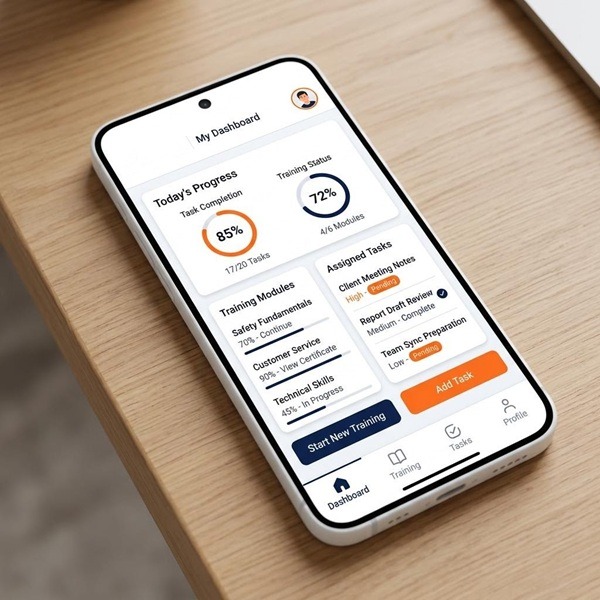
Focus on usability Modern interfaces should feature large buttons for gloved hands, dark mode for night shifts, and voice-to-note capabilities. Screenshots or mockups should illustrate a clean, thumb-friendly design—not cluttered wireframes.
Implementation Roadmap: Moving from Paper Logs to Mobile App
Transitioning a medium-sized program of 80-150 apprentices doesn’t require months of planning. A realistic 30-60 day rollout gets you from paper chaos to digital clarity. When choosing a time tracking app, consider features that support accurate employee time tracking data and facilitate payroll processes without requiring extensive manual corrections.
Phase 1 (Weeks 1-2): Audit and Prepare
- Review current log formats and identify inconsistencies
- Confirm state or DOL hour requirements and category standards
- Collect sample logs to understand data migration needs
- Identify pilot participants (10-20 users representing different roles)
Phase 2 (Weeks 3-4): Configure and Pilot
- Set up categories, roles, and approval flows in your chosen app
- Configure multi-employer toggles if apprentices rotate between sponsors
- Run pilot with small cohort, gathering feedback on workflow friction
- Refine settings based on real-world usage
Phase 3 (Weeks 5-6): Full Rollout
- Conduct 30-minute live training sessions for all users
- Distribute simple one-pagers with screenshots
- Establish one dedicated help contact for support questions
- Target 90% adoption within the first two weeks
Data Migration Import legacy hours from spreadsheets or use OCR to scan paper logs. Backfill 1-3 years of history so apprentices don’t lose past progress or create double-counting issues.
Change Management Declare a specific cutover date when mobile logging becomes the source of truth. Run a 2-4 week overlap period with both paper and digital to build confidence—programs report 95% transition success with this approach, minimizing resistance from supervisors accustomed to paper methods.
Compliance, Audits, and Record Retention
Accurate digital recordkeeping is essential for apprentices to document their hours and ensure compliance with licensing requirements, as many state licensing boards require complete records with supervisor signatures before issuing a journeyman license.
Retention requirements Typical programs must keep detailed apprenticeship records for 5-7 years after completion, with some jurisdictions like New York requiring 10 years. Cloud storage with automatic backups handles this without filing cabinets.
Immutable records carry weight Digital recordkeeping allows apprentices to maintain an immutable, time-stamped paper trail of their logged hours, which is crucial for protecting their career and ensuring that their work experience is recognized by licensing authorities. Unsigned paper notes simply can’t compete in disputes.
Simplified audit response Automated compliance reporting generates audit-ready, standardized reports to ensure compliance with state or federal regulations. Generate reports by date range, cohort, or individual apprentice in minutes rather than digging through binders.
Verify digital acceptance Most DOL-registered programs (approximately 80% as of 2025) now accept digital records, but confirm with your specific state board. Document their acceptance and submit sample exports to establish precedent.
Demonstrate ratio compliance Many apprenticeship programs require apprentices to log a specific number of hours across various work categories, and digital recordkeeping systems can help organize these records for review by training directors or licensing authorities. Link logged hours to supervising journeyworkers and jobsites to prove adherence to apprentice-to-journeyman ratios.
Why Choose Our Apprenticeship Time Tracking Solution
Generic time tracking tools built for payroll and shift scheduling don’t understand the unique demands of registered apprenticeships. They lack OJT tracking capabilities, can’t handle RTI separation, and don’t generate DOL-formatted compliance reports. Purpose-built solutions make the difference.
- Designed for apprenticeship compliance: Built from the ground up around RTI/OJT distinctions, work process categories, and multi-year training progress—not retrofitted from generic payroll software
- Mobile-first for field work: iOS and Android apps with offline logging that syncs automatically when connectivity returns. Clock in from any jobsite, any device
- Proven track record: Platforms in this space track tens of thousands of apprentices across 30+ states in construction, electrical, plumbing, HVAC, and IT programs (2023-2026 data)
- Support when you need it: Onboarding help, coordinator training, and technical support during peak reporting seasons like fiscal year-end or accreditation visits
- Results that matter: Fewer lost hours (under 1%), accelerated completions (15-20% faster), and clearer documentation for every stakeholder
Time tracking apps should include features like GPS verification and job-based tracking to enhance accountability and ensure accurate reporting of hours worked. GPS verification can enhance accountability in time tracking by providing a digital stamp of location, which can be crucial for compliance with apprenticeship requirements.

Frequently Asked Questions About Mobile Apprenticeship Time Tracking
Yes. Effective mobile apps for tracking apprenticeship hours, competencies, and on-the-job training (OJT) simplify compliance and track progress toward certification regardless of how many sites or employers you work with. Hours are tracked by job, employer, and date without mixing records. This is essential for work based learning programs where apprentices rotate through 5-10 locations annually.
You can submit an edit request through the app. Your supervisor reviews the correction, approves it with their digital signature, and the system maintains a complete audit trail showing the original entry, the edit, and who approved it. No data gets lost or becomes untraceable.
Most do—approximately 80% of DOL-registered programs now operate digitally. However, confirm with your specific board by exporting sample reports and submitting them for review. Document their acceptance for future reference. The app generates exports that comply with e-signature laws like the ESIGN Act and UETA.
Absolutely. Offline mode caches entries locally with full timestamp fidelity. When you reconnect, everything syncs automatically with accurate time data preserved. You don’t wait for signal to start tracking.
Platforms use AES-256 encryption, role-based access controls, and restricted sharing of personal information. Only authorized users—your supervisors, sponsors, and program administrators—can view your records. Job seekers and external parties cannot access your data.
Yes. Cohort-level analytics let sponsors and partners view aggregate progress, filter by category or completion percentage, and identify students who need intervention. This is particularly valuable for programs managing 100+ learners with cost effective oversight.
Next Steps: Start Modernizing Your Apprenticeship Tracking
Relying on paper logs in 2026 means risking the careers you’re trying to develop. Every lost hour, disputed signature, or failed audit delays workforce completion and erodes trust. The technology exists to eliminate these problems—and implementation takes weeks, not months.
- Enroll a pilot group: Test 10-20 apprentices on the mobile app for apprenticeship time tracking within the next 30 days to see results firsthand
- Request a live demo: Employers, JATCs, and schools can schedule a consultation focused on their specific trade and state requirements
- Prepare your data: Gather current hour logs, category lists, and a sample schedule before the demo to see a realistic configuration in action
- Build toward completion: Graduate job-ready talent on schedule with clear, verifiable records from day one to final sign-off
Want to Learn More About Your Registered Apprenticeship Opportunities?
BOOK A FREE CONSULTATION
The clients, teams, and apprentices counting on your program deserve better than paper timesheets. Start tracking the modern way—and create the workforce your industry needs.