Table of Contents
- What Work-Based Learning Management Software Is (And Why It Is Not Just Another LMS)
- The Hidden Cost of Managing Work-Based Learning Programs with Fragmented Tools
- The Core Features That Define a High-Functioning Work-Based Learning Platform
- How Work-Based Learning Software Protects Program Integrity and Compliance
- The Business Case for Centralizing Apprenticeship and Internship Management
- How GoSprout Functions as an End-to-End Work-Based Learning Management Solution
- How to Evaluate and Select the Right Work-Based Learning Platform
- Conclusion: From Administrative Liability to Strategic Program Infrastructure
- Frequently Asked Questions
What Work-Based Learning Management Software Is (And Why It Is Not Just Another LMS)
Defining the Category: Work-Based Learning Platforms vs. General Learning Management Systems
Most organizations that manage apprenticeship or internship programs already own a learning management system. The problem is that an LMS was not built for what they are actually trying to do.
The One-Directional Content Delivery Model of a Traditional LMS
A traditional LMS operates on a straightforward premise: an administrator publishes content, and a learner consumes it. The platform tracks completion rates, quiz scores, and time-on-module. That model works well for compliance training, onboarding eLearning, or product certifications, scenarios where the goal is verified content delivery to a large, relatively uniform audience.
The relationship is essentially one-directional. The system does not need to know who a learner’s supervisor is, whether a competency was demonstrated in the field, or how a cohort of apprentices is progressing against a Department of Labor training standard. It only needs to confirm that someone watched the video and passed the assessment.
The Two-Sided, Relationship-Driven Model of a Work-Based Learning Platform
Work-based learning is structurally different. An apprentice or intern does not just consume content. They develop skills through supervised practice, receive structured feedback from a workplace mentor, and accumulate documented experience that must meet defined program standards. That process involves at minimum three active parties: the learner, the supervisor, and the program coordinator. Often it involves more, including external compliance stakeholders or educational partners.
Work-based learning management software is built around this relational architecture. It does not just track what a learner has viewed. It manages the full operational relationship between all parties, covering who is assigned to whom, what milestones have been verified, which documentation is complete, and where each participant stands against program requirements. That is a fundamentally different product than an LMS, and treating one as a substitute for the other creates the exact operational gaps this article addresses.

What Work-Based Learning Management Software Actually Manages
Apprenticeship Program Administration and Registered Apprenticeship Standards
Registered apprenticeship programs operate under structured requirements set by the Department of Labor or a recognized State Apprenticeship Agency. Those requirements specify related technical instruction hours, on-the-job training hours, wage progression benchmarks, and competency verification protocols. Managing that documentation manually across multiple apprentices at different stages is not just inconvenient. It creates direct compliance exposure.
Work-based learning management software centralizes that administration. It holds each apprentice’s training plan, tracks hours against required minimums, documents competency sign-offs, and generates the records an employer needs to demonstrate program fidelity during an audit.
Internship Tracking, Onboarding Sequencing, and Progress Milestones
Internship programs carry a different set of requirements than registered apprenticeships, but they are no less operationally complex when managed at scale. A cohort of ten interns arriving in the same week needs sequenced onboarding tasks, supervisor assignments, role-specific access, and a clear timeline of check-ins and deliverables. Without a system that enforces that sequence, coordination falls back to manual email follow-up, and critical steps get missed.
A purpose-built internship tracking platform structures the internship lifecycle from the day an offer is accepted through final evaluation. Program coordinators set the sequence once, and the system surfaces the right tasks to the right people at the right time.
Compliance Documentation, Competency Tracking, and Outcome Reporting
Both apprenticeships and internships generate documentation that must be organized, retained, and reportable. Competency assessments, supervisor evaluations, training hour logs, and completion records are not just internal records. They are often required for grant reporting, accreditation, or regulatory compliance. Work-based learning management software maintains those records in a structured, searchable format and produces reports that do not require a coordinator to manually compile data from multiple disconnected files.
The Hidden Cost of Managing Work-Based Learning Programs with Fragmented Tools
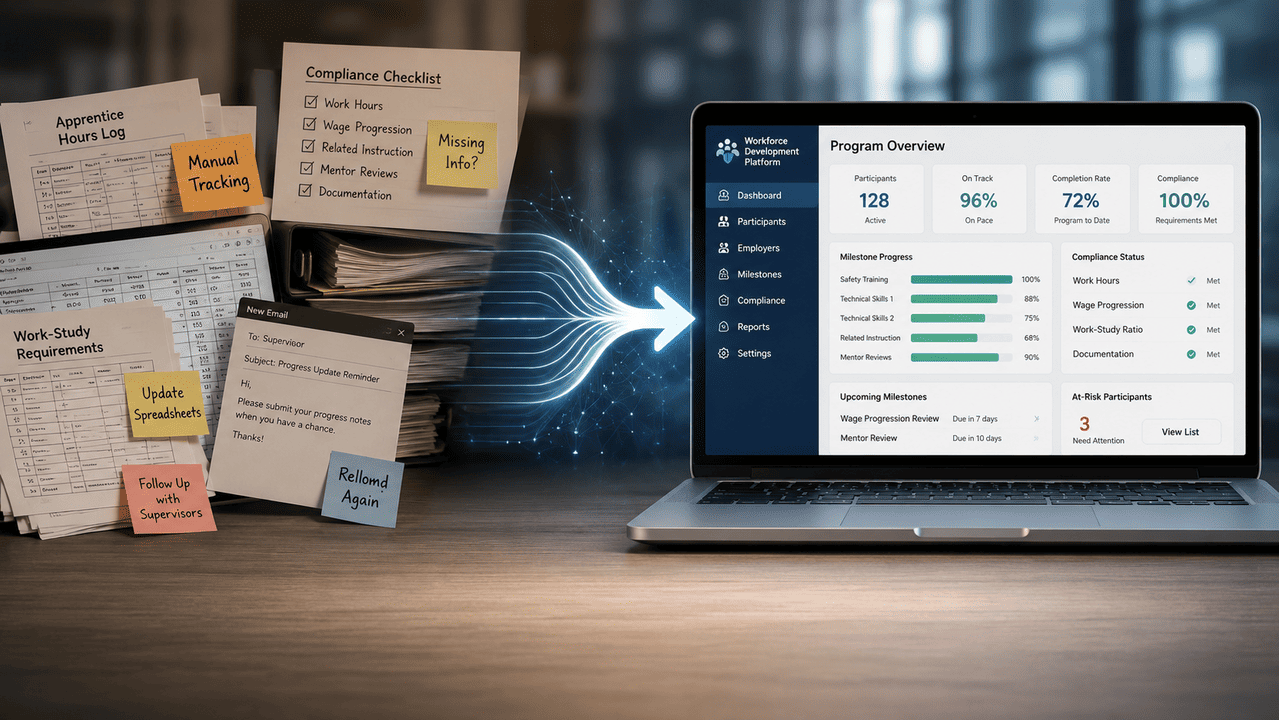
The Operational Reality: What a Spreadsheet-Based Program Looks Like at Scale
A spreadsheet-based apprenticeship program looks manageable at five participants. At fifteen, it starts to show strain. At thirty, it becomes a full-time job in itself, and that job belongs to whoever was supposed to be developing talent, not administering data.
Manual Progress Tracking Across Multiple Candidates and Cohorts
When progress lives in a spreadsheet, every update requires a manual input from someone: a coordinator checking in by email, a supervisor remembering to submit a log, or an administrator reconciling two versions of the same file. None of that happens automatically, and none of it scales. A coordinator managing three cohorts simultaneously is constantly context-switching between individuals at different stages, trying to maintain accuracy across a document that was not designed for this use case.
Email-Driven Onboarding Coordination and Its Failure Points
Email is not a workflow system. When onboarding relies on a series of manually triggered messages, the process is only as reliable as the person sending those messages. Tasks get delayed, steps get skipped, and new participants enter a program without the preparation they need to be productive. The failure is not a matter of effort. It is a matter of the tool being structurally incapable of enforcing a reliable sequence.
Compliance Risk When Documentation Lives in Disconnected Files
When training hour logs are in one spreadsheet, competency sign-offs are in another, and supervisor evaluations exist as attachments in an email folder, the documentation is technically present but operationally inaccessible. If a registered apprenticeship program is audited, reconstructing a complete compliance record from disconnected files is a significant liability, not because the work was not done, but because it cannot be demonstrated efficiently.
Why Generic Tools Are Active Liabilities, Not Neutral Choices
Choosing to manage a work-based learning program with generic tools is not a conservative or cost-neutral decision. Spreadsheets and email chains actively introduce compliance risk, administrative inefficiency, and talent pipeline instability that purpose-built work-based learning management software is specifically designed to eliminate. The costs are real. They are simply distributed across time and absorbed by the people working around the tool’s limitations.
How Administrative Overhead Displaces Mentorship and Strategic Talent Development
Every hour a program coordinator spends reconciling spreadsheets, chasing missing documentation, or manually triggering onboarding tasks is an hour not spent on what actually produces program outcomes: coaching supervisors, evaluating participant progress, and building the talent pipeline the organization invested in. The administrative burden created by fragmented tools does not just slow down operations. It systematically crowds out the strategic work that justifies the program’s existence.
The Compounding Effect: When Program Growth Multiplies Manual Workload
The relationship between program size and administrative effort is not linear when managed through generic tools. Adding a new cohort does not just add participants. It multiplies the number of spreadsheet rows, email threads, file versions, and manual touchpoints a coordinator must manage. A program that runs acceptably at ten participants becomes unmanageable at thirty using the same tools, not because the work is harder, but because the volume of coordination exceeds what manual processes can reliably sustain.
How Work-Based Learning Software Reduces Administrative Burden
Purpose-built work-based learning management software reduces administrative burden by converting manual coordination into automated workflows. Tasks that currently require a coordinator to initiate, track, and follow up on, including onboarding sequences, competency verifications, progress check-ins, and documentation submissions, are handled by the system based on rules set once at the program level. The coordinator’s role shifts from task management to program oversight.
The result is not just time saved. It is capacity recovered for the work that actually improves program outcomes.
Decision-Support Matrix: Fragmented Tool Stack vs. Purpose-Built Work-Based Learning Platform
Use the following rubric to assess whether your current process is functioning as a program management system or operating as a liability.
| Operational Dimension | Fragmented Tool Stack | Purpose-Built WBL Platform |
|---|---|---|
| Compliance Tracking | Manual, dispersed across files | Centralized, audit-ready, and reportable |
| Progress Visibility | Coordinator-dependent, updated manually | Real-time, role-based access for all stakeholders |
| Onboarding Automation | Email-triggered, prone to missed steps | Structured workflow, automatically sequenced |
| Reporting | Requires manual data compilation | Generated on demand from a single data source |
| Stakeholder Coordination | Ad hoc, mediated by coordinator | Direct access with role-appropriate permissions |
| Scalability | Effort grows proportionally with headcount | System absorbs volume without adding manual work |
If your program scores in the fragmented column across three or more of these dimensions, the operational cost of your current tool stack is measurable and growing with every participant you add.
The Core Features That Define a High-Functioning Work-Based Learning Platform
A purpose-built work-based learning platform is not distinguished by having more features than an LMS. It is distinguished by having the right features for a fundamentally different operational context. The sections below identify what those features are and why each one matters in practice.
Program Lifecycle Management: From Candidate Enrollment to Completion
Structured Onboarding Workflows and Role-Based Access Control
The moment a candidate accepts an offer, a structured program has already begun, even before the first day of work. A high-functioning platform captures that moment and immediately initiates a sequenced onboarding workflow. Form completions, supervisor assignments, access provisioning, and pre-start orientation tasks all trigger without manual intervention from a coordinator.
Role-based access control is what makes this operationally clean. Apprentices see their training plan and task queue. Supervisors see their assigned participants and pending verification requests. Coordinators see the full program across all cohorts. No one sees what they do not need, and no one has to request access to what they do. The system enforces the right information architecture from day one.
Milestone Tracking, Skills-Based Progression, and Competency Verification
Progress in a work-based learning program is not linear and is not measured by content consumption alone. An apprentice may complete required technical instruction hours while still awaiting competency sign-off from their supervisor on a specific workplace task. A platform that only tracks course completions misses half the picture.
Purpose-built work-based learning management software tracks both dimensions. It holds the full training plan, including required hours, competency checkpoints, and progression gates, and surfaces the current status of each element to the relevant stakeholder. Supervisors verify demonstrated competencies directly in the platform. Coordinators see which participants are on track and which have stalled, without needing to compile that view manually.
Compliance and Reporting Infrastructure
Audit-Ready Documentation for Department of Labor Apprenticeship Standards
Registered apprenticeship programs carry documentation requirements that are non-negotiable. On-the-job training hours must be logged against the approved schedule. Related technical instruction must be tracked separately. Wage progression must align with documented skill advancement. Each of these data points has to exist in a format that a Department of Labor representative or State Apprenticeship Agency can review on short notice.
A platform built for this environment maintains those records in a structured, timestamped format that requires no reconstruction before an audit. The documentation does not get assembled after the fact. It accumulates continuously as the program runs.
Automated Reporting for Program Coordinators and Stakeholders
Manual reporting is one of the most time-intensive tasks in apprenticeship administration, and it is largely avoidable. A capable apprenticeship management system generates program status reports, cohort progress summaries, compliance documentation packets, and outcome metrics from the same underlying data, on demand, without requiring a coordinator to pull figures from multiple sources.
This matters beyond internal efficiency. Many apprenticeship programs depend on public funding, grant agreements, or institutional partnerships that require regular performance reporting. When that reporting is automated, coordinators spend their time on program quality rather than data assembly.
Integration Capabilities: Connecting Work-Based Learning Software to Your Existing HR Stack
ATS and HRIS Integration Considerations
Without integration, candidate records created in an applicant tracking system must be re-entered manually when a hire is confirmed. Employee data maintained in an HRIS has to be duplicated in a separate system. Both scenarios introduce data integrity risk and administrative friction that a connected platform eliminates.
When evaluating work-based learning software, confirm bidirectional data flow with your existing systems, not just a one-time import function. The goal is a single source of record for each participant that updates across platforms as their status changes, from candidate to active apprentice to program graduate.
Mentorship and Relationship Management Features Beyond Content Delivery
The supervisor-participant relationship is the mechanism through which work-based learning actually works. No platform feature substitutes for a skilled mentor, but a platform that does not support the supervisory relationship structurally makes that relationship harder to sustain.
Supervisor Assignment, Communication Logs, and Feedback Loops
A capable platform assigns supervisors to participants explicitly, not implicitly. That assignment drives the supervisor’s task queue, their notification triggers, and their reporting obligations. Communication logs tied to each participant record give coordinators visibility into whether the mentorship relationship is active without requiring a separate check-in call. Structured feedback tools replace the informal, unrecorded conversations that produce no documentation.
Dual-Enrollment and Multi-Stakeholder Coordination Tools
Many apprenticeship programs involve participants who are simultaneously enrolled in an educational institution and employed with a sponsoring organization. Coordinating between those two entities requires managing schedules, aligning credit requirements, and documenting outcomes for both. Work-based learning software designed for this context manages those relationships within a single system rather than routing all coordination through a program coordinator acting as a manual relay.
Scalability and Flexibility Across Organization Sizes
Cloud-Based Deployment and Its Operational Advantages
Cloud-based deployment removes the infrastructure burden that historically made enterprise-grade program management software inaccessible to smaller organizations. A program coordinator at a mid-sized manufacturer running twenty apprentices has access to the same system architecture as a large employer running two hundred. Updates, security patches, and new features deploy without IT involvement, which means the platform stays current without placing that burden on internal teams.
Key Features to Prioritize When Evaluating Work-Based Learning Software
Hiring managers and program coordinators evaluating platforms should prioritize these operational capabilities:
- Structured onboarding workflows that activate automatically at enrollment
- Competency verification tools that support supervisor sign-off without paper forms
- Compliance documentation that is audit-ready by default, not by effort
- Integration with existing ATS and HRIS systems
- Role-based access that gives each stakeholder the right view without coordinator mediation
- Reporting that generates from live program data, not manual compilation
If a platform requires a coordinator to manually maintain program status, it has not solved the core problem. It has simply moved it to a different interface.
How Work-Based Learning Software Protects Program Integrity and Compliance
Compliance failure in an apprenticeship program is rarely the result of bad intent. It is the result of a documentation process that could not keep up with program activity. Purpose-built software addresses this by making documentation a byproduct of normal program operation rather than a separate administrative task.
The Compliance Burden Unique to Apprenticeship and Internship Programs
Registered Apprenticeship Requirements and Structured Training Program Standards
Registered apprenticeship programs operate under approved training standards that specify, in precise terms, what a participant must complete to achieve journeyworker status. Those standards are not guidelines. They are the basis on which the apprenticeship is registered and the credential is issued. Deviating from them, even unintentionally, puts the program’s registration at risk.
The documentation burden this creates is substantial. Every on-the-job training hour must be logged. Every competency must be signed off by a qualified supervisor. Every wage progression must align with documented skill advancement. Managing this across multiple participants at different stages requires a compliance tracking system that records each element continuously, not a coordinator who reviews spreadsheets at the end of the month.
How Manual Processes Create Compliance Exposure at the Program Level
The risk with manual documentation is not that records go missing entirely. It is that records are incomplete, inconsistently formatted, or impossible to verify under time pressure. An audit that requires a coordinator to reconstruct documentation from email attachments and shared drives is an audit the program may not survive intact, regardless of whether the underlying work was done correctly.

Minimum Compliance Infrastructure for Registered Apprenticeship Programs
Any capable workforce development software solution should provide the following as standard functionality, not as premium add-ons:
- Continuous OJT hour logging tied to each participant’s approved training plan
- Competency verification workflows with timestamped supervisor sign-off
- Related technical instruction tracking, recorded separately from OJT hours
- Wage progression documentation linked to verified skill milestones
- A complete audit trail exportable in a format suitable for agency review
These are baseline requirements. Any platform that does not support all of them requires manual processes to fill the gaps, and those gaps are where compliance exposure lives.
How Purpose-Built Platforms Enforce Program Fidelity at Scale
Automated Alerts, Documentation Workflows, and Audit Trail Generation
A well-designed platform does not wait for a coordinator to notice that a participant is behind on OJT hours. It generates an alert when logged hours fall behind the training schedule. It flags a competency checkpoint that has been pending supervisor review beyond the defined window. It surfaces incomplete documentation before an audit cycle, not during one.
The audit trail is generated automatically as users interact with the system. Every competency verification, every hour log submission, and every supervisor feedback entry is timestamped and attributed. That trail does not require assembly. It exists as a structural output of normal program operation.
Role-Based Accountability Structures That Replace Ad Hoc Email Chains
When compliance tasks are assigned to specific roles within a platform, accountability follows. A supervisor who has not completed a required quarterly evaluation sees it in their task queue. A coordinator who needs to approve a training plan modification has a structured workflow to complete, not an email to draft and track manually. The platform enforces the program’s accountability structure without requiring a coordinator to personally monitor every obligation.
The Business Case for Centralizing Apprenticeship and Internship Management
The operational arguments for purpose-built work-based learning management software are clear. The business case translates those arguments into terms that justify a platform investment to a leadership team evaluating cost and return.
Quantifying the Administrative Overhead Reduction
Time-to-Value Metrics for Coordinators Moving Off Spreadsheets
Consider a coordinator managing thirty apprentices across two cohorts using a spreadsheet-based process. Conservative estimates place manual coordination tasks, covering progress tracking updates, onboarding follow-ups, documentation reconciliation, and report preparation, at roughly eight to twelve hours per week. That is not time spent developing program quality. It is time spent maintaining data integrity in a system not designed for this use case.
A purpose-built platform automates the majority of those tasks. Coordinators who make the transition consistently report that the first measurable return is reclaimed time, hours per week that shift from administrative maintenance to program oversight, supervisor coaching, and cohort planning. That shift becomes visible within the first thirty days of adoption.
Talent Pipeline Stability as a Strategic Outcome
A well-administered apprenticeship program produces predictable talent pipeline outcomes: participants who complete on schedule, achieve documented competency, and convert to productive full-time roles. Administrative failure disrupts that pipeline. Participants who fall through onboarding gaps start behind. Supervisors who receive no structured support disengage from the mentorship role. Compliance failures delay or void completions. Each of these outcomes carries a measurable cost in recruiting replacement hires, extended time-to-productivity, and program credibility with the participants the organization most wants to retain.
Platform centralization reduces the administrative failure rate that produces these outcomes. Talent pipeline stability is a consequence of a program that runs as designed.
The ROI of Implementing a Work-Based Learning Platform
The return on a work-based learning platform investment is measured across three dimensions: coordinator capacity recovered, compliance risk reduced, and program completion rate improved. Each dimension has a quantifiable component.
Coordinator capacity recovered translates directly to labor cost. If a coordinator at a burdened annual cost of $70,000 recovers ten hours per week from manual administration, the platform is generating meaningful recaptured productive capacity annually, before factoring in compliance risk reduction or completion rate improvement.
The more practical framing for most organizations is not ROI in the abstract but capacity in the specific. What could your program coordinator accomplish if several hours of manual data maintenance disappeared each week? Most coordinators answer that question with work that directly improves program outcomes: deeper supervisor engagement, earlier identification of struggling participants, better cohort planning. The platform does not just save time. It redirects that time toward the activities that make the program worth running.
Workforce Development Trends Reinforcing the Case for Purpose-Built Software
Institutional Emphasis on Structured Apprenticeship Programs and Skills-Based Hiring
The policy and employer landscape is moving toward structured apprenticeship programs and skills-based hiring at a pace that outstrips the administrative capacity of manual processes. Federal investment in registered apprenticeships has expanded significantly in recent years, and major employers across construction, healthcare, advanced manufacturing, and technology are building apprenticeship programs as primary talent pipelines rather than supplementary development initiatives. The programs that scale successfully in this environment will be the ones with administrative infrastructure designed to handle growth without proportional increases in coordinator workload.
How Growing CTE and Dual Enrollment Pipelines Increase Administrative Complexity
Career and technical education partnerships and dual enrollment programs add a coordination layer that spreadsheets cannot manage cleanly. When a participant is simultaneously an enrolled student at a community college and an active apprentice at a sponsoring employer, the program coordinator is managing obligations to two institutions with different reporting cadences, different documentation requirements, and different stakeholders. Work-based learning software designed for multi-stakeholder environments handles that complexity within a single system. Organizations building CTE pipelines without purpose-built infrastructure will hit an administrative ceiling long before they hit a talent ceiling.
How GoSprout Functions as an End-to-End Work-Based Learning Management Solution
GoSprout’s Position in the Work-Based Learning Software Category
Apprenticeship-Specific Workflows vs. Generalist Platform Compromises
Most platforms that claim to support work-based learning were built for something else first. An LMS adapted to track apprenticeship hours is still an LMS. An HRIS with an added learning module still routes decisions through an employment record framework that was not designed for competency-based progression or Department of Labor documentation standards.
GoSprout is built specifically for work-based learning programs. The workflows, the data model, and the reporting structure all reflect the operational reality of apprenticeship and internship administration, not a configuration layer applied on top of a generic platform. That distinction matters in practice: coordinators do not spend time working around system logic that was designed for a different use case.
Want to Learn More About Your Registered Apprenticeship Opportunities?
BOOK A FREE CONSULTATION
The Two-Sided Platform Advantage: Connecting Talent With Opportunities
GoSprout operates as a two-sided platform, meaning it manages the relationship between employers and participants, not just the delivery of program content to learners. Employers post structured opportunities. Qualified candidates connect with programs that match their profile. The match is the starting point, not an assumed given.
This architecture produces a meaningful operational difference. The program does not begin when a coordinator manually enters a participant into a spreadsheet. It begins when the right participant is connected to the right opportunity, and every subsequent step, including onboarding, supervision, competency tracking, and completion, flows from that initial match within the same system.
How GoSprout Addresses Core Operational Pain Points
Onboarding Workflow Automation and Structured Program Sequencing
When a participant is enrolled, GoSprout initiates a structured onboarding sequence without coordinator intervention. Pre-start tasks, supervisor assignments, role-based access provisioning, and orientation checkpoints activate according to the program configuration set at the administrative level. The coordinator sets the sequence once, and the system executes it consistently across every participant.
This removes the single largest source of early-program failure: the manual handoff. When onboarding depends on a coordinator remembering to send the right emails in the right order, steps get missed. When it depends on a system that triggers automatically at enrollment, the program starts the same way every time.
Progress Tracking, Competency Documentation, and Compliance Reporting in One System
GoSprout holds the complete participant record in one place: training hours logged against the approved plan, competency verifications with timestamped supervisor sign-off, related technical instruction tracked separately from OJT, and wage progression tied to documented skill milestones. There is no reconciliation step between systems, because there is only one system.
Compliance reporting is generated from that live record. A coordinator preparing for a Department of Labor audit does not assemble documentation from multiple files. The platform produces the required records in a reviewable format because they have been accumulating continuously as the program runs.
How GoSprout Scales Program Management Without Scaling Administrative Workload
Program Coordinator Tools Designed for Multi-Cohort, Multi-Site Environments
A coordinator managing multiple cohorts at different stages across more than one site faces a coordination problem that no spreadsheet architecture can solve cleanly. GoSprout provides a unified program view that surfaces each cohort’s status, flags participants who are behind on milestones or pending documentation, and allows coordinators to act on that information directly within the platform.
Adding a new cohort does not require building a new tracking structure. The program configuration scales to each new group automatically, which means growth adds participants without adding administrative overhead proportionally.
Learner Engagement, Supervisor Coordination, and Outcome Visibility in One Platform
Supervisors interact with GoSprout directly, not through a coordinator acting as a relay. They see their assigned participants, their pending verification tasks, and their feedback obligations in a role-specific view. Participants see their own training plan, task queue, and progress against program milestones. Coordinators see everything.
That structure eliminates the coordination bottleneck that makes programs hard to scale. When each stakeholder has direct access to what they need, the coordinator’s role shifts from managing information flow to managing program quality.
How to Evaluate and Select the Right Work-Based Learning Platform
Choosing Between General LMS Platforms and Specialized Work-Based Learning Software
The decision comes down to what your program actually requires. If your primary need is delivering standardized training content to a large, uniform audience and tracking completion, a general LMS may be sufficient. If your program involves structured employer-learner relationships, compliance documentation obligations, competency-based progression, or multi-stakeholder coordination, a general LMS will handle part of the job and leave the rest to manual processes. The question is not which platform type is better in the abstract. It is which one matches the operational structure of your specific program.
A Practical Evaluation Framework for Hiring Managers and Program Coordinators
Criterion One: Apprenticeship and Internship Workflow Specificity
Ask whether the platform was built for work-based learning or adapted for it. A platform built specifically for apprenticeship program management will have native support for OJT hour tracking, competency verification workflows, and Department of Labor documentation standards. A platform adapted from a general LMS will require configuration workarounds to approximate the same functionality.
Criterion Two: Compliance Infrastructure and Audit Readiness
The platform should generate audit-ready documentation as a standard output of normal program operation, not as a report you configure after the fact. Confirm that OJT hour logs, competency sign-offs, and related technical instruction records are maintained in a structured, exportable format by default.
Criterion Three: Integration Compatibility with Existing HR Systems
Verify whether the platform supports bidirectional data flow with your ATS and HRIS, not just an initial import. Participant status should update across connected systems as they move from candidate to active apprentice to program graduate.
Criterion Four: Scalability Model and Total Administrative Load
Evaluate how the platform handles program growth. Adding fifty participants should not require fifty new manual setup tasks. Ask vendors specifically how coordinator workload changes as cohort size and site count increase.
Criterion Five: Stakeholder Access and Role-Specific Views
Confirm that supervisors, participants, and coordinators each have a role-specific view with direct access to their relevant tasks. If the platform routes all participant communication through a coordinator, the coordination bottleneck that fragmented tools create will persist inside the new system.
How to Transition Your Apprenticeship Program from Spreadsheets to Dedicated Software
Data Migration, Change Management, and Stakeholder Alignment
Start with a data audit before selecting a platform. Identify what records currently exist, where they live, and what format they are in. Participant rosters, training hour logs, and competency records that exist in spreadsheets or email folders need to be structured before migration, not during it.
Stakeholder alignment matters as much as data migration. Supervisors who have been operating informally need to understand that their role inside the platform is not additional work. It is a replacement for the ad hoc processes they are already following. Delivering that context before launch rather than after confusion sets in determines how quickly the platform is adopted.
What to Expect in the First 90 Days After Platform Adoption
The first thirty days are primarily structural. Coordinators configure program workflows, supervisors receive access and orientation, and the first cohort moves through automated onboarding. The system is proving its setup, not yet demonstrating its value at scale.
Between days thirty and sixty, coordinators begin recovering time. Manual follow-up tasks that previously consumed hours each week are handled by the system. Progress visibility improves as participants interact with the platform directly rather than through coordinator-mediated updates.
By day ninety, the program is running with a fundamentally different administrative rhythm. The most meaningful change coordinators report is not the features themselves but the shift in how they spend their time: less data maintenance, more program oversight.
Quick-Pick Recommendation: Which Platform Type Does Your Program Need?
| Your Situation | Recommended Solution |
|---|---|
| You deliver standardized training content to employees with no compliance documentation requirements and no employer-learner relationship structure | General LMS |
| You manage HR workflows and want basic learning module support, but your program has no registered apprenticeship obligations | Hybrid HR tool with learning features |
| You run a registered apprenticeship, structured internship, or CTE program with compliance requirements, multi-stakeholder coordination, and competency-based progression | Purpose-built work-based learning management software |
If your program requires OJT hour documentation, competency verification with supervisor sign-off, or audit-ready records for a Department of Labor or agency review, neither a general LMS nor an HR platform will meet that standard without significant manual workaround. A purpose-built work-based learning management solution is not a premium option for programs like this. It is the baseline requirement.
Conclusion: From Administrative Liability to Strategic Program Infrastructure
The Operational Argument Against Fragmented Tool Stacks
The case against spreadsheet-based program management is not about preference or convenience. It is about what fragmented tools structurally cannot do: enforce a sequenced onboarding process, maintain audit-ready compliance records, give supervisors direct access to their obligations, or absorb program growth without multiplying coordinator workload. Those are not minor limitations. They are the mechanisms through which administrative failure enters a program and compounds over time.
Generic tools are not neutral choices for managing work-based learning programs. They are active liabilities that introduce compliance risk, inefficiency, and talent pipeline instability that purpose-built infrastructure is specifically designed to prevent.
The Strategic Shift: Managing Work-Based Learning Programs With Purpose-Built Software
Purpose-built work-based learning management software does not just replace the spreadsheet. It replaces the operational model the spreadsheet represents, one where the coordinator holds the program together through personal effort rather than system infrastructure. When the system enforces structure, coordinators can direct their attention toward what actually produces program outcomes: developing supervisors, supporting participants, and building the talent pipeline the organization invested in creating.

Exploring GoSprout as Your End-to-End Apprenticeship and Internship Management Platform
GoSprout is built for the specific operational context this article has described: structured employer-learner relationships, compliance documentation obligations, multi-stakeholder coordination, and programs designed to scale. If your organization is managing apprenticeship or internship programs with tools that were not designed for this work, GoSprout is worth examining as the infrastructure those programs require.
Frequently Asked Questions
A work-based learning management system manages the full operational infrastructure of a structured program, including employer-learner relationships, competency verification, compliance documentation, and multi-stakeholder coordination. A traditional LMS manages the delivery of learning content and tracks completion rates. The distinction is meaningful: an LMS handles content consumption, while a work-based learning platform handles the people, processes, and compliance requirements that define whether a program is functioning as designed.
Purpose-built work-based learning management software converts manual coordination tasks into automated workflows. Onboarding sequences, competency verification requests, progress check-ins, and documentation submissions are handled by the system according to rules set once at the program level, rather than initiated manually by a coordinator each time. The practical result is that coordinators recover significant working time previously spent on data maintenance and can redirect it toward supervisor development, participant support, and program planning.
At a minimum, a platform managing registered apprenticeship programs should provide continuous OJT hour logging tied to each participant’s approved training plan, competency verification workflows with timestamped supervisor sign-off, separate tracking for related technical instruction, wage progression documentation linked to verified skill milestones, and a complete audit trail exportable for agency review. These are baseline requirements, not premium features. Platforms that do not support all of them require manual processes to fill the gaps, which is where compliance exposure concentrates.
Yes, and integration is a practical requirement for any organization running a program at meaningful scale. Without it, candidate records must be re-entered manually at each status change, and participant data maintained in an HRIS must be duplicated elsewhere. When evaluating platforms, confirm bidirectional data flow rather than a one-time import function. The goal is a single source of record for each participant that updates automatically as they move from candidate to active apprentice to program graduate.
The decision depends on what your program actually requires. A general LMS is appropriate when the primary need is delivering standardized training content to a uniform audience with no compliance documentation requirements. If your program involves structured employer-learner relationships, competency-based progression, registered apprenticeship obligations, or multi-stakeholder coordination, a general LMS will handle part of the job and leave the rest to manual processes. The right question is not which type of platform is better in the abstract, but which one matches the operational structure of your specific program.
Return on a work-based learning platform investment is measured across three dimensions: coordinator capacity recovered, compliance risk reduced, and program completion rate improved. The most immediate and quantifiable component is coordinator capacity. Hours previously spent on manual data maintenance, documentation reconciliation, and onboarding follow-up are absorbed by the system, freeing coordinators to focus on supervisor development, participant support, and cohort planning. Over time, reduced compliance exposure and improved completion rates contribute additional measurable value to the program’s overall return.