Table of Contents
- The Hidden Cost of Managing Apprenticeships Without Dedicated Software
- What Apprentice Onboarding Software Must Actually Do: A Framework for Evaluation
- The Core Features That Separate Functional Platforms From Truly Effective Ones
- How to Evaluate ROI: Cost Per Hire, Time-to-Productivity, and Completion Rates
- From Manual to Digital: A Practical Change Management Playbook
- Why GoSprout Unifies What Other Platforms Separate
- Conclusion: Selecting the Platform That Serves the Whole Apprenticeship Journey
- Frequently Asked Questions
The Hidden Cost of Managing Apprenticeships Without Dedicated Software
Why Spreadsheets, Email Chains, and Paper Contracts Are a Business Risk, Not Just an Inconvenience
Managing apprenticeship onboarding through spreadsheets and email threads is not just inefficient. It introduces operational risk that compounds with every enrollment cycle. A single missed document, an outdated wage progression record, or a misfiled apprenticeship agreement does not just create extra work. It creates a gap in your compliance record that can surface at the worst possible moment: during a Department of Labor audit, a program renewal review, or a dispute with a training provider.
The instinct to defend these tools is understandable. Spreadsheets are flexible, familiar, and free. But flexibility in an uncontrolled environment is the same thing as inconsistency, and inconsistency in apprenticeship administration is what regulators penalize.

The Compliance Exposure That Manual Processes Create
Audit Trail Gaps and What They Cost During a Department of Labor Review
Registered apprenticeship programs are subject to periodic compliance reviews by the Department of Labor’s Office of Apprenticeship. Reviewers do not simply ask whether your program is structured correctly. They ask whether you can prove it. That means demonstrating documented wage increases at each OJT hour milestone, signed apprenticeship agreements for every active apprentice, and evidence of related technical instruction completion tied to specific competency requirements.
When those records live across multiple spreadsheet versions, email attachments, and filing cabinets, reconstructing a complete audit trail becomes a multi-day emergency project. Programs that fail to produce documentation during a review can face sanctions, required corrective actions, or loss of registered status. Those consequences dwarf whatever was saved by avoiding dedicated software.
Multi-State Registered Apprenticeship Standards and the Limits of Manual Tracking
Programs operating across multiple states face a compounding problem. Each state apprenticeship agency maintains its own standards, approval processes, and documentation requirements. A wage schedule acceptable in one state may not satisfy another. A competency framework approved by one agency may require modification before another will recognize it.
Tracking this manually requires someone with specialized knowledge of each state’s standards to maintain separate documentation sets, monitor for regulatory updates, and verify that each apprentice’s record reflects the correct jurisdiction-specific requirements. That is not a scalable process. It is a liability waiting for a trigger.
How Administrative Drag Compounds Across Enrollment Cycles
Each enrollment cycle run on manual infrastructure adds overhead in two directions: forward and backward. Program coordinators spend time onboarding new cohorts while simultaneously managing corrections, missing signatures, and status follow-ups from prior cohorts. Over time, the administrative load does not reset between cycles. It accumulates.
A mid-sized program running two cohorts per year, each with 20 apprentices, can easily generate more than 400 individual document touchpoints annually. Without automated tracking, each touchpoint requires a human action to log, file, and verify. That is the operational reality that eventually forces a choice between hiring additional administrative staff and accepting higher error rates.
What Is Apprentice Onboarding Software and How Does It Differ From General HR Onboarding Tools?
Apprentice onboarding software is purpose-built to manage the specific workflows that govern registered and non-registered apprenticeship programs: enrollment and eligibility verification, apprenticeship agreement generation, OJT hour tracking, wage progression, related technical instruction logging, and multi-party stakeholder coordination.
This is categorically different from general HR onboarding tools, which are designed for the relatively linear process of converting a new hire into an active employee. Standard onboarding software handles document collection, benefits enrollment, and IT provisioning. It is built around a two-party relationship between employer and employee, and a one-time workflow that concludes when the employee is active in payroll.
Apprenticeship onboarding is a multi-year, multi-party process governed by regulatory standards that vary by state and funding source. A general HR tool can support pieces of it, but it was never designed for the compliance depth, the tri-party coordination, or the longitudinal tracking that apprenticeship management requires.
What Apprentice Onboarding Software Must Actually Do: A Framework for Evaluation
Enrollment and Eligibility Verification Workflows
Enrollment in a registered apprenticeship program is not simply confirming a job offer. Programs must verify that candidates meet eligibility criteria, including age, education level, and in some trades, physical requirements, and that enrollment is documented in compliance with equal opportunity standards. Purpose-built platforms automate eligibility checks against program-specific criteria, flag missing documentation before enrollment is confirmed, and generate timestamped records for each step in the process.
Digital Contract Automation and Document Management
The apprenticeship agreement is the legal foundation of the program relationship. It specifies the occupation, the wage schedule, the OJT hour requirements, and the obligations of both the employer and the apprentice. Generating, routing for signature, and storing these agreements manually is one of the highest-risk administrative tasks in the program lifecycle.
Effective apprentice onboarding software automates agreement generation from program templates, routes documents to the correct signatories including the apprentice, employer, and in many cases the state apprenticeship agency, and stores executed documents in an audit-ready repository. When a document needs to be retrieved during a review, the answer is a search query, not a filing expedition.
Compliance Tracking Across Registered Apprenticeship Standards
State-by-State Variation: What a Purpose-Built Platform Must Handle
Purpose-built platforms maintain structured data models for each state’s registered apprenticeship standards. When an apprentice’s record is created, it inherits the correct wage schedule, OJT requirements, and RTI thresholds for the governing jurisdiction automatically. A generic tool requires someone to manually configure these rules and manually update them whenever standards change.
IRA Apprenticeship Compliance Requirements and Why They Demand Specialized Tracking
The Inflation Reduction Act created a new compliance surface for apprenticeship programs by tying prevailing wage bonuses for clean energy projects to specific apprenticeship participation and ratio requirements. Projects seeking these tax credits must document that a qualifying percentage of labor hours were performed by registered apprentices, that apprentice-to-journeyworker ratios were maintained on site, and that good faith effort exceptions were properly recorded when qualified apprentices were not available.
These are not standard HR compliance requirements, and general onboarding tools have no framework to capture them. A platform without IRA-specific tracking modules forces program managers to maintain supplemental records outside the system, which recreates exactly the fragmentation that dedicated software is supposed to eliminate.
Program Tracking, Apprentice Progress Metrics, and Multi-Stakeholder Engagement
Apprenticeship programs do not conclude at day one. They span one to five years, require periodic check-ins with training providers, and depend on supervisors logging OJT hours accurately and on time. Effective platforms provide dashboards that show each apprentice’s progress against their individual training plan, alert coordinators when milestones are approaching or overdue, and give training providers visibility into their portion of the program without requiring access to unrelated employer HR data.
This multi-stakeholder architecture is not a feature. It is a structural requirement. Without it, progress data lives in silos and coordinators spend their time consolidating information rather than acting on it.

Why Generic HR Platforms Fail for Apprenticeship-Specific Workflows
The Tri-Party Relationship Problem: Employers, Apprentices, and Training Providers
Standard HR software models the employer-employee relationship. Apprenticeship programs involve a third party, the training provider or Joint Apprenticeship Training Committee, that has distinct administrative rights, reporting obligations, and data access needs. Generic platforms have no native concept of this tri-party structure. Building it through workarounds, such as creating a vendor profile for a training provider, compromises data integrity and creates permission management problems that grow more complex as the program scales.
Work-Based Learning Tracking Versus Standard Employee Onboarding Logic
HRIS platforms track employment status, compensation, and benefits. They are not designed to log OJT hours by competency area, map progress against a multi-year training plan, or generate the wage determination records that registered programs require. Adapting an HRIS for this work typically requires custom development that exceeds the cost of a purpose-built solution and produces a brittle system that breaks when the HRIS vendor releases updates.
Feature Evaluation Matrix: Scoring Apprentice Onboarding Platforms
Use this matrix to score platforms on a 1-to-5 scale for each capability. A score of 1 indicates no native functionality, requiring a workaround or manual process. A score of 5 indicates full automation, audit-ready documentation, and no reliance on external tools.
| Capability | Score of 5 | Score of 1 |
|---|---|---|
| Enrollment Automation | Eligibility rules configured per program, automated flag-and-hold on incomplete applications, timestamped enrollment confirmation | Manual review of each application, no eligibility logic, no audit record |
| Compliance Tracking Depth | State-specific standards built into data model, IRA ratio tracking, automated milestone alerts tied to regulatory thresholds | Single-template compliance fields, no state variation, no IRA-specific fields |
| Document Management | Auto-generated agreements from program templates, multi-party e-signature routing, centralized audit-ready repository | Email-attached PDFs, manual signature collection, documents stored in shared drives or filing cabinets |
| Multi-Stakeholder Access | Role-based portals for employers, apprentices, and training providers with appropriate data scoping for each | Single login tier, all users see all data, or training providers excluded from the system entirely |
| Integration Capability | Pre-built connectors to major HRIS and LMS platforms, documented API, bidirectional data sync | Manual data export and import, no API documentation, no native integrations |
| Two-Sided Marketplace Functionality | Unified platform connects talent discovery to onboarding so candidates move from application to apprenticeship agreement without switching systems | Onboarding-only tool with no talent pipeline; employers source candidates externally and import them manually |
Before finalizing your evaluation, identify the two or three capabilities where your current process carries the highest risk or cost, and weight those categories accordingly. A platform that scores well on document management but poorly on compliance tracking depth may solve your paperwork problem while leaving your audit exposure intact. The goal is not the highest average score across all categories. It is eliminating the specific failure modes that your current process creates.
The Core Features That Separate Functional Platforms From Truly Effective Ones
Cloud-Based Scalability and Multi-Program Architecture
A platform that handles one apprenticeship program cleanly but fractures under two is not a foundation. It is a ceiling. Multi-program architecture means the system can maintain distinct configurations for each program, including separate wage schedules, OJT requirements, reporting templates, and stakeholder rosters, without those configurations interfering with one another. Cloud-based delivery makes this practical at scale by removing the infrastructure burden from your team and ensuring that every user across sites, cohorts, and organizational layers works from the same data set in real time.
The distinction matters operationally when you add a second trade, expand to a new state, or launch a pre-apprenticeship pipeline alongside your registered program. Platforms built on single-program logic require workarounds at that point. Platforms built for multi-program environments treat that expansion as a configuration task, not a rebuild.
Integration With Existing HR and Training Systems
What to Verify Before Assuming Compatibility With Your HRIS or LMS
Vendor claims about integration capability often outpace what integration actually delivers in practice. Before treating compatibility as confirmed, verify four specific things:
- Data flow direction. Does the integration push data one way, or does it sync bidirectionally? A one-way push from your HRIS to the apprenticeship platform means changes made in the platform do not return to your system of record.
- Field mapping. Ask which specific fields transfer. Employee ID, hire date, and department are standard. Apprenticeship-specific fields such as OJT hours, wage tier, and competency progress often are not.
- Trigger logic. Understand what events initiate a sync. Real-time sync and nightly batch processing produce very different operational realities when a compliance deadline is involved.
- Maintenance ownership. When your HRIS vendor releases an update, who is responsible for ensuring the integration still functions? A pre-built connector maintained by the apprenticeship platform vendor is fundamentally different from a custom API connection your IT team built and must now support independently.
Role-Based User Experience: What Ease of Use Means in Practice
“Ease of use” is not a feature. It is an outcome that depends entirely on whose experience you are measuring. The same platform can reduce friction for one user type while creating it for another. Evaluate user experience separately for each role.
The Hiring Manager’s View: Reducing Administrative Load Without Losing Visibility
For hiring managers, the value of a well-designed platform is not simplicity for its own sake. It is the ability to monitor program status without being involved in every administrative action. A good platform surfaces the information that requires a decision and routes everything else through automated workflows. The manager sees which apprentices are on track, which are approaching a milestone, and which have documentation gaps, without having to generate those views manually.
The Apprentice’s View: Reducing Friction From Application to Day One
An apprentice’s first interaction with your program shapes their expectation of the organization. A fragmented onboarding process, involving paper forms, emailed PDFs, and phone calls to confirm receipt, signals administrative dysfunction before the relationship has started. Purpose-built platforms give apprentices a single, guided path from application through signed agreement to program start, with clear status visibility at each step. That experience is not cosmetic. Dropout rates are highest in the earliest program stages, and onboarding friction is a contributing factor.

The Compliance Officer’s View: Audit-Readiness Without Manual Reconciliation
For the compliance officer, the central question is whether the system produces a complete and accurate record automatically, or whether audit preparation still requires manually pulling data from multiple sources and reconciling discrepancies. A platform that logs every document action, timestamps every workflow step, and generates audit reports on demand eliminates the week of emergency preparation that a DOL review would otherwise trigger.
Engagement and Retention Metrics: How Software Design Influences Completion Rates
Apprenticeship completion rates nationally are well below 100%, which means many programs lose a significant share of enrolled apprentices before they finish. Software design is not the primary driver of that outcome, but it is a contributing factor that program managers can directly control.
Platforms that automate milestone alerts keep supervisors from missing check-ins that signal an apprentice is struggling. Platforms that give apprentices visibility into their own progress, including hours logged toward their target, competencies completed, and wage tier timeline, give them a concrete stake in continuing. Platforms that reduce administrative burden on supervisors make it more likely that OJT hour logging happens promptly, which keeps records accurate enough to identify problems before they become exits.
The mechanism is not motivational. It is operational. A well-designed system removes the friction that causes small problems to go undetected until they escalate into program withdrawals.
How to Evaluate ROI: Cost Per Hire, Time-to-Productivity, and Completion Rates
Building an Apprenticeship-Specific ROI Model
ROI calculations for apprenticeship software fail when they rely on generic HR hiring metrics. The cost-per-hire model does not account for the multi-year program lifecycle. Time-to-fill does not capture what happens between enrollment and productive contribution. An apprenticeship-specific model requires three distinct inputs.
Cost Per Onboarded Apprentice: An Illustrative Calculation Framework
Start with your current fully loaded administrative cost per apprentice onboarded. Include coordinator time spent on document collection, eligibility verification, agreement generation, and signature routing. For a program that requires several hours of staff time per apprentice at a fully loaded rate of $50 per hour, each onboarded apprentice carries meaningful administrative overhead before their first day of work. Multiply that by cohort size and annual cohort frequency to establish your baseline.
A platform that reduces that time through automated document generation, eligibility checking, and e-signature routing produces a measurable cost reduction that compounds with every cohort. The calculation does not require precision to be useful. It requires enough specificity to make the cost of inaction visible.
Time-to-Productivity as a Measurable Platform Output
Time-to-productivity in an apprenticeship context means the interval between program enrollment and the point at which an apprentice is performing assigned work without close supervision. Administrative delays in onboarding, including waiting for signed agreements, incomplete eligibility documentation, and delayed system access, directly extend that interval. Track your current average time from offer to first supervised OJT day. Platforms that automate the onboarding sequence can reduce that interval meaningfully, and in trade and technical roles, that reduction translates directly to productive output.
Completion Rate Impact: How Workflow Design Affects Program Outcomes
A measurable improvement in completion rate for a typical cohort means additional apprentices finishing the program. Considering the recruitment and training cost already invested in each apprentice, retaining even one or two additional completions per cohort is a material outcome. Completion rate is the metric where software design has its least obvious but most significant long-term impact.
Free vs. Paid Apprentice Onboarding Software: When the Free Tier Stops Being Enough
What Free Platforms Typically Limit
Free tiers in apprenticeship platforms typically restrict one or more of the following: the number of active apprentices, the number of programs, access to compliance-specific features, document storage capacity, or integration capability. For a small program running a single cohort of fewer than 10 apprentices, a free tier may be sufficient for basic workflow management.
The cost of that limitation appears when the program grows, when a DOL audit requires documentation the free tier does not generate in audit-ready format, or when a new state expansion requires compliance configurations that sit behind the paid tier. The transition from free to paid at that point carries data migration risk that could have been avoided by selecting an appropriately scoped plan at program launch.
How Much Does Apprentice Onboarding Software Typically Cost?
Pricing structures vary across three models: per-apprentice monthly fees, flat platform fees that scale with program size and feature depth, and annual contracts with volume tiers. For a program with a few dozen active apprentices, annual platform costs vary widely depending on feature set and vendor.
Evaluate that cost against your current administrative overhead. A program spending substantial staff hours annually on manual onboarding tasks is already incurring costs that purpose-built software can reduce or eliminate. The more relevant question is not whether the platform costs money, but whether the cost is lower than the status quo.
The Two-Sided Marketplace Advantage: Why Serving Job Seekers and Employers Together Multiplies ROI
How Unified Talent Discovery and Onboarding Creates Compounding Efficiency
Most apprenticeship programs treat talent sourcing and onboarding as sequential problems managed by separate tools. Employers find candidates through job boards, transfer them into an applicant tracking system, and then export applicant data into an onboarding platform. Each handoff is a friction point where data gets lost, candidates drop out, and staff time gets consumed reconciling records across systems.
A two-sided platform eliminates that sequence. When the job seeker discovers an apprenticeship opportunity and expresses interest in the same environment where the employer manages enrollment, the transition from candidate to enrolled apprentice happens within a single data record. No export, no re-entry, no duplicate profile management.
Why Compliance Tooling in Isolation Leaves the Most Significant Efficiency Gain Untouched
A compliance-only platform improves what happens after an apprentice is enrolled. It reduces audit risk, automates document management, and tracks progress against regulatory requirements. Those are genuine operational improvements. But they do nothing to address the time and cost spent filling program seats in the first place.
Apprenticeship programs face a persistent sourcing challenge. Registered programs require specific candidate profiles, often combining trade aptitude, geographic availability, and employer-specific prerequisites. Sourcing candidates who meet those criteria manually is expensive and slow. A platform that includes talent discovery reduces time-to-fill alongside time-to-onboard, and that is where compounding efficiency actually lives.

The Structural Argument for an Integrated Platform Over a Point Solution
The total cost of a point solution strategy, involving a separate sourcing tool, a separate onboarding platform, and a separate compliance tracker, includes not just the sum of the subscription costs but the integration overhead, the staff time spent managing data across systems, and the error rate that multiple handoffs introduce. An integrated platform replaces that stack with a single data environment where every action, from a candidate’s first expression of interest to their final competency sign-off, lives in one record.
The argument is not that integration is always superior to specialization. It is that in apprenticeship program management, where the same population moves through sourcing, onboarding, and multi-year compliance tracking as a single continuous relationship, fragmentation creates redundancy that a unified system structurally eliminates.
From Manual to Digital: A Practical Change Management Playbook
How Long Does It Take to Implement Apprentice Onboarding Software?
Implementation timelines depend on three variables: the complexity of your current documentation infrastructure, the number of programs being migrated, and the integration requirements with existing systems. A single-program implementation with no HRIS integration and a clean document set can reach operational readiness in two to four weeks. A multi-program implementation with HRIS integration and legacy data migration realistically takes eight to twelve weeks.
The more relevant question for most programs is not how long full implementation takes, but how quickly new enrollments can move through the platform. Most purpose-built platforms are designed so that new cohorts can be processed in the system before historical data migration is complete. That sequencing matters because it means you do not have to delay an incoming cohort while your team migrates prior spreadsheet records.
The Migration Framework: Moving From Spreadsheets to Software Without Disrupting Active Cohorts
Phase One: Auditing Your Current Workflow and Identifying the Highest-Risk Gaps
Before any data moves, document your current process at the task level. List every manual step from initial candidate inquiry to signed apprenticeship agreement, and identify where records are currently stored. Then flag the three to five gaps that carry the highest compliance or operational risk. These are typically unsigned agreements without audit trails, OJT hours logged inconsistently across supervisors, and eligibility documentation that exists in email rather than in a managed record.
Those gaps become your implementation priority list. They determine which platform features need to be operational from day one, and they give you a concrete answer to the question of why this migration is happening now.
Phase Two: Parallel Running and Staff Enablement During the Transition Window
For the first full cohort cycle after implementation, run both systems simultaneously. Process new enrollments in the platform while maintaining your existing records as a backup. This approach catches configuration errors before they affect compliance records and gives staff the opportunity to build platform fluency under low-stakes conditions.
Staff enablement during this phase should be role-specific, not generic. The coordinator who manages document routing needs different training than the supervisor who logs OJT hours. Delivering training against specific workflows rather than feature overviews reduces the time between training and confident independent use.
Phase Three: Full Cutover, Metric Baselining, and Continuous Optimization
Full cutover means the legacy process is officially retired. The trigger for cutover should be a specific condition, not a calendar date: active cohort records migrated and verified, staff able to complete all core workflows without assistance, and at least one compliance checkpoint completed in the new system.
At cutover, establish your baseline metrics: time from enrollment to agreement execution, OJT hour logging compliance rate by supervisor, and days to resolve a documentation gap. Those numbers are your optimization targets. Review them quarterly. Platforms that support configurable dashboards surface these metrics without manual reporting, which means continuous improvement becomes a byproduct of normal operations rather than a separate analytical effort.
Overcoming Internal Resistance: Making the Case to Operations, Finance, and Frontline Managers
Resistance to software adoption in apprenticeship programs typically takes three forms, each requiring a different response.
Operations teams worry about disruption to active cohorts. The response is a phased implementation plan with a parallel-running window, demonstrating that the transition is managed rather than abrupt.
Finance wants a cost justification. The response is the ROI model described earlier: current administrative cost per apprentice, multiplied by annual cohort volume, compared against platform pricing. For programs running 20 or more apprentices annually, that math typically favors the platform, and the conversation shifts from whether the investment is justified to what the cost of waiting actually is.
Frontline managers resist tools that add steps to their workflow. The response is a demonstration focused exclusively on their specific interface, showing that their task of logging OJT hours or approving milestone completions takes less time in the platform than in the current process. Resistance drops significantly when managers see their own workflow rather than a feature overview designed for program administrators.
Why GoSprout Unifies What Other Platforms Separate
The Purpose-Built Architecture Argument: Full-Lifecycle Apprenticeship Management in One System
Most apprentice onboarding software is built around a single phase of the program lifecycle. Compliance tools handle regulatory tracking. Document platforms manage agreements. Sourcing tools fill the pipeline. Each solves a real problem, but none of them treats the apprenticeship as what it actually is: a continuous relationship that begins before enrollment and extends through multi-year completion.
GoSprout is built on the premise that fragmenting that relationship across tools creates the inefficiency rather than resolving it. The platform manages the full lifecycle in one system, from initial candidate discovery through enrollment, agreement execution, OJT tracking, and compliance documentation, so every action taken on a candidate’s behalf lives in a single record that does not need to be reconciled, exported, or reconstructed.
That architecture matters when a DOL reviewer asks for a complete program history. It matters when a supervisor logs OJT hours and a compliance officer needs to verify them against a wage milestone. It matters when a program coordinator needs to know, in real time, which apprentices across multiple cohorts are approaching a documentation deadline. A unified system answers those questions from one place. A stack of point solutions requires someone to assemble the answer manually.
GoSprout’s Two-Sided Marketplace Model as a Structural Differentiator
The case for two-sided platforms rests on a straightforward operational logic: when job seekers and employers operate in the same environment, the handoff from candidate to enrolled apprentice happens within one data record instead of across multiple systems. GoSprout is built on that model.
Employers post apprenticeship opportunities and manage their program requirements within the same platform where candidates discover, apply, and begin onboarding. That means no ATS export, no duplicate profile creation, and no manual re-entry when a candidate advances to the enrollment stage. The candidate who expresses interest at the start of the week can have a signed apprenticeship agreement by the end of it, without leaving the platform or generating a paper trail that lives outside the system.
For programs competing for a limited pool of qualified candidates, particularly in trades where apprenticeship aptitude and geographic availability are both constraints, speed from discovery to enrollment is a competitive variable. The programs that convert candidates fastest lose the fewest to competing opportunities. A two-sided platform gives GoSprout users a structural advantage in that conversion window.
Addressing the Intern and Apprentice Pipeline Together: From Discovery to Completion
GoSprout serves both intern and apprentice pipelines through the same platform architecture. For employers running both programs, which is common in healthcare, construction, and advanced manufacturing, managing them through separate tools means maintaining separate workflows, separate compliance configurations, and separate stakeholder access setups.
A unified pipeline lets employers identify early-career talent through internship engagement and transition high-performing interns into registered apprenticeship tracks without rebuilding their record from scratch. The candidate’s history, documents, and performance data carry forward. That continuity reduces re-enrollment friction and gives program coordinators a richer profile on each incoming apprentice before the formal program begins.
How GoSprout Handles Registered Apprenticeship Tracking, Document Automation, and Multi-State Compliance
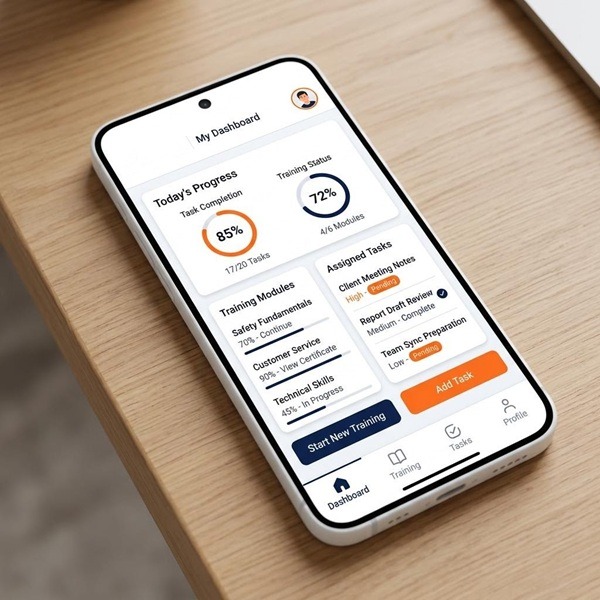
GoSprout’s compliance architecture addresses the specific tracking requirements that generic HR tools cannot handle without custom configuration. The platform supports state-specific registered apprenticeship standards, so wage schedules, OJT hour thresholds, and RTI requirements are configured per jurisdiction rather than manually maintained in supplemental spreadsheets. When an apprentice’s record is created, the correct state-specific rules apply automatically.
Document automation handles agreement generation, multi-party routing, and executed document storage in an audit-ready repository. When a DOL review requires documentation, retrieval is a query, not a search project. For programs with IRA compliance obligations, GoSprout tracks apprentice-to-journeyworker ratios and labor hour participation at the project level, capturing the data points that good faith effort exceptions and prevailing wage calculations require.
Multi-state programs receive consistent process management across jurisdictions without requiring a separate workflow for each state. Coordinators work from one dashboard while compliance configurations handle the variation underneath.
GoSprout Quick-Pick: Is This Platform the Right Fit?
GoSprout is best suited for employers and program sponsors who meet one or more of the following conditions:
- You manage 15 or more active apprentices annually, across one or more registered programs.
- Your program operates across multiple states or has IRA-related compliance requirements.
- You are currently using spreadsheets, email, or disconnected tools and have experienced at least one compliance gap or audit preparation problem in the past two years.
- You want to consolidate talent sourcing and onboarding into one system rather than managing them separately.
- You run both intern and apprenticeship programs and need a single platform to track both pipelines.
If your program runs fewer than 10 apprentices annually with no multi-state complexity, a simpler tool may serve you adequately for now. GoSprout’s value compounds with program scale and compliance complexity.
Conclusion: Selecting the Platform That Serves the Whole Apprenticeship Journey
The Evaluation Criteria Recap: From Compliance Baseline to Integrated ROI
The evaluation framework built across this article rests on a layered argument. The baseline requirement is compliance depth: state-specific registered apprenticeship standards, document automation with full audit trails, and IRA-specific tracking for programs with clean energy obligations. Any platform that cannot deliver those capabilities creates risk that persists regardless of how well it handles everything else.
Above that baseline, the differentiating criteria are integration capability, multi-stakeholder architecture, and whether the platform unifies talent discovery with onboarding or treats them as separate problems. Platforms that score high on compliance but low on integration force your team to manage data across systems. Platforms that handle onboarding but not sourcing leave your time-to-fill problem unsolved. The highest ROI comes from eliminating both failure modes simultaneously.
The feature evaluation matrix earlier in this article provides a structured way to score the platforms you are considering. Use it against your specific gaps, including compliance exposures, administrative overhead, and candidate conversion friction, rather than optimizing for the highest average score across all categories.
Why the Right Platform Is a Business Control System, Not Just a Compliance Tool
Programs that select apprentice onboarding software primarily to reduce audit risk are solving the right problem with too narrow a frame. Compliance is the floor. The ceiling is a system that gives you real-time visibility into program health, flags problems before they become exits, and produces the data you need to demonstrate program ROI to internal stakeholders and external sponsors.
That visibility changes how program decisions get made. A coordinator who can see, on a single dashboard, which apprentices are behind on OJT hours, which agreements are pending signature, and which cohorts carry the highest early dropout risk is not just administratively better positioned. They are making different decisions than a coordinator who assembles that picture from spreadsheets after the fact.
The right platform functions as a control system for your program: continuous, real-time, and connected to the actual variables that determine whether apprentices complete. That is a different category of investment than compliance software alone, and it produces a different category of return.
Next Steps: How to Begin Your GoSprout Platform Evaluation
The most productive first step is not a demo. It is a gap audit. Before scheduling a platform walkthrough, document two things: where your current process creates the most administrative overhead, and where it creates the most compliance risk. Those two inputs define what a platform needs to solve for your program specifically.
Want to Learn More About Your Registered Apprenticeship Opportunities?
BOOK A FREE CONSULTATION
With that clarity, a GoSprout evaluation becomes a targeted conversation rather than a feature tour. You are testing whether the platform closes your specific gaps, not whether it scores well on generic criteria. Request a walkthrough focused on your program structure, including your states, your trade occupations, and your current document workflow, and ask to see how the platform handles your highest-risk scenarios.
For programs still running on spreadsheets, the question is not whether to migrate. It is how quickly the migration pays for itself. The ROI model in the earlier section gives you the structure to answer that question before your next enrollment cycle begins. Start there, and the platform decision becomes considerably more straightforward.
Frequently Asked Questions
Apprentice onboarding software is purpose-built to manage the multi-year, multi-party workflows specific to registered and non-registered apprenticeship programs, including eligibility verification, OJT hour tracking, wage progression, and compliance documentation across state and federal standards. General HR onboarding tools are designed for a two-party, one-time workflow that concludes when a new employee is active in payroll. They lack the compliance depth, tri-party coordination, and longitudinal tracking that apprenticeship management requires.
The most important capabilities are enrollment and eligibility automation, digital contract generation with multi-party e-signature routing, compliance tracking configured to state-specific registered apprenticeship standards, role-based stakeholder access for employers, apprentices, and training providers, and integration with existing HRIS and LMS systems. For programs with IRA compliance obligations, dedicated apprentice-to-journeyworker ratio tracking and labor hour documentation are also essential. Platforms that unify talent discovery with onboarding deliver the broadest operational efficiency.
Purpose-built apprenticeship management platforms are designed to support compliance with Department of Labor registered apprenticeship standards, including documented wage progressions, OJT hour milestones, related technical instruction requirements, and equal opportunity obligations. For multi-state programs, they maintain jurisdiction-specific configurations so each apprentice’s record reflects the correct state agency requirements. For programs pursuing IRA prevailing wage credits, specialized platforms track apprentice participation ratios and good faith effort exceptions at the project level.
Most purpose-built platforms offer integration with common HRIS and LMS systems, but the quality of those integrations varies significantly. Before treating compatibility as confirmed, verify whether the integration is bidirectional, which specific fields transfer, what events trigger a sync, and who owns maintenance when either system updates. Apprenticeship-specific data fields, such as OJT hours, competency progress, and wage tier, are frequently absent from standard HRIS integrations and must be confirmed explicitly with the vendor.
A single-program implementation with no HRIS integration and an organized document set can reach operational readiness in two to four weeks. Multi-program implementations with HRIS integration and legacy data migration typically require eight to twelve weeks. Most platforms are designed to process new cohorts before historical data migration is complete, which means an incoming enrollment cycle does not need to be delayed while prior records are transferred.
Free tiers exist in some apprenticeship platforms and may be sufficient for very small programs running a single cohort of fewer than 10 apprentices. They typically restrict the number of active apprentices, the number of programs, access to compliance-specific features, document storage capacity, or integration capability. The practical risk of a free tier is that it may not generate the audit-ready documentation that a DOL review requires, and transitioning from free to paid mid-program introduces data migration complexity that an upfront platform selection would have avoided.


