Table of Contents
- Why Most Employee Training Tracking Software Fails Apprenticeship and Internship Programs
- Understanding What Employee Training Tracking Software Actually Does
- How Training Tracking Requirements Differ for Apprenticeships and Internships
- Key Features to Evaluate When Comparing Training Tracking Software for Apprenticeship Programs
- Integration, Compliance Infrastructure, and Audit Readiness
- Connecting Training Milestones to Hiring and Retention Outcomes
- How GoSprout Bridges Apprenticeship Training Management With Talent Pipeline Development
- Choosing Employee Training Tracking Software Built for the Program You Actually Run
- Frequently Asked Questions
Why Most Employee Training Tracking Software Fails Apprenticeship and Internship Programs
The Hidden Assumption Baked Into Generic Training Tools
Most employee training tracking software is built on a single premise: your learners are already employees. That assumption shapes everything, from how users are provisioned to how progress is measured, how compliance is defined, and what “completion” actually means. For internal workforce training, this works well enough. For apprenticeship and internship programs, it quietly breaks down from the start.
Generic training tools are designed around recurring annual compliance cycles: safety certifications, policy acknowledgments, skills refreshers. The workflow assumes a stable employee who needs periodic training to remain compliant. Apprentices and interns operate on a completely different model. They enter as external learners on a defined trajectory, accumulate structured competencies over months, and exit the program either as hires or as disqualified candidates. No standard training tracker is built to manage that arc.
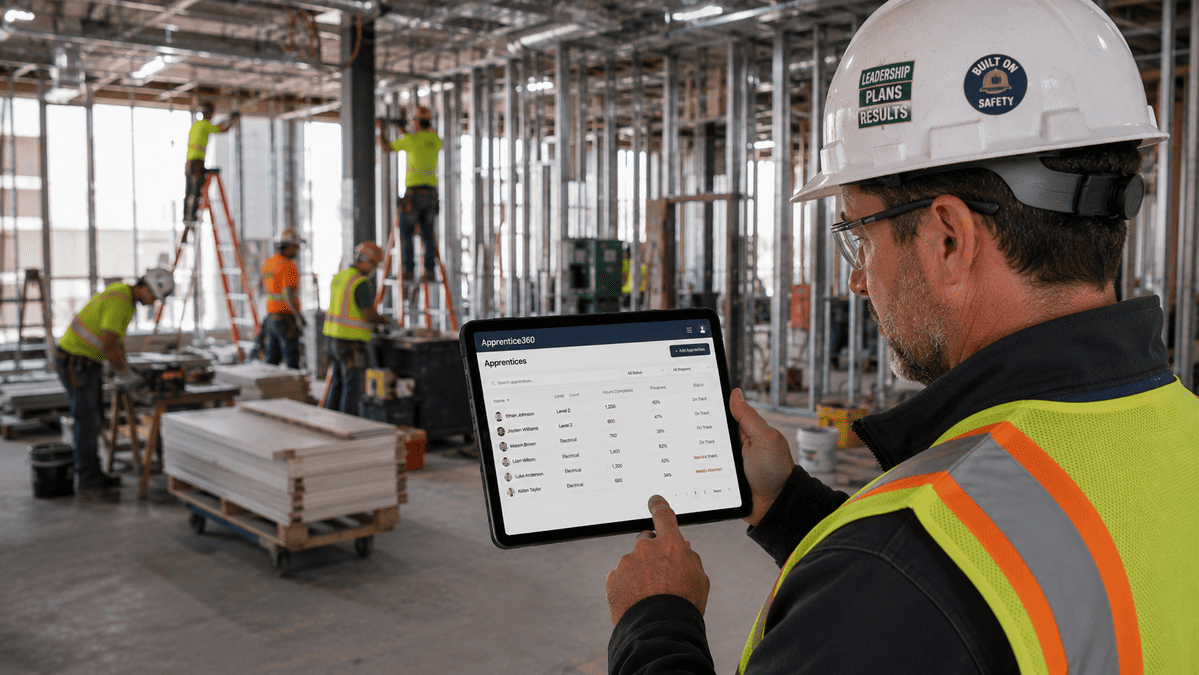
Internal Compliance vs. External Learner Lifecycle: A Fundamental Mismatch
Internal compliance training and apprenticeship management are not variations of the same problem. They are structurally different workflows.
Internal compliance is cyclical. An employee completes a required training, receives credit, and the system resets a timer until the next renewal. The goal is coverage, ensuring everyone has completed what they are required to complete.
Apprenticeship management is sequential and cumulative. A trainee progresses through defined competency stages, with each milestone building on the last. Progress gates exist not just to confirm a module was completed, but to verify that a specific skill was demonstrated and assessed. Failure to pass a gate affects the trainee’s entire timeline, not just a single record. That distinction, progression versus coverage, is the core mismatch that generic tools cannot bridge through configuration alone.
What Is the Difference Between an LMS and Apprenticeship Management Software?
A learning management system (LMS) delivers and records training content. It tracks whether a learner completed a course, passed an assessment, or watched a video. For content-heavy training programs, an LMS provides real value.
Apprenticeship management software tracks the full operational lifecycle of a structured program. That includes competency milestones, mentor and supervisor assignments, certification management with automated expiration alerts, onboarding-to-productivity timelines, regulatory documentation for registered programs, and the connection between trainee progress and hiring decisions.
An LMS answers the question: “Did this person complete the training?” Apprenticeship management software answers: “Is this person on track to become a productive hire, and can I prove it to an auditor?”
The Real Cost of Using the Wrong Tool
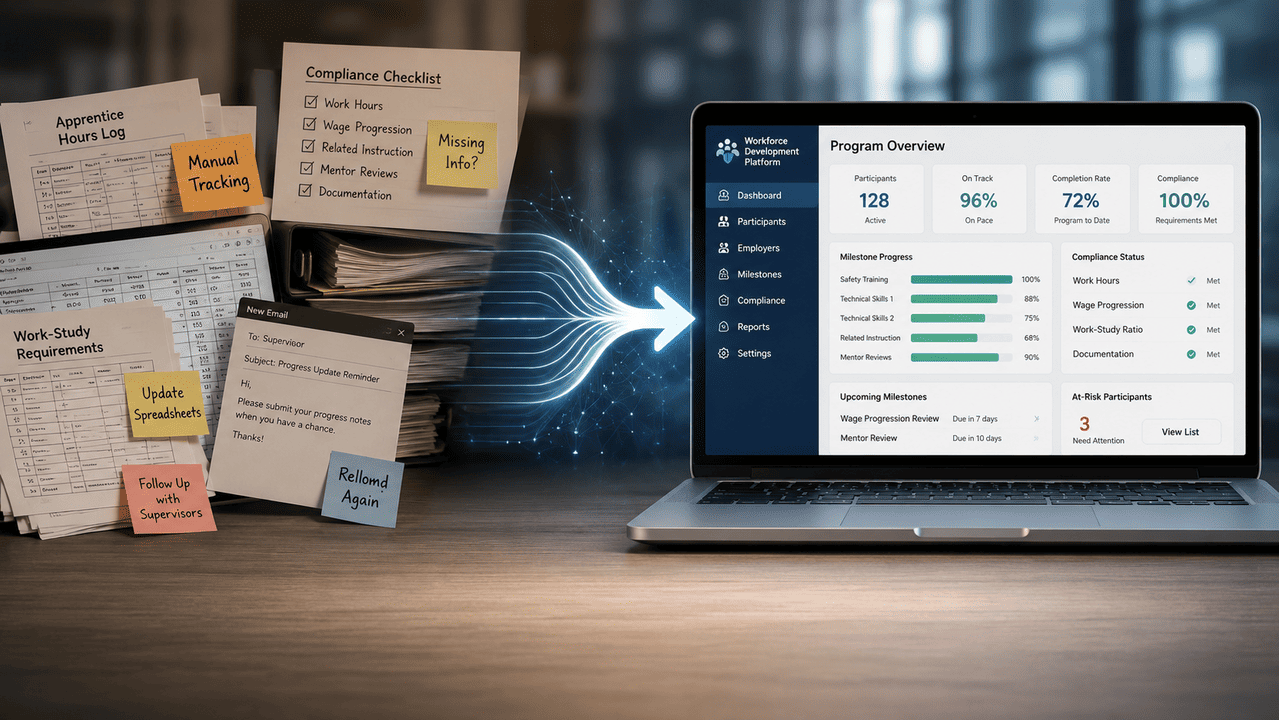
The cost of using generic employee training tracking software for apprenticeship programs rarely shows up as a single failure. It accumulates as friction: a missed certification expiration that creates a compliance gap, a mentor assignment tracked in a spreadsheet that no one updated, a cohort of interns whose progress was never formally documented because the system did not support that workflow. That friction is a big reason programs are moving to modern apprenticeship tracking solutions built for hours, competencies, and compliance.
These gaps remain invisible until they are not. A Department of Labor audit, a lapsed credential, or an inability to answer the basic question, “How many apprentices from last year’s cohort were converted to full-time hires?”, surfaces the problem all at once. By then, the cost is measured not in subscription fees but in compliance liability, lost pipeline intelligence, and training investments that produced no measurable hiring outcome.
Understanding What Employee Training Tracking Software Actually Does
Core Functions: Training Records, Progress Monitoring, and Compliance Tracking
At its core, employee training tracking software performs three functions: it stores training records, monitors progress against requirements, and flags compliance gaps. Every tool in this category does some version of all three. The differences between tools lie in how deeply each function is built and for whom.
Training records capture what training occurred, when, and by whom. Progress monitoring shows where learners stand against required completions. Compliance tracking identifies gaps, flags expiring certifications, and generates reports for audit or regulatory review. These are the baseline capabilities any serious platform should provide.
How Training Management Systems Differ From Learning Management Systems
The distinction matters practically, not just conceptually. An LMS is primarily a content delivery platform. It manages course libraries, enrollments, and completion records. A training management system (TMS) is primarily an operational platform. It manages the administrative workflow around training, including scheduling, assignment, compliance tracking, reporting, and record retention, often without delivering any content directly.
In practice, many platforms blur this line. A tool marketed as a TMS may include course authoring. An LMS may add compliance dashboards. What matters for evaluation is which function the platform was designed around, because that design priority determines what it does well and what it treats as an afterthought.
What Compliance Tracking Really Entails Beyond Checkbox Completion
Compliance tracking in most tools defaults to binary status: complete or incomplete. That approach works for a one-time policy acknowledgment. For structured programs with regulatory oversight, it falls short in three specific ways.
First, many compliance requirements have expiration dates. A certification completed eighteen months ago may no longer satisfy current standards. Second, some compliance requirements are sequential, meaning a later credential requires documented proof of an earlier one. Third, for registered apprenticeship programs, compliance means satisfying Department of Labor or state agency standards that require specific documentation formats, not just internal records. Generic tracking software typically handles none of these scenarios without significant manual workaround.
Where General Employee Training Trackers Fall Short for Structured Programs
The operational ceiling of general training trackers becomes visible when you try to manage a structured apprenticeship cohort through them. There is no workflow for external learner onboarding. Mentor assignment exists, if at all, as a custom field rather than a tracked relationship. Competency milestones cannot be sequenced with dependencies. Certification expiration alerts are not connected to program eligibility. And there is no output that links training completion to a hiring decision.
Each of these gaps is manageable individually, a spreadsheet here, a calendar reminder there. Together, they describe a program that is being run manually, regardless of what software is theoretically in place.
Tool Category Comparison: Matching Software to Apprenticeship Program Needs
The table below maps three common tool categories against the operational requirements specific to apprenticeship and internship programs. Use it as a first-pass filter before moving to detailed vendor evaluation.
| Operational Need | LMS | General TMS | Purpose-Built Apprenticeship Management |
|---|---|---|---|
| External learner management | Partial, requires workarounds for non-employees | Limited, typically employee-only provisioning | Native, designed for pre-hire and trainee access |
| Certification expiration tracking | Basic, records completion dates only | Moderate, expiration alerts available in most platforms | Full, expiration alerts tied to program eligibility and compliance status |
| Onboarding-to-productivity timelines | Not supported | Not supported | Core feature, tracks progress against defined time-to-competency benchmarks |
| Mentor and supervisor assignment | Not supported | Limited, custom fields rather than tracked relationships | Native, mentor assignment is a managed workflow with visibility for all parties |
| Audit-ready documentation | Partial, completion records only | Moderate, reporting available but not structured for regulatory formats | Full, documentation structured for DOL and state agency review |
| Hiring pipeline integration | Not supported | Not supported | Core feature, trainee progress connects directly to hiring and conversion tracking |
| Competency milestone sequencing | Not supported | Limited, course prerequisites available but not competency-based | Native, structured milestones with dependencies and assessor sign-off |
The pattern is consistent across every dimension relevant to apprenticeship programs. LMS and general training management systems were not designed for this use case, and configuration rarely closes the gap. Purpose-built apprenticeship management software treats these requirements as foundational, not as add-ons.
For businesses running one or two interns on an informal basis, a general tool may be sufficient. For any organization managing a structured program with regulatory requirements, cohort tracking, or a genuine intent to convert trainees into hires, the tool category choice is the most consequential decision in the evaluation process.

How Training Tracking Requirements Differ for Apprenticeships and Internships
Managing External Learners on a Trajectory Toward Employment
Apprentices and interns enter your program from outside the organization and exit, ideally, as qualified candidates for permanent roles. That trajectory creates a fundamentally different administrative workflow than anything a standard employee training tracker is built to support.
Internal employees have a personnel record, a manager, a defined role, and an established place in your HR system before any training begins. An apprentice or intern arrives with none of that infrastructure. They need to be provisioned as learners, assigned a mentor or supervisor, enrolled in a structured sequence of training activities, and tracked against a timeline that ends with a hiring decision, not a renewal date. Every step in that workflow is purpose-built for a population that generic tools simply were not designed to serve.
Apprenticeship-Specific Compliance: Registered Programs, DOL Standards, and State Regulations
Registered apprenticeship programs carry a compliance burden that has no parallel in standard employee training. The U.S. Department of Labor’s Office of Apprenticeship sets specific requirements for related technical instruction hours, on-the-job training hours, wage progression, and program documentation. State apprenticeship agencies impose additional standards that vary by jurisdiction. Every element of a registered program, from mentor qualifications to competency assessments, must be documented in formats that satisfy those regulatory expectations.
This means compliance tracking for apprenticeships is not a matter of confirming that a trainee watched a video and clicked complete. It requires maintaining time logs, structured competency records, wage progression documentation, and audit-ready reports organized to match Department of Labor or state agency review formats. A general employee training management system that generates a standard completion report will not satisfy a registered program audit.
Intern Program Management: Onboarding Workflows, Mentor Assignment, and Progress Gates
Intern programs operate under less formal regulatory requirements than registered apprenticeships, but they carry their own operational complexity. A well-run intern program includes a structured onboarding sequence, a defined mentor relationship, scheduled progress check-ins, and formal gates that determine whether an intern is on track for a possible offer.
Without a system designed to manage these steps, programs default to informal coordination. A manager sends welcome emails, a spreadsheet tracks assigned projects, and progress feedback lives in someone’s inbox. That approach works for a single intern. It breaks down for a cohort of ten, and it produces no usable data about which program elements are generating ready-to-hire talent.
How to Track Apprenticeship Training Completion and Compliance
Tracking apprenticeship training completion requires more than a record of courses finished. It requires a system that ties completion to eligibility, connecting what a trainee has completed to what they are now authorized to do, what credentials they hold, and what they still need to satisfy program requirements.
Certification Timelines and Expiration Alert Requirements
Apprenticeship programs regularly involve credentials that expire: safety certifications, first aid qualifications, and trade-specific licenses. A training record that captures when a certification was earned but does not alert program administrators before it lapses creates a compliance gap that can disqualify a trainee from active work assignments mid-program.
Robust expiration management means alerts fire at meaningful intervals before expiration, not the day after. It also means those alerts are tied to the trainee’s program status, so a lapsing credential triggers action from the right person: the mentor, the program coordinator, or the trainee directly.
Structured Competency Milestones vs. Course Completion Checkboxes
The most significant tracking gap in generic tools is their inability to distinguish between completing a training module and demonstrating a competency. In a registered apprenticeship, a trainee may complete related technical instruction on a topic and still need to demonstrate applied proficiency on the job before that competency is credited. These are different events, and they need to be tracked separately.
Competency milestone tracking requires assessor sign-off, not just system confirmation. A checkbox indicating that a course was completed tells you the training happened. A signed competency record tells you the skill was observed, assessed, and validated, which is what the program record and the eventual hiring decision should be based on.
Key Features to Evaluate When Comparing Training Tracking Software for Apprenticeship Programs
Centralized Record-Keeping and Audit-Ready Documentation
Every trainee record, including enrollment dates, completed training, competency sign-offs, certification history, mentor assignments, and progress notes, should exist in a single location that any authorized reviewer can access without reconstructing it from multiple sources. Centralization is not a convenience feature. It is the foundation of audit readiness.
For registered programs, audit-ready documentation means records are organized to match the review criteria of the relevant oversight body. A general export of completion records is not the same as a structured program record.
Certification and Expiration Management: What Robust Alerting Looks Like
Effective certification tracking does three things: records the credential, tracks its expiration date, and sends proactive alerts to the right people before the expiration creates a problem. The alerting logic matters. A system that notifies the learner only, without alerting the program coordinator or supervisor, places the entire compliance burden on the trainee and produces no operational visibility.
Look for platforms that allow configurable alert timing at 30, 60, and 90 days before expiration, route notifications to multiple stakeholders, and flag expiration status within the trainee’s overall program record.
Skills Matrix and Competency Framework Support
A skills matrix gives program managers a structured view of where each trainee stands across the full range of required competencies. For apprenticeship programs, this means mapping completed and validated competencies against the program’s defined framework, not just a list of courses taken.
This feature separates purpose-built apprenticeship management from general employee training tracking software. A skills matrix that only reflects training completion tells you what someone studied. One tied to assessed competency milestones tells you what they can actually do.
Real-Time Progress Monitoring and Supervisor Reporting
Supervisors and mentors need current information, not end-of-month reports. Real-time progress dashboards allow them to identify trainees who are falling behind a milestone schedule before it becomes a program completion risk. Reporting should be filterable by cohort, by individual, and by competency area, so a program coordinator managing multiple apprentices can see both the overall picture and the details for any one trainee.

How to Automate Intern Onboarding and Training Tracking
Automating intern onboarding means removing the manual steps that currently sit in someone’s inbox or calendar. A well-configured system should:
- Trigger onboarding training sequences automatically when a new intern record is created
- Assign mentors and notify them of their responsibilities without a separate email
- Gate access to later program phases based on completion of earlier requirements
- Send progress reminders to interns and supervisors on a defined schedule
The goal is a repeatable onboarding process that runs consistently regardless of which coordinator is managing it and that generates a documented record of every step.
Ease of Use and Learner Adoption Across Mixed-Experience Cohorts
Apprenticeship cohorts include people who are entirely new to professional environments. A platform that requires significant navigation to find a training assignment or log a completed activity will produce poor adoption, incomplete records, and frustrated mentors chasing documentation. Evaluate platforms with the least technically experienced trainee in your cohort in mind, not the most experienced administrator.
What Features Should Apprenticeship Tracking Software Have?
Mentor and Supervisor Assignment Workflows
Mentor assignment should be a tracked relationship, not a custom field. That means the system records who is assigned to whom, notifies the mentor of their responsibilities, provides them with visibility into their trainee’s progress, and documents their sign-offs on competency milestones. When a mentor leaves or a reassignment occurs, the record should transfer cleanly without losing prior documentation.
External Learner Access and Role-Based Permissions
Trainees who are not yet employees need a different access model than internal staff. They should be able to view their own training records, complete assigned activities, and track their progress without accessing employee data or internal system functions. Role-based permissions designed for external learners, rather than permission-limited employee accounts, are a prerequisite for any platform managing apprentices or interns.
Integration, Compliance Infrastructure, and Audit Readiness
HRIS and Onboarding System Integration: What to Evaluate Before Committing
Integration matters most at the transition points: when a trainee is first added to the system and when they convert to a full-time employee. If your training tracking platform does not connect to your HRIS, those transitions require manual data entry, creating the risk of duplicate records, missing information, and a broken chain of documentation from pre-hire training through post-hire onboarding.
Before committing to any platform, evaluate whether it can receive trainee records from your existing onboarding system and push completed program records to your HRIS when a trainee converts. A platform that manages training records in isolation generates more administrative work, not less.
Regulatory Compliance Architecture: What Your Tracking System Must Support
For registered apprenticeship programs, the tracking system’s compliance architecture needs to support:
- Hour tracking for both related technical instruction and on-the-job training
- Wage progression documentation tied to milestone completion
- Competency records with assessor identification and sign-off dates
- Program reports structured for Department of Labor or state agency review
These are not features most employee training management systems include. They require a platform designed with registered program compliance as a core use case, not as a reporting module added after the fact.
What Are the Compliance Requirements for Tracking Apprenticeship Training Records?
The Department of Labor’s registered apprenticeship standards require that program sponsors maintain records demonstrating each apprentice’s progress through the program, including hours completed, competencies achieved, and wage rates at each progression step. State apprenticeship agencies may require additional documentation or use different audit formats. Records must typically be retained for a defined period after program completion and be available for review on request.
The practical implication is clear: your tracking system needs to produce records that satisfy those formats, not just internal reports that confirm training happened.
Audit Readiness as an Operational Standard, Not a Reactive Scramble
Programs that treat audit readiness as something they prepare for, rather than something they maintain continuously, consistently find themselves reconstructing records from spreadsheets, emails, and memory when a review is requested. That reconstruction takes time, introduces gaps, and creates liability where there may have been none.
A system with audit readiness built in produces the required documentation as a byproduct of normal program management. Records are complete because the workflow required them to be completed, not because someone assembled them after the fact.
Common Mistakes Businesses Make When Selecting Training Tracking Software
Conflating Feature Volume With Operational Fit
A platform with dozens of features can still fail to support the specific workflows an apprenticeship program requires. Feature count is not a proxy for fit. Evaluate whether the platform handles the core operational requirements your program genuinely depends on, including external learner provisioning, competency milestone tracking, certification expiration management, mentor assignment, and audit-ready reporting, before expanding the evaluation to secondary capabilities.
Want to Learn More About Your Registered Apprenticeship Opportunities?
BOOK A FREE CONSULTATION
Underweighting Compliance Automation for External Learner Programs
Compliance automation, including alerts, triggered workflows, and automated documentation, has a different value for apprenticeship programs than for internal training. With internal employees, a missed renewal is a compliance gap. With a registered apprenticeship, it can affect the trainee’s eligibility status and the program’s standing with the sponsoring agency. The stakes are higher, and the case for automation is correspondingly stronger. That’s why sponsors of registered programs are turning to registered apprenticeship management software built around these requirements.
Selecting for Internal Employees First, Then Retrofitting for Apprentices
The most common selection mistake is evaluating a platform primarily against internal employee training needs, then assuming it can be configured to handle apprentices. That assumption reverses the correct priority. If your program depends on apprenticeship and intern management, that use case should drive the evaluation. A platform that handles it well will almost certainly handle internal compliance training. The reverse is rarely true.
Connecting Training Milestones to Hiring and Retention Outcomes
Time-to-Competency as a Talent Pipeline Metric
Time-to-competency, the span between a trainee’s first day and the point at which they can perform core job functions independently, is one of the most useful metrics a workforce development program can track and one of the least frequently measured. Most businesses know their training completion rates. Very few know how long it actually takes their apprentices to become productive, or how that timeline varies across cohorts, mentors, or program structures.
That gap matters because time-to-competency is not just a training metric. It is a hiring metric. If your program consistently produces job-ready talent in six months but you have no data to confirm or challenge that assumption, you cannot improve it, report on it, or use it to make informed decisions about program investment.
How to Measure Whether Apprenticeship Training Is Producing Hireable Talent
The direct answer: track the connection between competency milestone completion and post-program outcomes. Specifically, capture whether each trainee completed all required milestones, at what point in the program timeline they reached readiness, and whether they were ultimately offered and accepted a position. Aggregate that data across cohorts and patterns begin to emerge: which program elements correlate with successful conversions, which do not, and where the pipeline loses candidates before a hiring decision is made.
Without that linkage built into your tracking system, those questions require manual reconstruction. Your employee training tracking software should make cohort-level conversion analysis a standard report, not a quarterly project.
Onboarding-to-Productivity Tracking: Building a Measurement Model
Consider a structured apprenticeship program with four defined competency stages, a target completion timeline of nine months, and a conversion goal of 70% of cohort members receiving a full-time offer. A tracking model that supports meaningful measurement would capture:
- The date each trainee entered the program and completed each competency stage
- Variance from the target timeline at each milestone
- Mentor sign-off dates and any milestone delays requiring reassessment
- Final program status: converted, extended, or not offered
With that data, a program coordinator can calculate average time-to-competency per cohort, identify whether certain stages consistently produce delays, and compare conversion rates across cohorts or hiring managers. The model does not require complex analytics infrastructure. It requires a system that captures the right events consistently, which is precisely what purpose-built apprenticeship program management software is designed to do and what general employee training tracking software does not support.
How Tracking Software Improves Retention When Linked to Structured Progression
Trainees who can see their own progress through a defined competency framework stay more engaged than those navigating an informal process where expectations are unclear. Structured progression, with visible milestones, documented sign-offs, and clear criteria for advancement, communicates to an apprentice or intern that the program is serious and that their development is being managed intentionally. That perception reduces early attrition.
The operational mechanism is straightforward. When a tracking system makes progress visible to the trainee in real time, the trainee knows where they stand, what comes next, and who is responsible for their advancement. Programs without that visibility produce the opposite effect: trainees feel overlooked, mentors neglect to document completions, and attrition occurs before the program produces any return on its training investment.
Training ROI and Workforce Planning: The Business Case for Purpose-Built Software
The business case for purpose-built apprenticeship management software rests on three connected outcomes: faster time-to-competency, higher program completion rates, and better conversion from trainee to full-time hire. Each of those outcomes has a measurable cost attached to its absence.
Extended time-to-competency adds weeks of reduced-productivity labor cost before a new hire is fully contributing. Cohort attrition represents recruiting, onboarding, and training investment that produced no hire. And a program that cannot report its conversion rate to leadership cannot make a credible case for its own budget.
The software investment is not the cost driver. The cost driver is running a structured program on infrastructure that was not built to support it.
How GoSprout Bridges Apprenticeship Training Management With Talent Pipeline Development
Purpose-Built for the Apprenticeship and Internship Lifecycle
GoSprout was built specifically for the apprenticeship and internship use case, not adapted from an internal employee training platform. That distinction matters at every layer of the product: how trainees are provisioned, how program milestones are structured, how mentor relationships are tracked, and how program outcomes connect to hiring decisions.
The design premise is that an apprentice or intern is not a partial employee who needs limited access to an HR system. They are an external learner on a trajectory toward employment, and the software managing their program should reflect that from day one through final placement.
The Dual-Sided Platform Model: Connecting Trainee Progress to Hiring Outcomes
GoSprout operates on a dual-sided model that serves both the trainee and the employer simultaneously. Trainees use the platform to track their own progress, access training assignments, and document completed activities. Employers use it to monitor cohort progress, manage mentor assignments, generate compliance reports, and evaluate trainees against hiring criteria.
This model closes the loop between training and hiring within a single system. A program coordinator does not need to export training records to a separate platform to make a hiring recommendation. The program data, the competency record, and the trainee’s trajectory are all in the same place.
Placement Tracking, Mentor Assignment, and Program Visibility in a Single System

GoSprout consolidates the functions that most programs currently manage across disconnected tools: mentor assignment and progress visibility, certification and expiration tracking, competency milestone documentation, and placement outcome recording. Each of those functions informs the others. A mentor’s sign-off on a competency milestone updates the trainee’s program record. An expiring certification triggers an alert to both the trainee and the program coordinator. A placement offer connects back to the full program record, giving the organization a complete picture of what the training investment produced.
That consolidation is the operational difference between a program that generates useful pipeline data and one that generates documentation only.
What Purpose-Built Apprenticeship and Intern Management Software Should Deliver
The standard for this category of software is practical and specific. It should provision external learners without requiring them to be treated as employees in your HR system. It should track competency milestones with assessor sign-off, not just course completions. It should alert the right people before certifications expire, not after. And it should connect program completion to hiring outcomes in a format that supports both operational decisions and budget justification.
Generic employee training tracking software meets some of those requirements for some programs. GoSprout is designed to meet all of them for the programs that need them most.
Quick-Pick: Which Tool Fits Your Situation?
| Your Situation | Recommended Tool Category |
|---|---|
| Internal employees, recurring compliance training, no external learners | General TMS or LMS |
| Single intern, informal program, no regulatory requirements | Spreadsheet or basic task management |
| Structured intern cohort, mentor assignment, progress tracking | Purpose-built intern management (GoSprout) |
| Registered apprenticeship program, DOL compliance, competency milestones | Purpose-built apprenticeship management (GoSprout) |
| Mixed program: apprentices, interns, and internal staff training | GoSprout for apprentice/intern track, integrated with existing LMS for internal compliance |
If your program involves external learners on a defined trajectory toward employment, a general tool category will require workarounds that accumulate into real operational and compliance costs. GoSprout is built for exactly this use case.
Choosing Employee Training Tracking Software Built for the Program You Actually Run
Recapping the Distinction That Changes the Evaluation
The evaluation framework that matters is not LMS versus TMS or feature count versus price point. It is whether the software was designed for the population you are managing. Internal compliance training and apprenticeship program management are different problems with different workflows, different regulatory requirements, and different definitions of success. A tool built for one will consistently underperform for the other, regardless of how it is configured.
The Talent Pipeline Advantage of Purpose-Built Apprenticeship Management
Programs that track the full trainee lifecycle, from onboarding through competency milestones to placement, accumulate a strategic asset that generic tools cannot produce: reliable pipeline intelligence. You learn which program elements drive conversion, which cohort characteristics predict success, and what time-to-competency actually looks like in your organization. That intelligence compounds over time. Each cohort adds to a dataset that makes the next program cycle more predictable, more defensible, and more productive.
That is the return on choosing software built for the program you actually run.
Next Steps: Evaluating GoSprout for Your Apprenticeship or Internship Program
Start by mapping your current program against the operational requirements outlined in this guide: external learner provisioning, competency milestone tracking, certification expiration management, mentor assignment, compliance documentation, and placement outcome tracking. Identify where your current tools leave gaps, and assess honestly whether those gaps are being closed through configuration and manual workaround or whether they simply exist as unmanaged risk.
If the gaps are real, the evaluation question is not whether you need a purpose-built platform. It is whether your program can continue to absorb the cost of not having one. GoSprout is designed to close those gaps, not by adding features to a general system, but by treating apprenticeship and intern program management as the primary use case from the ground up.
Frequently Asked Questions
A learning management system is primarily a content delivery platform that records whether a learner completed a course, passed an assessment, or watched a video. Apprenticeship management software tracks the full operational lifecycle of a structured program, including competency milestones, mentor assignments, certification expirations, regulatory documentation, and the connection between trainee progress and hiring outcomes. An LMS tells you whether training happened. Apprenticeship management software tells you whether a trainee is on track to become a productive hire and provides the documentation to prove it.
Effective apprenticeship tracking requires a system that connects completion to eligibility, not just a record of finished courses. This means maintaining time logs for both on-the-job training and related technical instruction, recording competency sign-offs from qualified assessors, managing certification expiration dates with proactive alerts, and generating documentation structured for Department of Labor or state agency review. A general training tracker that only records completion dates will not satisfy the compliance requirements of a registered apprenticeship program.
Registered apprenticeship programs are governed by Department of Labor standards that require program sponsors to maintain records of each apprentice’s completed hours, validated competencies, and wage progression at each program stage. State apprenticeship agencies may impose additional or varying requirements. Records must typically be retained for a defined period following program completion and produced on request during an audit. Your tracking system needs to generate documentation that satisfies those specific formats, not just internal reports confirming that training occurred.
At minimum, purpose-built apprenticeship tracking software should support external learner provisioning, structured competency milestone tracking with assessor sign-off, certification expiration management with configurable alerts, mentor and supervisor assignment as a tracked relationship, audit-ready reporting aligned to regulatory formats, and hiring outcome tracking that connects program completion to conversion decisions. Platforms that treat these as add-on features rather than core design priorities will require manual workarounds that undermine the value of having a system at all.
The most reliable method is to track the relationship between competency milestone completion and post-program outcomes across cohorts. Record whether each trainee completed all required milestones, at what point in the program timeline they reached readiness, and whether they received and accepted an employment offer. Over multiple cohorts, that data reveals which program elements correlate with successful conversions, where attrition occurs, and what time-to-competency actually looks like in your organization. Purpose-built apprenticeship management software should make this analysis a standard report, not a manual reconstruction effort.
Automating intern onboarding means replacing manual coordination steps with system-triggered workflows. When a new intern record is created, the platform should automatically initiate the onboarding training sequence, assign and notify the designated mentor, and gate access to later program phases based on completion of earlier requirements. Scheduled progress reminders to both the intern and their supervisor should run without manual intervention. The result is a repeatable, consistently documented process that does not depend on any individual coordinator remembering each step.


