

Table of Contents
- Why Spreadsheets Are the Hidden Enemy of Your Apprenticeship Program
- What Apprenticeship Workflow Software Actually Does, and Who Needs It
- Core Features That Define a High-Performing Apprenticeship Management Platform
- Building the Internal Business Case: ROI, TCO, and Compliance Risk Reduction
- Integration, Scalability, and the Systems Your Software Must Work With
- Implementation Realities: What to Expect When Moving From Spreadsheets to Software
- The Two-Sided Platform Advantage: Why Candidate Experience Is a Business Metric
- Choosing the Platform That Solves the Whole Problem, Not Just Half of It
- Frequently Asked Questions
Why Spreadsheets Are the Hidden Enemy of Your Apprenticeship Program
Spreadsheets do not fail apprenticeship programs dramatically. They fail them gradually, through accumulated friction that never triggers a single crisis but consistently limits what the program can accomplish.
The Administrative Burden Sponsors Carry Alone
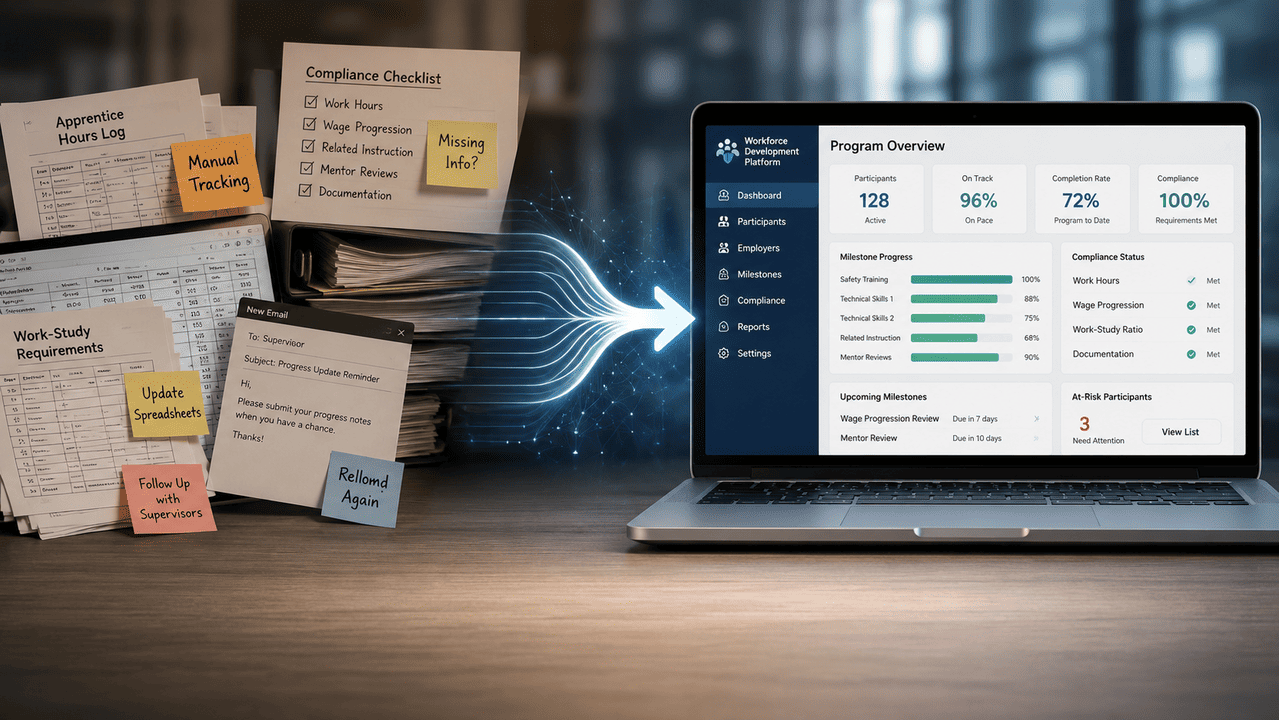
Program sponsors carry a disproportionate share of the operational weight in a registered apprenticeship. They are responsible for enrollment paperwork, wage progression documentation, Related Technical Instruction (RTI) scheduling, on-the-job learning (OJL) hour logs, and regulatory reporting, often while holding a full-time role that treats apprenticeship administration as a secondary function.
Manual RAPIDS Reporting and the Compliance Risk It Creates
RAPIDS, the Registered Apprenticeship Partners Information Data System, is the federal database where sponsors submit enrollment records, completions, cancellations, and demographic data for their programs. Keeping RAPIDS current is not optional. It is the mechanism through which the Department of Labor verifies that a program operates in compliance with its registered standards.
When sponsors manage this process manually, they rely on whoever handles the spreadsheet to remember submission timelines, catch data entry errors, and reconcile discrepancies between what the spreadsheet shows and what actually happened on the floor. That dependency on individual memory and manual reconciliation is where compliance risk accumulates. A missed update, a miscounted hour log, or an enrollment record submitted under the wrong occupation code can trigger a discrepancy that takes weeks to untangle during an audit.
Tracking Competencies, Hours, and Enrollment Across Fragmented Tools
Most sponsors who run programs without dedicated software are not using one spreadsheet. They are using several, plus email threads, shared drives, paper sign-in sheets, and whatever their HRIS exports. Apprentice progress data lives in one place, hour logs in another, and onboarding documents somewhere else entirely.
The practical consequence is that no single person has an accurate, real-time picture of where any given apprentice stands. Supervisors work from outdated information. Compliance reviews require manual data assembly. When a program tries to scale to a second cohort or a second location, the fragmentation becomes a structural barrier.
The Problem on the Other Side: Why Candidates Struggle to Find and Navigate Programs
The administrative friction on the sponsor side has a mirror image on the candidate side that rarely gets addressed in the software conversation. Prospective apprentices often cannot find registered programs relevant to their location and trade. When they do, the application process is opaque, the onboarding experience is inconsistent, and progress visibility is minimal once they start.
This matters operationally. A candidate who cannot navigate the discovery and enrollment process either drops out before starting or enters the program with a poor first impression that affects retention. Sponsors who have solved their internal tracking problems but ignored the candidate experience are still operating an incomplete program.
What Compliance Risks Do Spreadsheet-Based Apprenticeship Programs Actually Face
The compliance exposure in a spreadsheet-managed program falls into three categories. First, documentation gaps: records that exist somewhere but cannot be produced quickly during an audit. Second, reporting errors, specifically RAPIDS submissions that do not match the actual enrollment and hour data in the sponsor’s files. Third, standards drift, where program delivery gradually diverges from the registered standards because no one is systematically verifying that each apprentice is receiving the correct OJL hours and competency training on schedule.
None of these risks announce themselves. They accumulate quietly until an audit, a complaint, or a program review makes them visible. By then, the remediation cost in staff time and potential program standing is significantly higher than the cost of the tracking discipline that would have prevented it.
The Structural Argument for Apprenticeship Workflow Software
The case for apprenticeship workflow software is not that spreadsheets are primitive tools. It is that the compliance and operational requirements of a registered apprenticeship program generate a volume and complexity of data that spreadsheets cannot manage reliably at scale. Crucially, a program’s success depends not just on sponsor-side compliance but on whether candidates can find, enter, and progress through the program without unnecessary friction.
A platform that solves only the sponsor’s administrative burden is addressing roughly half the problem. The programs that consistently produce strong completion rates and build sustainable talent pipelines are the ones that reduce friction on both sides simultaneously.
What Apprenticeship Workflow Software Actually Does, and Who Needs It
Defining the Category: Registered Apprenticeship Software vs. General Internship Tracking Systems
Registered apprenticeship software is a distinct product category, not a configuration of general HR software. The distinction matters when you are evaluating vendors. A general internship tracking system manages tasks like offer letter routing, check-in scheduling, and intern feedback collection. It was not built to handle RAPIDS data submission, OJL hour verification against registered standards, or competency progression frameworks tied to specific occupation codes.
The compliance requirements of a Registered Apprenticeship Program (RAP) are specific enough that software built around them functions differently from general workforce management tools. If a vendor cannot articulate how their platform handles RAPIDS reporting and competency tracking against DOL-registered standards, they are selling a repurposed product, not a purpose-built solution.
Core Administrative Functions: Enrollment Automation, Onboarding Workflows, and Program Lifecycle Management
At the operational core, apprenticeship workflow software automates the sequence of administrative tasks that sponsors currently handle manually. Enrollment triggers onboarding task assignments. Onboarding completion updates RAPIDS-ready records. Hour logs flow into compliance dashboards without requiring manual aggregation. Competency milestones get tracked against each apprentice’s registered standards and surfaced to supervisors automatically.
The program lifecycle, from initial enrollment through wage progression approvals, RTI completions, and final certification, becomes a managed workflow rather than a series of individually tracked events across disconnected files. That shift from reactive record-keeping to proactive workflow management is the functional difference sponsors should be evaluating.
Who Uses It and Why: Roles Across the Program Hierarchy
The value of apprenticeship workflow software is distributed across several roles, and the evaluation criteria differ depending on where in the program hierarchy a person sits.
Hiring Managers and Program Sponsors
Sponsors use the platform to manage program enrollment, monitor cohort-level progress, and ensure that every apprentice’s record is current and audit-ready. For this role, the primary requirement is visibility without manual data assembly. A sponsor should be able to open a dashboard and see which apprentices are on track, which have hour log gaps, and which are approaching a wage progression milestone, without pulling from three different files.
Compliance Officers and DOL Reporting Leads
Compliance-focused users need accurate, exportable records that map directly to RAPIDS submission requirements. Their priority is reducing the gap between what the program’s internal records show and what gets submitted to the Department of Labor. The feature that matters most here is automated RAPIDS-ready reporting, ideally with built-in validation that flags discrepancies before submission rather than after.
Apprentice Supervisors and On-the-Job Learning Coordinators
Supervisors need a simple way to log OJL hours, sign off on competency observations, and communicate task completion without navigating a complex system. For this role, mobile accessibility and a low-friction interface matter more than reporting depth. A supervisor who logs hours accurately in the field prevents the data gaps that create compliance problems upstream.

When a General HR System Is Not Enough
Most enterprise HR systems were designed for employee lifecycle management, not apprenticeship program compliance. They can handle onboarding checklists and document storage, but they cannot track OJL hours against registered standards, generate RAPIDS-formatted reports, or manage competency progression frameworks tied to specific trade occupations.
The practical test is straightforward: can your current HR system produce a RAPIDS-compliant enrollment record, an OJL hour summary by apprentice, and a competency progress report against your registered standards in under ten minutes? If not, you are compensating with manual work that purpose-built apprenticeship workflow software would eliminate.
Vendor Evaluation Rubric: Feature-by-Role Decision Matrix
Use this matrix to distinguish between capabilities your program requires on day one and those that add value but do not determine platform viability.
Sponsor Administration
- Must-have: Enrollment record management, wage progression tracking, cohort dashboards, document storage with audit trail
- Nice-to-have: Automated onboarding task assignment, multi-cohort comparison views, scheduling tools for RTI
- Must-have: RAPIDS-ready data formatting and export, OJL hour logging against registered standards, discrepancy flagging before submission
- Nice-to-have: Automated submission workflow, state-specific compliance rule sets, audit response report generation
Apprentice Experience
- Must-have: Progress visibility for active apprentices, accessible hour logging for supervisors, clear onboarding task flow
- Nice-to-have: Mobile-first interface, candidate discovery tools, in-platform communication between apprentice and coordinator
Score each vendor against the must-have column first. A vendor that checks every nice-to-have but leaves a gap in the must-have column is not a viable option regardless of pricing or interface quality. Once must-haves are confirmed, use the nice-to-have column to differentiate between finalists, weighting categories based on your program’s most acute pain points. A program struggling with candidate sourcing should weight the apprentice experience column more heavily. A program under compliance scrutiny should prioritize the reporting column. A sponsor managing multiple programs across departments should treat multi-cohort administration capabilities as a de facto must-have even if this rubric lists them as secondary.
Core Features That Define a High-Performing Apprenticeship Management Platform
The features that separate purpose-built apprenticeship workflow software from general HR tools are not cosmetic differences. They map directly to the compliance obligations and operational realities of running a Registered Apprenticeship Program, and each one eliminates a specific category of manual work.
Enrollment and Onboarding Automation: Eliminating the Paper Chase
Every apprentice enrollment generates a predictable sequence of tasks: offer documentation, program agreement signatures, RAPIDS registration, RTI scheduling, and supervisor assignment. Without automation, a program coordinator touches each of these manually, for every apprentice, every cohort.
Enrollment automation converts that sequence into a triggered workflow. When an apprentice is confirmed, the platform assigns onboarding tasks, routes documents for signature, and creates a RAPIDS-ready enrollment record simultaneously. The coordinator’s role shifts from task executor to exception handler, which is where their time creates genuine value.
Time Tracking and Hour Logging for OJL Compliance
OJL hour requirements are non-negotiable in a registered program. Each apprentice must accumulate a specific number of documented hours in their occupation, and those hours must be verifiable against the registered standards on file with the DOL.
Platforms that handle this well give supervisors a simple, fast way to log hours at the point of work, ideally from a mobile device, and route those logs to a running total that compares actual hours against required hours per apprentice. The compliance value is not just in the logging but in the automatic comparison. A supervisor who logs hours accurately is providing data. The software’s job is to surface what that data means: which apprentices are on pace, which are behind, and which are approaching a milestone that triggers a wage progression review.
Competency Management and Progress Tracking
How to Track Apprentice Progress Without Manual Intervention
Competency-based apprenticeship programs require that sponsors document not just hours worked but specific skills demonstrated. Tracking this manually means relying on supervisors to update shared files, which produces inconsistent records and frequent gaps.
A well-designed competency management module ties each apprentice’s profile to the competency list in their registered standards. Supervisors log observations against specific competencies, and the platform aggregates those inputs into a progress view that the sponsor can review without requesting updates from anyone. When a competency is verified, the record is timestamped and stored. When a milestone cluster is complete, the platform flags the next step. No spreadsheet, no email, no manual assembly required.
RAPIDS Reporting: Eliminating Manual Submission Risk
RAPIDS is the federal system of record for registered apprenticeships. Sponsors are required to submit enrollment records, demographic data, completions, and cancellations through it. Keeping RAPIDS current is both a compliance requirement and a condition of program standing.
The manual submission process is where errors concentrate. A coordinator pulling data from multiple files, cross-referencing against prior submissions, and formatting records to RAPIDS specifications is doing work that is inherently error-prone. Apprenticeship workflow software eliminates this by maintaining RAPIDS-ready records in real time and generating submission-ready exports that match the required format. The strongest platforms flag data discrepancies before submission, so errors are caught internally rather than discovered during an audit.
Centralized Program Administration, Scheduling, and Communication
A single dashboard showing enrollment status, hour log completion, competency progress, and upcoming RTI sessions for an entire cohort is not a convenience feature. It is the operational infrastructure that allows a sponsor to manage a program without maintaining a private spreadsheet to track what the system is not showing them.
Scheduling and communication tools belong in the same platform because disconnected tools create version control problems. When RTI session changes are communicated through email and tracked separately from the program record, attendance data and scheduling history end up fragmented. Centralizing these functions means the program record is always current, and every participant is working from the same information.
Mobile Accessibility: A Retention Variable, Not a Luxury
Apprentices and their supervisors are often not at a desk. A construction supervisor logging OJL hours at the end of a shift, or an apprentice checking their progress from a job site, needs a mobile interface that works quickly and without friction. If the logging process requires a laptop, it gets deferred. Deferred logs create gaps. Gaps create compliance risk and, from the apprentice’s perspective, the impression that the program is disorganized.
Mobile accessibility affects supervisor compliance rates and apprentice engagement in equal measure. Programs that treat it as a secondary feature consistently see lower log completion rates and higher early attrition than those that treat field usability as a core design requirement.

What Features to Prioritize When Comparing Apprenticeship Management Platforms
Start with the three functions that carry direct compliance consequences: RAPIDS reporting accuracy, OJL hour tracking, and competency documentation. A gap in any of these is not a workflow inconvenience. It is a program integrity risk.
From there, evaluate the supervisor and apprentice experience layer. Enrollment automation and onboarding workflows reduce coordinator burden. Mobile accessibility and progress visibility affect whether the people actually doing the work engage with the platform consistently enough for the data to be reliable.
Features like advanced analytics, multi-location dashboards, and communication tools differentiate mature platforms from entry-level ones, but they are most valuable once the compliance foundation is solid. Prioritize for compliance requirements first, then assess what the platform adds beyond them.
Building the Internal Business Case: ROI, TCO, and Compliance Risk Reduction
The case for investing in apprenticeship workflow software is stronger than most sponsors realize, but it requires translating operational pain into financial terms that resonate with finance and executive stakeholders.
How to Measure ROI From Switching to Software
The Time-Saved Model: Quantifying Administrative Hours Recovered
The most direct ROI calculation starts with hours. Identify how many hours per week your program coordinator spends on tasks the software would automate: RAPIDS data entry, hour log aggregation, onboarding paperwork, and progress report assembly. Multiply by the coordinator’s loaded hourly cost. For a program where a coordinator spends ten hours per week on these tasks at a $35 loaded rate, the annual administrative cost is approximately $18,200 in labor alone, before accounting for errors and their downstream remediation.
Most programs find the actual number is higher once they account for manager time spent answering status questions, HR time spent locating documents for audits, and supervisor time spent re-entering data that was already logged somewhere else.
Compliance Risk Reduction: The Cost of an Audit You Were Not Prepared For
An audit response for a program with incomplete records typically requires a significant investment of staff time to assemble, depending on how fragmented the documentation is. If the audit reveals substantive discrepancies, the remediation timeline extends further and program standing may be affected. Quantify the probability of a documentation deficiency under your current system and multiply by the estimated remediation cost. That product belongs in your ROI model as risk-adjusted cost avoidance.
Talent Pipeline Value: What a Retained Apprentice Is Worth Over Time
Each completed apprenticeship represents a trained, credentialed worker entering your workforce or your client’s workforce. If your program currently loses apprentices to early attrition, estimate the cost of that attrition: recruiting replacement candidates, delayed productivity, and lost RTI investment. A platform that improves the onboarding experience and gives apprentices visible progress tracking addresses the experiential factors most commonly associated with early exits, and retention improvement is a measurable output that belongs in any honest ROI model.
Total Cost of Ownership: What Pricing Models Actually Look Like
Apprenticeship software vendors typically price on one of three models: per-apprentice monthly subscriptions, flat annual licenses by program size, or modular pricing where compliance reporting, candidate management, and communication tools are priced separately.
Per-apprentice pricing scales predictably but can become expensive as programs grow. Flat annual licensing is easier to budget but may include capability tiers that require upgrades as your program matures. Modular pricing looks cost-effective initially but often leads to higher total spend once you identify the functions you actually need.
When calculating total cost of ownership, include implementation fees, data migration support, and training time. A platform priced $5,000 lower annually that requires three months of internal configuration work is not necessarily the less expensive option when staff time is properly costed.
How to Justify the Cost of Apprenticeship Software to Your Finance Team
Finance stakeholders respond to three data points: cost avoidance, risk reduction, and productivity recovery. Frame the business case around all three, in that order.
Lead with cost avoidance, the administrative hours that software eliminates, expressed as an annual dollar value. Follow with risk reduction, the audit preparation cost and compliance remediation exposure that a well-managed program avoids, expressed as a probability-weighted estimate. Close with productivity recovery: what your coordinator and supervisors can accomplish with the time they recover, whether that is expanding the program, improving apprentice support, or eliminating a backfill hire.
One practical approach is to run a ninety-day baseline audit before the proposal meeting. Document the actual hours spent on manual administrative tasks during that period, project them annually, and present that figure as the baseline cost of not acting. Then position the software cost against it. Framed that way, the question is no longer whether the program can afford the software. It is whether the program can afford to keep operating without it.
Integration, Scalability, and the Systems Your Software Must Work With
Can Apprenticeship Software Integrate With Your Existing HR or Payroll System
Most organizations already have systems managing employee records, payroll, and benefits. Apprenticeship software that cannot exchange data with those systems creates a new version of the fragmentation problem it was supposed to solve.
At minimum, your apprenticeship program management platform should be able to receive new hire records from your HRIS and pass wage progression data to your payroll system without manual re-entry. Verify these integration points before signing a contract, not after. Ask vendors specifically which HR and payroll platforms they have pre-built connectors for, and what the fallback process is if yours is not on the list.
API Connectivity and LMS Integration: What to Verify Before Signing a Contract
Many registered apprenticeship programs include a Related Technical Instruction component delivered through a learning management system. If your LMS tracks course completions and your apprenticeship platform tracks competency progress separately, someone is manually reconciling those records. That reconciliation step is both a time cost and an error source.
Want to Learn More About Your Registered Apprenticeship Opportunities?
BOOK A FREE CONSULTATION
Confirm whether the vendor offers an API that your LMS can connect to, or whether they have a native integration with your specific LMS. Ask for documentation of the data fields that sync, the frequency of sync, and how conflicts between systems are resolved. Vague answers here signal that the integration is less reliable in practice than it appears in the sales presentation.
Multi-Program Scalability: Managing Apprenticeships Across Departments and Locations
A program that works well for one cohort in one location does not automatically scale to three departments and two sites. The platform architecture needs to support program-level data separation, role-based access controls that allow site-level supervisors to see their apprentices without accessing other programs, and aggregate reporting that gives program leadership a consolidated view across the portfolio.
Ask vendors how they handle this configuration specifically. Request a demonstration using a multi-program scenario, not a single-program walkthrough. If the vendor cannot show you how a compliance officer at the enterprise level views aggregate RAPIDS status across all registered programs simultaneously, the platform may not have been built for the organizational complexity you are managing.
Data Security, Record Retention, and Audit Readiness
Apprenticeship records are personnel records. They contain demographic data, wage information, and training documentation that must be retained according to both federal and, in many cases, state requirements. Your platform needs to meet the data security standards appropriate for this record category and support the retention schedule your program is required to follow.
Verify that the vendor uses encrypted storage and transmission, supports role-based access controls, and offers configurable retention policies. Confirm that records remain accessible and exportable if you ever need to change platforms or respond to a DOL data request. A system that holds your records but makes them difficult to export is a vendor lock-in risk as much as it is a security consideration.
Implementation Realities: What to Expect When Moving From Spreadsheets to Software
How Long Does It Take to Implement Apprenticeship Management Software
Most programs complete a full implementation of apprenticeship workflow software in four to twelve weeks, depending on program complexity, data cleanliness, and how many stakeholders need to be trained. A single-cohort program with well-organized records and a cooperative IT environment can be operational in under a month. A multi-department program with fragmented historical data and multiple supervisor groups should plan for eight to twelve weeks and budget internal staff time accordingly.
The variable that most often extends timelines is not the software configuration. It is the state of the data being migrated into it.
Migration Pain Points: The Three Phases of a Realistic Transition
Phase One: Data Audit and Baseline Migration
Before any software can be configured, someone has to assess what exists: which records are complete, which are inconsistent, and which exist only in someone’s memory or a folder no one has opened in two years. This audit is the most uncomfortable part of the transition because it surfaces exactly the documentation gaps that motivated the software purchase in the first place.
Treat this phase as a compliance exercise, not just an IT task. Every apprentice record that cannot be reconstructed cleanly is a liability that exists independent of which system you are using. Resolving those gaps before they move into the new platform is the right time to address them.
Phase Two: Workflow Configuration and Stakeholder Training
Once clean data is ready for migration, the platform needs to be configured to match your registered program standards: occupation codes, OJL hour requirements, competency frameworks, and wage progression triggers. Purpose-built apprenticeship workflow software typically provides configuration templates for common occupation types, but your program’s registered standards are the authoritative source. Verify that every configuration decision maps to your DOL-registered documentation.
Training is where programs most frequently underinvest. Coordinators who receive a cursory walkthrough will use the system the way they used spreadsheets, reaching around the automation to do things manually. Supervisors who do not understand why mobile hour logging matters will log inconsistently or not at all. Invest in role-specific training that connects each feature to the specific task it replaces. The goal is not software literacy. It is behavior change.
Phase Three: Go-Live, Adoption Monitoring, and Process Stabilization
The first sixty days after go-live are when adoption patterns solidify. Supervisors who struggled during training will either find a workable rhythm or revert to old habits. Coordinators will discover edge cases the configuration did not anticipate. RAPIDS submission workflows will encounter real data for the first time.

Build a monitoring checkpoint at thirty days and again at sixty. Review log completion rates by supervisor, identify which workflow steps are being skipped or worked around, and treat those signals as configuration feedback rather than user failure. Most workarounds indicate a process that was not designed with field-level constraints in mind.
Change Management for Program Sponsors: Reducing Internal Resistance Without Slowing the Rollout
Resistance to new software is rarely about the software itself. It is about disruption to routines that people have made reliable through personal systems and workarounds. The coordinator who built the master spreadsheet is also the person who knows where every exception lives. That person’s cooperation is essential, and their skepticism is worth taking seriously.
Address resistance by involving high-friction stakeholders in the configuration phase, not just the training phase. When the people who will use the platform daily have input on how workflows are structured, they develop ownership rather than obligation. That distinction matters for long-term adoption.
One practical move: run the new platform in parallel with existing processes for the first two to four weeks after go-live. Present it as a verification layer rather than an immediate replacement. Once stakeholders see that the platform’s records match their manual records, and that the platform is faster to update and easier to query, the case for full transition makes itself.
The Two-Sided Platform Advantage: Why Candidate Experience Is a Business Metric
The Flaw in Back-Office-Only Platforms: Compliance Without Talent Is Not a Program
A program that achieves perfect RAPIDS compliance but cannot fill its cohort is not a successful program. It is an administrative structure waiting for participants. Back-office-only platforms treat talent acquisition as a problem that exists upstream of their product, which effectively means they treat it as someone else’s problem.
That assumption works if your candidate pipeline is reliable and self-replenishing. For most sponsors, it is not. Candidate discovery is difficult, application processes are inconsistent, and early attrition often begins during onboarding before a candidate is fully committed to the program. Addressing compliance while ignoring these friction points produces clean records for a shrinking or underperforming program.
How Marketplace Platforms Differ From Pure Administration Tools
A pure administration platform is built around the sponsor’s operational workflow. It manages what happens after a candidate enrolls. A marketplace-specific platform is built around the full program lifecycle, including how candidates find programs, evaluate fit, apply, and experience their first weeks.
The practical difference is where the product’s logic starts. Administration tools begin at enrollment. Marketplace platforms begin at discovery. For sponsors who struggle with candidate volume or candidate quality, that earlier starting point is where the value differential becomes significant.
Matching Algorithms and Candidate Discovery: Reducing Time-to-Placement for Sponsors
Sponsor-side candidate sourcing typically relies on job boards, union referrals, or word of mouth, each of which produces inconsistent candidate quality and unpredictable volume. A marketplace platform that matches candidates to programs based on location, trade, and eligibility criteria shortens the sourcing cycle and surfaces candidates who have already expressed relevant intent.
Time-to-placement matters operationally. A cohort that starts two months late because sourcing was slow loses two months of OJL progress, which cascades into wage progression delays and, in some programs, RTI scheduling conflicts. Reducing sourcing friction does not just improve the candidate experience. It protects the program timeline.
Apprentice Experience and Retention as a Measurable ROI Variable
Early attrition is one of the most underquantified costs in apprenticeship program management. When an apprentice exits in the first ninety days, the program absorbs recruiting cost, onboarding investment, RTI seat cost, and supervisor time, with no credential outcome to show for it.
The factors that drive early attrition are frequently experiential, not occupational. Apprentices who cannot see their progress, do not understand what is expected of them, or feel administratively neglected during onboarding disengage before they have a reason to stay. A platform that gives apprentices progress visibility, clear task sequences, and direct communication with their coordinator addresses those factors directly. Retention improvement is a measurable output, and it belongs in the ROI model alongside administrative hours recovered.
GoSprout’s Approach: Bridging Sponsor Administration and Candidate Discovery in a Single Workflow
GoSprout is built on the premise that sponsor compliance and candidate experience are not separate product problems. They are two sides of the same program management challenge, and solving one while ignoring the other produces a structurally incomplete solution.
On the sponsor side, GoSprout handles enrollment automation, OJL hour tracking, competency progress management, and RAPIDS-ready reporting in a centralized workflow. On the candidate side, it functions as a discovery and matching platform that connects prospective apprentices with registered programs based on relevant criteria, then carries them through onboarding within the same environment where the sponsor is managing compliance.
The result is a single system of record for both sides of the program. Sponsors are not reconciling candidate data from an external source with administrative records in their platform. Candidates are not navigating a disconnected application process before entering an unfamiliar onboarding system. The friction reduction on both sides happens within the same product, which is what distinguishes a two-sided marketplace from a back-office tool with a candidate portal added on as an afterthought.
Quick-Pick Recommendation: Which Type of Platform Fits Your Program
- If your program is small, your candidate pipeline is reliable, and your primary pain point is documentation accuracy for an upcoming audit, a compliance-focused administration tool may cover your immediate needs.
- If you manage multiple cohorts, have grown beyond what a single coordinator can track manually, and need scalable workflow automation, a full administration platform is the right category.
- If you are also struggling with candidate volume, early attrition, or sourcing consistency, and you need a single platform that reduces friction from first discovery through program completion, a two-sided marketplace solution like GoSprout addresses the full problem rather than the administrative half of it.
Choosing the Platform That Solves the Whole Problem, Not Just Half of It
Recapping the Evaluation Framework
The evaluation criteria this article has built toward reduces to a practical checklist. On the compliance side, verify RAPIDS reporting accuracy, OJL hour tracking against registered standards, and competency documentation with an audit trail. On the administration side, verify enrollment automation, mobile accessibility for supervisors, and multi-cohort visibility for program coordinators. On the integration side, confirm HRIS and payroll connectivity, LMS data exchange, and exportable records that remain accessible if you change platforms.
Pressure-test any vendor claim about RAPIDS automation with a demonstration using real submission scenarios, not a feature overview. Any integration claim should come with documentation of the specific data fields exchanged, not just a list of compatible systems.
Walk away from a platform that requires you to maintain a supplementary spreadsheet to track what it is not showing you. Walk away from a vendor that cannot demonstrate multi-program scalability in a live environment. And walk away from any platform with no candidate-side functionality that asks you to solve your talent pipeline problems elsewhere. That is a structural gap, not a roadmap item.
The Strategic Case for a Two-Sided Solution
Workforce development programs are evaluated on outcomes: completion rates, credential attainment, and time-to-productivity for placed apprentices. Those outcomes depend on two things operating well simultaneously, a compliant and well-administered program structure, and a candidate experience strong enough to attract and retain qualified participants. A platform that optimizes for one and neglects the other is a partial solution to a problem that is fundamentally bilateral.
The sponsors who build durable apprenticeship programs, ones that expand to new cohorts, earn strong reputations in their trade communities, and consistently deliver trained workers to their organizations, are the ones who treat candidate experience as a program design variable rather than an afterthought. Software that reflects that logic structurally is not a premium option. It is the right category of tool for the actual problem.
Your Next Step: How to Evaluate GoSprout Against Your Program’s Specific Requirements
Start with a documentation audit of your current program. Identify where your hour logs, competency records, and RAPIDS data currently live, how long it takes to assemble them on request, and where the gaps are. That baseline gives you a concrete before-state to compare against any platform you evaluate.
When you engage GoSprout, bring that audit with you. Ask how the platform handles your specific occupation codes and registered standards. Request a walkthrough of the RAPIDS reporting workflow using your program’s data structure. Ask to see the candidate discovery interface from an applicant’s perspective, not just the sponsor dashboard.
The question to answer is not whether GoSprout has the right feature list. It is whether the platform eliminates the specific friction points your program is carrying today on both sides of the workflow. That is the test every platform should pass before you sign a contract, and it is the test GoSprout is designed to meet.

Frequently Asked Questions
Spreadsheet-managed programs are most exposed to three categories of risk: documentation gaps that cannot be produced quickly during an audit, RAPIDS reporting errors that arise from manual data entry and reconciliation, and standards drift where program delivery gradually diverges from registered requirements. None of these risks surface immediately. They accumulate until an audit or program review makes them visible, at which point the remediation cost in staff time and potential program standing is considerably higher than the cost of disciplined tracking would have been.
Frame the business case around three financial metrics: cost avoidance, risk reduction, and productivity recovery. Quantify the administrative hours currently spent on manual tasks such as RAPIDS data entry, hour log aggregation, and onboarding paperwork, then express that as an annual labor cost. Layer in a probability-weighted estimate of audit remediation exposure under the current system. Close with what your coordinator and supervisors can accomplish with recovered time. Running a ninety-day baseline audit of actual manual hours before the proposal meeting gives you a concrete cost-of-inaction figure that positions the software investment as the less expensive alternative.
Most programs complete implementation in four to twelve weeks. A single-cohort program with well-organized records can be operational in under a month. A multi-department program with fragmented historical data should plan for eight to twelve weeks and budget internal staff time for data cleanup, workflow configuration, and role-specific training. The variable that most consistently extends timelines is the state of existing data, not the software configuration itself.
Yes, most purpose-built apprenticeship program management platforms offer integration with common HRIS and payroll systems, though the depth and reliability of those integrations vary by vendor. At minimum, your platform should be able to receive new hire records from your HRIS and pass wage progression data to payroll without manual re-entry. Before signing a contract, ask vendors to specify which systems they have pre-built connectors for, what data fields are exchanged, and what the fallback process is if your systems are not on their compatibility list.
The most reliable approach is a platform that allows supervisors to log OJL hours at the point of work, preferably from a mobile device, with those entries routing automatically to a running total compared against each apprentice’s registered hour requirements. Manual logging to spreadsheets introduces reconciliation errors and creates gaps when entries are deferred. Purpose-built intern and apprenticeship tracking systems maintain a continuous, auditable hour log per apprentice that can be exported for RAPIDS submission or audit response without additional assembly.
Begin with a time-saved model: calculate the weekly hours your team spends on tasks the software would automate, multiply by loaded hourly cost, and project annually. Add a risk-adjusted estimate of compliance remediation exposure under the current system. Finally, quantify the talent pipeline value of reducing early attrition, since each prevented early exit represents recruiting costs, onboarding investment, and RTI spend that the program retains rather than absorbs. Together, these three metrics provide a defensible, data-grounded ROI case that addresses both operational efficiency and program performance.