Districts across the country face mounting pressure to document every internship hour, employer partnership, and student placement with precision. Modern work based learning tracking software replaces scattered spreadsheets with one organized system built for the realities of CTE compliance in 2026 and beyond.
Table of Contents
- Why You Need Work-Based Learning Tracking Software Now
- What Is Work-Based Learning Tracking Software?
- How Implementation Works in 3 Practical Steps
- Work-Based Learning Tracking Software vs. Spreadsheets
- Track Every Type of Work-Based Learning Experience
- Compliance, State Reporting, and Audits
- Analytics That Improve Program Quality
- Why Choose Our Work-Based Learning Tracking Software
- Pricing, Rollout Planning, and Change Management
- Frequently Asked Questions
- Ready to Modernize Your Work-Based Learning Program?
Why You Need Work-Based Learning Tracking Software Now
Districts in 2026 face strict Perkins V reporting deadlines, quarterly accountability submissions, and heightened expectations from industry partners. Manual spreadsheets now cost coordinators 8–12 hours per week in verification tasks and increase audit risk significantly.
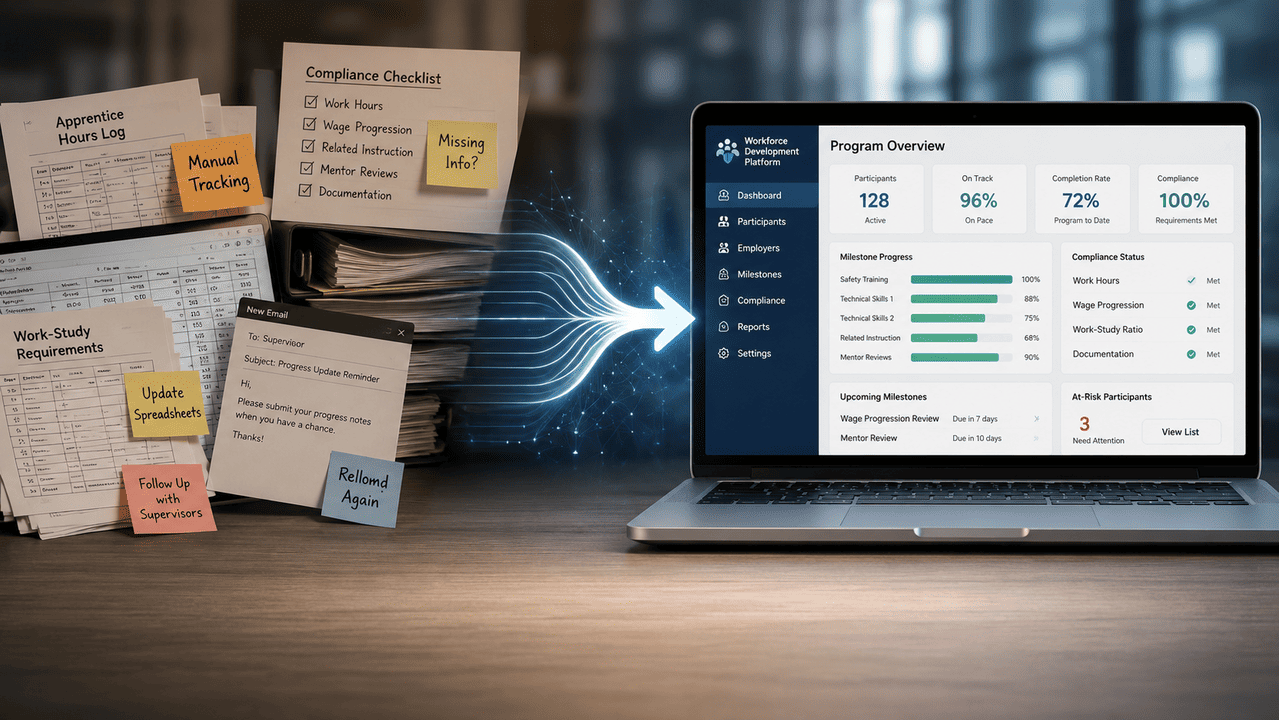
Work based learning tracking software solves these challenges by centralizing documentation and automating routine tasks. Key outcomes include:
- Faster hour verification through employers verify workflows
- Easier compliance reports aligned to state requirements
- Better employer coordination with centralized communication platforms
- Clearer student progress tracking from grades 9–12
This article focuses on concrete features, implementation timelines (30–45 days), and real reporting scenarios for the 2026–2027 school year.
What Is Work-Based Learning Tracking Software?
Work based learning tracking software is a web-based system that records student hours, placements, evaluations, and compliance data for internships, apprenticeships, job shadowing, and other WBL experiences. Unlike SIS or LMS platforms, this tool is purpose-built for CTE programs with fields for placement sites, mentors, wages, and safety training dates.
Core capabilities include:
| Feature | Function |
|---|---|
| Hour Logging | Students log via mobile apps or web interfaces |
| Employer Verification | Supervisors approve hours through email links |
| Placement Management | Track all WBL activities across pathways |
| State-Aligned Reporting | Generate compliance reports for Perkins V |
| Analytics Dashboards | Real-time visibility into program performance |
Typical users span coordinators, CTE directors, principals, students, and employer supervisors. The platform centralizes data across multiple campuses, academies, and magnet programs in one platform.
How Implementation Works in 3 Practical Steps
Districts can launch within a single semester—start configuration in August, go fully live by October. Streamlining work-based learning management can significantly reduce administrative burden, allowing coordinators to focus on enhancing student experiences.
Step 1: Import Your Existing WBL Data
Begin by importing CSV exports from your SIS, Google Sheets, and legacy employer databases. Typical data includes:
- Student rosters for 2024–2027 cohorts
- Active employer contacts and placements
- Historical hour totals from the last 2–3 school years
Bulk upload templates help clean inconsistent data like duplicate employers or missing emails. Most districts complete this step in 5–10 business days, then stop updating spreadsheets entirely.
Step 2: Configure Programs, Pathways, and Compliance Rules
Set up structures mirroring your actual programs—CTE pathways, academies, grade levels, and graduation cohorts. Configuration options include:
- Minimum hour requirements per pathway (e.g., 120 hours for health sciences)
- Required documentation (parent consent, training certificates)
- Evaluation forms aligned to state rubrics
Effective program management involves creating customizable workflows and comprehensive reporting to enhance collaboration among stakeholders. This phase typically takes 1–2 weeks with customer success guidance.
Want to Learn More About Your Registered Apprenticeship Opportunities?
BOOK A FREE CONSULTATION
Step 3: Launch and Start Tracking Hours in Real Time
Students receive login instructions via SSO and start logging hours immediately. Modern WBL software replaces manual spreadsheets and paper forms with automated workflows that include:
- Mobile-friendly time tracking for students
- Employer portals eliminating paper timesheets
- Automated reminders sent when hours are overdue
- Dashboard alerts when students near required thresholds
Most teams see meaningful time savings within 30 days of go-live. Organizations benefit from improved efficiency and scalability by automating routine tasks.
Work-Based Learning Tracking Software vs. Spreadsheets
In 2026, many districts still have multiple coordinators across schools maintaining separate Google Sheets or Excel files. This creates version conflicts, lacks audit trails, requires manual hour calculations, and offers no self-service for students or employers.
Software advantages include:
- Single source of truth with role-based access
- Automated calculations and real time visibility
- One-click exports generating complete logs with signatures in under 60 seconds
Coordinators reclaim 6–12 hours weekly by offloading email follow-ups and manual totals. Centralized program management systems help track student experiences, manage documentation, and ensure compliance with state requirements.
Track Every Type of Work-Based Learning Experience
Districts rarely run just one type of experience. Work-based learning opportunities include internships, job shadowing, apprenticeships, and cooperative education programs, allowing students to apply classroom knowledge in real world settings. The software should support 15–20 distinct experience types with configurable rules.
Stop Chasing Missing Timesheets
Manual follow-up through phone calls, sticky notes, and email chains fails during busy periods like May and December. Automated reminders are commonly used in hour tracking systems to ensure students submit their timesheets on time, reducing the need for manual follow-ups.
Many platforms provide templates for timesheets, allowing students to submit hours in single-event, daily, or multiday formats. Read-only audit logs show when entries were created, edited, and approved—helping resolve discrepancies instantly.
Employer and Opportunity Management
Robust employer management systems enable local businesses to engage with educational institutions, helping build a talent pipeline. The software maintains directories with fields for address, industry sector, contacts, and site-specific requirements.
Creating partnerships with local businesses is essential for providing students with real world work based learning experiences that enhance career readiness. Coordinators can post opportunities with dates, pay rates, prerequisites, and track placement history since 2022–2023.
Tracking Every Student’s WBL Journey
A student profile aggregates all placements from grades 9–12, verified hours by type, and milestones completed. Better student outcomes are facilitated by the creation of a longitudinal record of student experiences.
Students participating in WBL experiences develop skills directly related to their careers and can explore their career interests while building their resumes. Counselors access read-only views without requesting custom reports, supporting senior portfolios and college applications.
Compliance, State Reporting, and Audits
State agencies and Perkins V require precise documentation of WBL participation. Automated reporting and compliance generates real-time reports for CTE compliance without manual tracking. Required reporting includes:
- Total hours by type and subgroup
- Participation aligned to CTE pathways
- Employer counts by industry cluster
The system generates preformatted exports (CSV, PDF) for 2025–2026 and 2026–2027 templates. Streamlined compliance ensures all placements meet safety standards and legal requirements, while centralized documentation securely stores training agreements and liability insurance proof.
Analytics That Improve Program Quality
Beyond compliance, analytics answer strategic questions like “Which pathways need more employer partners in 2026–2027?” Real-time analytics provides visibility into student progress, completion rates, and employer engagement.
Data and insights from work-based learning programs can be leveraged to measure student progress, demonstrate program impact, and support district performance reporting and funding goals. Data-driven decisions help administrators identify skill gaps and measure program ROI for advisory boards and school boards.

Why Choose Our Work-Based Learning Tracking Software
Unlike generic tools, our platform offers K–12-first design with fast implementation—district launch in under 45 days. Effective WBL tracking software must bridge the gap between classroom instruction and professional experience.
Key differentiators:
- Unlimited employer records and multi-district support
- Role-based permissions for CTE directors, principals, and counselors
- Same-business-day support during the school year
- Automatic updates reflecting changing state WBL rules
Centralized communication and evaluation features allow mentors and educators to provide real-time feedback on skill attainment. Schools can effectively connect students with work based learning opportunities by partnering with local businesses and community organizations.
Pricing, Rollout Planning, and Change Management
Pricing is based on student count or district size with transparent tiers—no surprise add-on fees for core features. Districts can pilot with limited schools for one semester before expanding.
Recommended rollout:
| Phase | Timeline |
|---|---|
| Stakeholder Alignment | Late Spring 2026 |
| Configuration | Summer 2026 |
| Go-Live | Fall 2026–2027 |
A strong partnership between students, administrators, and employers is crucial for effective work-based learning, enhancing student outcomes and career readiness. Training sessions support coordinators, students, and employer supervisors through the transition.
Frequently Asked Questions
Yes. The platform supports multi-site oversight with centralized dashboards for district-wide reporting.
Flexible activity types track paid versus unpaid hours separately within unified student profiles.
No. It complements existing systems through imports or APIs—placement workflows manage student-employer matching independently.
The vendor updates report formats to match new state requirements automatically.
Optional parent views or downloadable summaries allow coordinators to share student participation data. Automated tracking of training agreements, safety protocols, and background checks maintains documentation throughout.
Ready to Modernize Your Work-Based Learning Program?
Dedicated work based learning tracking software delivers:
- Reduced manual work through streamlined workflows
- Improved compliance with automated documentation
- Stronger relationships with employer partners
- Real-time dashboards for tracking every student’s progress
Districts can move from scattered spreadsheets to a unified system before the 2026–2027 reporting cycle. Effective work-based learning programs are essential for postsecondary success, requiring strong partnerships between educators and the future workforce.
Schedule a demo today and reclaim your time to focus on building meaningful WBL opportunities that prepare students for life after education.