Table of Contents
- Introduction: Why Apprenticeship Reporting Is So Hard (and So Critical)
- What Is Apprenticeship Reporting Software?
- Core Reporting Features Every Apprenticeship Platform Should Include
- Compliance & Audit Readiness: Turning Data Into Defensible Evidence
- Stakeholder Dashboards: Sponsors, Employers, Mentors, Apprentices
- Implementation: How to Move From Spreadsheets to a Reporting System in 60–90 Days
- How to Evaluate Apprenticeship Reporting Software (Beyond a Feature Checklist)
- Why Choose Our Apprenticeship Reporting Platform
- FAQs About Apprenticeship Reporting Software
Introduction: Why Apprenticeship Reporting Is So Hard (and So Critical)
It’s 4 PM on the last day of the quarter. A program manager at a community college is hunched over three different spreadsheets, cross-referencing OJT hours against RTI attendance records while an employer emails asking “how is my apprentice doing?” Meanwhile, the RAPIDS upload deadline is tomorrow.

Apprenticeship reporting software is a system that centralizes hours, competencies, wages, and outcomes into audit-ready reports for DOL, funders, and employers. Companies—including training providers, employers, and government agencies—use these software solutions to manage apprenticeship programs across industries. These software solutions help eliminate the need for manual management of spreadsheets, calendars, and paperwork, allowing for streamlined delivery of tailored apprenticeship programs.
The pain points are consistent across sponsors: reconciling OJT versus RTI hours at quarter-end, preparing documentation for a USDOL or state apprenticeship agency review, and responding to constant employer inquiries about progress. The software is designed to be accessible, lowering barriers for both managers and apprentices. This article moves quickly from definition to specific features, timelines, and selection criteria so you can act this year. Our solution serves as the running example throughout—built specifically for apprenticeship reporting rather than retrofitted from generic HR tools.
Apprenticeships are the future of work, and simplifying reporting is essential for the continued growth and accessibility of apprenticeship programs.
What Is Apprenticeship Reporting Software?
Apprenticeship reporting software is used by apprenticeship sponsors, intermediaries, colleges, and workforce boards to log OJT and RTI hours, track wage progressions, record competencies, and produce standardized reports from one place. Companies rely on the software for effective program management, including planning and tracking apprenticeship activities. This includes RAPIDS exports, state forms, and grant outcomes for registered apprenticeship programs.
Unlike generic training management, HRIS, or learning management system tools, dedicated apprenticeship management software is designed to manage the entire apprenticeship training lifecycle, including onboarding, tracking hours, organizing training sessions, and documenting outcomes for regulatory reporting. The software also supports the creation and management of structured plans and courses, standardizing training experiences across programs.
Key capabilities include:
- Tracking OJT and RTI hours against occupation-specific standards
- Managing wage progression tied to competencies
- Producing RAPIDS, WIOA, and state-specific compliance reports
- Supporting multi-stakeholder access for employers, mentors, and learners
- Managing course catalogs, tracking learner progress across different courses, and supporting the development of On-The-Job Learning (OJL) plans
Modern tools are cloud-based, updated frequently with minor feature releases every 2–4 weeks, and support USDOL Registered Apprenticeship Programs alongside state agencies like California DAS or Washington L&I.
Core Reporting Features Every Apprenticeship Platform Should Include
Every apprenticeship program needs reporting capabilities that match regulatory requirements and daily operations. The right apprenticeship reporting software helps streamline apprenticeship management and reporting processes, reducing administrative costs. Here’s what matters:
- OJT hour tracking: Log hours by occupation, task, and employer with real-time dashboards showing progress toward benchmarks like 2,000 hours per year. Mobile-friendly tools allow apprentices to log on-the-job training and related instruction hours from any location.
- RTI tracking: Pull attendance and completion data from classroom lists or LMS integrations, aligning them with standards such as 144 hours per year requirements. Software must allow for real-time tracking of specific skills and competencies unique to the occupation of the apprentice.
- Wage progression: Effective software monitors an apprentice’s progress and automatically flags when they are due for a pay increase, with automatic audit trails showing why each wage step was approved.
- Competency sign-offs: Mentor or supervisor approvals with digital signatures and timestamps feed directly into progress reports. Dedicated software provides standardized workflows that allow organizations to manage apprentices across multiple departments or locations.
- Outcome reporting: Track completions, cancellations, demographics, placement, and wage gains for state reports and grant deliverables. Organizations can track high-level metrics such as completion rates and post-apprenticeship retention to measure program ROI, while also tracking compliance with regulations and ensuring organizations meet what learners and clients expect in terms of standardized, reliable training experiences.
- Export formats: CSV exports for RAPIDS uploads, PDF progress reports for employers, and summary dashboards for board briefings.
Compliance & Audit Readiness: Turning Data Into Defensible Evidence
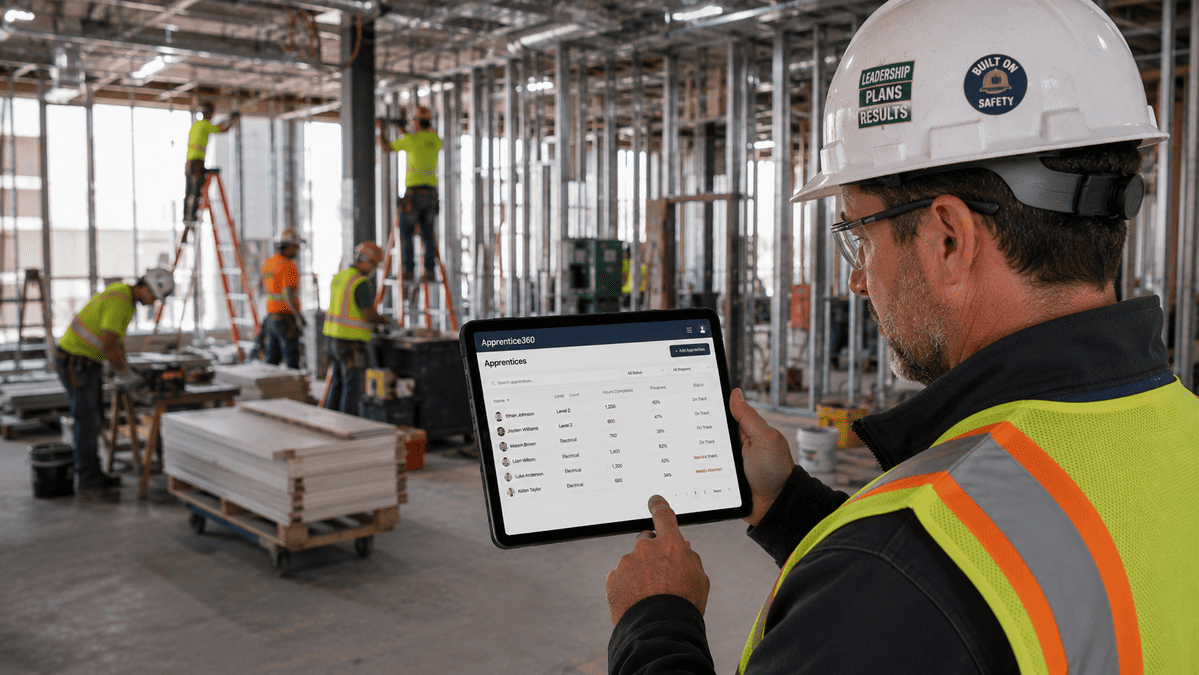
During a USDOL or state apprenticeship agency audit, sponsors must produce documented evidence of apprenticeship standards alignment, hour completion, competency assessments, and wage progression documentation. Scrambling to assemble this from scattered systems creates audit risk.
Good apprenticeship reporting software keeps sponsors audit-ready every day. Maintaining accurate training records for each apprentice is crucial for compliance and can be streamlined through apprenticeship management software, which links data points to the correct contacts or courses. Software can automatically collect and compile necessary data into pre-built templates for federal or state regulatory bodies.
Key compliance features include:
- Immutable activity logs showing who edited what and when
- Document storage for standards and agreements
- Configurable data retention aligned with state rules (typically 3–7 years after completion)
- Compliance software should feature built-in templates for federal and state reporting to avoid manual data entry errors
Concrete scenarios: producing a cohort completion report for a 2025–2026 grant, generating demographic breakdowns by occupation, or showing time-stamped proof of safety training before jobsite placement. The system should support both federal RAPs and state-only programs with customizable fields for specific state requirements.
Stakeholder Dashboards: Sponsors, Employers, Mentors, Apprentices
High-quality tools provide dedicated dashboards for apprentices, mentors, employers, and instructors to facilitate communication. Centralized systems eliminate communication silos and ensure stakeholders view the same real-time progress data.
For sponsors and program managers: A dashboard surfacing at-risk apprentices (behind on hours or RTI), upcoming reporting deadlines, and key KPIs including completion rate, average wage gain, and enrollment by cohort year.
For employers and HR partners: Filtered reports showing only their apprentices with hours logged this pay period, pending competency approvals, and forecasted completion dates. Dashboards can also display upcoming instructor-led sessions and allow for coordination with instructors. Easy access to data eliminates constant email requests.
For mentors: A simple mobile view of assigned apprentices, outstanding sign-off requests, and quick entry for daily or weekly OJT hours designed for busy workdays.
For apprentices: A learner portal showing learner progress toward completion, completed competencies, upcoming classes, and wage steps with clear indicators like “you are 78% complete with OJT hours.” The portal features a simple login process, giving apprentices and employers easy access to their dashboards and training information.
Role-based permissions ensure each person only sees authorized data, which is crucial for FERPA and internal policy compliance.
Implementation: How to Move From Spreadsheets to a Reporting System in 60–90 Days
Most organizations can move from scattered spreadsheets to a functioning reporting system in 2–3 months with a structured plan. Effective progress tracking in apprenticeship programs can reduce administrative work significantly, allowing for more focus on learner outcomes and compliance with standards.
High-level roadmap:
- Weeks 1–2: Discovery—map existing data sources (Excel logs, LMS exports, HRIS wage data) into a standard data model
- Weeks 3–6: Configuration and data migration—create standards, occupations, and required reports; set up billing cycles and manage payment schedules to ensure compliance for different clients
- Weeks 7–10: Pilot and refinement with one occupation or employer cohort
A training management system (TMS) can automate training scheduling and communication tasks, ensuring that all stakeholders, including trainers and apprentices, receive timely updates about sessions and changes. Organizations can automate tasks like sending reminders for on-the-job training logs and scheduling technical instruction.
Training providers and implementation specialists with apprenticeship backgrounds guide configuration so organizations don’t start from a blank screen. With a TMS, automatic email notifications can be sent to all affected parties when changes occur in the training schedule, eliminating the need for manual follow-ups.

How to Evaluate Apprenticeship Reporting Software (Beyond a Feature Checklist)
Many tools claim to “do reporting,” but the difference shows up in audits, renewals, and daily usability. A TMS helps manage every stage of an apprenticeship, including recruiting, scheduling training sessions, tracking completions, and coordinating with external training providers, thereby streamlining the entire process.
Evaluation criteria:
- Depth of apprenticeship-specific reporting (RAPIDS, state forms, WIOA outcomes)
- Recruiting features for attracting and selecting apprentices as part of end-to-end apprenticeship management
- Flexibility for custom reports without vendor support
- Ease of use for non-technical staff and participants
- Request live demos using your own sample data and real scenarios
Check how often the vendor ships reporting improvements and regulatory updates. Look for release notes responding to DOL changes. Ask about support for multi-employer sponsors, intermediaries, and regional collaboratives where reporting must be sliced by employer, region, or funding stream.
Security, hosting location, and data ownership matter. Our platform keeps ownership of data with the sponsor and never sells apprenticeship data to third parties.
Why Choose Our Apprenticeship Reporting Platform
Our platform was designed specifically around apprenticeship reporting use cases—tracking standards, hours, competencies, and wage steps—rather than retrofitting generic HR or training tools. Apprenticeship training management software helps manage multiple clients with different requirements by allowing customization of training programs, reporting, and compliance documentation for each client.
What sets us apart:
- Pre-built RAP and state reporting templates ready for RAPIDS exports
- Configurable dashboards by employer, cohort, and funding source
- Point-and-click exports for compliance audits and board briefings
- Responsive, apprenticeship-savvy support team with implementation guidance
Our team has direct experience running apprenticeship and workforce programs, so built-in reports mirror what sponsors actually must deliver to DOL, state agencies, employers, and grant funders. Apprenticeship management software can automate training scheduling and communication tasks, reducing administrative workload and improving efficiency in managing apprenticeship programs.
Book a demo or discovery call to see your current spreadsheets turned into live dashboards and sample compliance reports within the session.
Want to Learn More About Your Registered Apprenticeship Opportunities?
BOOK A FREE CONSULTATION
FAQs About Apprenticeship Reporting Software
Apprenticeship reporting software specializes in tracking OJT hours, RTI completion, wage progressions, and regulatory reports that generic systems don’t produce reliably. Effective client management in apprenticeship programs includes maintaining accurate training records for every apprentice, which can be easily accessed and reported on, reducing administrative burdens.
Yes. The same infrastructure supports both with different reporting templates. Apprenticeship training management software helps manage every stage of an apprenticeship, including tracking completions and ensuring compliance with regulatory or funding obligations.
Most organizations complete implementation in 60–90 days. Factors like data complexity, number of occupations, and stakeholder availability can accelerate or slow the process.
Import options from spreadsheets and legacy systems ensure organizations keep a complete history for audits. Training management systems can automate training scheduling and communication tasks, allowing for the assignment of trainers, venues, and apprentices to each session using templates or recurring booking rules.
Pricing structures vary—typically per active apprentice, per program, or per organization. Contact our team for a tailored quote based on your scale and requirements.
Gather sample reports you currently submit, anonymized spreadsheets, and a list of must-have metrics. This ensures the demo addresses your specific workflow and candidates for improvement.
Stop reconciling spreadsheets at quarter-end and focus on what actually matters: learner outcomes and program success. Book a demo today to see how our platform transforms compliance chaos into clear, actionable data.