Table of Contents
- What Is Employee Training Tracking Software?
- Why Tracking Employee Training Is Essential (Beyond Just Checking a Box)
- Common Training Management Problems (and How Software Fixes Them)
- Key Features to Look For in Employee Training Tracking Software
- How GoSprout Goes Beyond Generic Training Tracking Software
- Implementing Training Tracking Software Successfully: A Step-by-Step Guide
- Signs It’s Time to Upgrade Your Employee Training Tracking Approach
- How GoSprout Helps Different Stakeholders Track Training Effectively
- FAQs About Employee Training Tracking Software and Apprenticeships
- Why Choose GoSprout for Employee Training Tracking and Work-Based Learning
- Next Steps: See GoSprout’s Training Tracking Software in Action
Picture this: it’s Monday morning, and your training manager is buried in three different spreadsheets, two shared drives, and a stack of paper sign-off sheets, trying to verify that 40 apprentices have completed their required on-the-job training hours and related technical instruction before a Department of Labor audit next week. Half the records are outdated. A few certificates are missing. Nobody is sure which apprentices have hit the 2,000 OJT hour threshold required for their next wage step. Sound familiar?
This is where employee training tracking software changes everything. At its simplest, it’s a centralized system designed to track employee training completion, hours, competencies, and certifications across online training, classroom instruction, and on-the-job learning. These platforms help organizations meet regulatory requirements and remove the guesswork from workforce compliance. When training records are scattered or incomplete, the consequences are real: failed audits, lost funding, delayed wage progressions, and even program closures.
GoSprout is a work-based learning and apprenticeship-focused training management software built to help employers, schools, and sponsors track employee training and prove compliance in real time. Effective training tracking leads to better compliance and increased completion rates, and that’s exactly what GoSprout was designed to deliver. In this article, you’ll learn how employee training tracking software works, the key features to look for, common mistakes to avoid, how GoSprout is different from generic solutions, and what steps to take next.
What Is Employee Training Tracking Software?
Employee training tracking software is a training management system that centralizes records for training programs, training courses, OJT tasks, RTI classes, certifications, and training completion data into a single, accessible platform. It is used to manage and monitor educational content for employees, but more importantly, it proves who completed which training, when they completed it, for how many hours, and against which standards. It provides centralized records for training histories and certificates that are always audit-ready.
Most organizations start with basic methods: Excel spreadsheets, shared drives, and email chains. These approaches fall apart at scale. Version control becomes a nightmare, expiry dates get missed, and when someone asks for a compliance report, the scramble begins. A dedicated training tracking software solution handles version control, expiry alerts, dashboards, and reporting automatically, so your team spends time on development instead of data entry. Employee training tracking software is often a learning management system at its core, but the critical distinction is this: learning management systems deliver online training content, while training tracking software proves completion, compliance, and competency.
For apprenticeship and internship programs, the software must track additional dimensions that generic tools simply don’t cover: OJT competencies, RTI hours, mentor sign-offs, wage step eligibility, and federal or state reporting formats like RAPIDS, WIPS, and PIRL. Consider a 2025 healthcare apprenticeship program-say, a Medical Assistant program-where each apprentice must prove at least 2,000 OJT hours plus 306 hours of paid classroom instruction. Without a dedicated employee training tracker, verifying these numbers across dozens of apprentices, multiple clinical sites, and several RTI providers is nearly impossible to do accurately or efficiently.
Why Tracking Employee Training Is Essential (Beyond Just Checking a Box)
Tracking employee training is about far more than satisfying a regulatory checkbox. It directly impacts safety, funding, career progression, and organizational performance.
Compliance is non-negotiable. Many industries require specific training for compliance to avoid fines, and this is especially true in U.S. Registered Apprenticeship Programs. Under federal regulation 29 C.F.R. § 29.5(b)(4), time-based apprenticeships require a minimum of 144 RTI hours per year and typically at least 2,000 OJT hours annually. Missing even a handful of hours-or failing to document them properly-can jeopardize federal and state program approval. In healthcare, manufacturing, and construction, compliance training requirements are layered on top of these apprenticeship obligations, raising the stakes even further.
Employee development depends on visibility. When you map an apprentice’s progression from novice to competent worker, you create a documented path tied to competency assessments, supervisor evaluations, and real training data. This progression informs promotions, wage increases, and credential attainment. Training tracking software enhances employee performance and retention because learners can see exactly where they stand and what remains. Self-directed learning boosts employee engagement and retention, particularly when employees have a clear view of their training progress and training status.
Funding and ROI require proof. U.S. organizations spent $102.8 billion on corporate training in 2025, with an average spend of about $1,254 per employee per year. For organizations using WIOA grants, state apprenticeship incentives, or other workforce funding, accurate reporting is the prerequisite for receiving and retaining those dollars. Training tracking software helps prove ROI to executives and funders by connecting training completion to measurable outcomes like credential attainment and wage progression. Data-driven decision-making reveals skill gaps in training, so you can redirect resources where they matter most.
Risk reduction is measurable. Fewer accidents, fewer skill mismatches on critical tasks, and stronger documentation if an incident or audit occurs. When your employee training records are centralized and timestamped, you have a defensible record. Consider a construction firm that raised training completion from 60% to 95% after switching from spreadsheets to training tracking software-the difference isn’t just operational; it’s a reduction in liability exposure across every job site.
Modern workforces demand a single source of truth. Remote work, hybrid learning, multiple training providers (community colleges, online academies, in-house trainers)-the modern training ecosystem is complex training territory. Without centralized tracking, you lose visibility into who’s trained, who’s current, and where training gaps exist. Employee growth depends on reliable, accessible training history that follows a learner across every context.
Common Training Management Problems (and How Software Fixes Them)
Scattered Records and No Single Source of Truth
When training records live in multiple spreadsheets, email inboxes, and LMS exports, you’re always one step away from a data gap. Version control issues mean two people can look at the same apprentice’s file and see different numbers. Centralized training records simplify compliance management for audits because everything-OJT logs, RTI attendance, certificates, mentor evaluations-lives in one place. Centralized training records simplify compliance audits and management reviews by eliminating the reconciliation work that eats up hours every week.
GoSprout was built to solve this problem at its root: every data point about an apprentice’s training is stored, versioned, and accessible in a single profile. Audit prep goes from days to minutes.
Manual Updates That Steal Hours Every Week
Chasing down certificates, rebuilding training matrices, and manually entering apprentice hours is a massive time sink. Training managers in apprenticeship programs often spend 5–10 hours per week on these tasks-time that should go toward mentoring, curriculum improvement, and employee development. Automated tracking reduces manual follow-up by letting mentors, supervisors, and apprentices log hours and upload evidence from mobile devices. Training tracking software automates monitoring of training completion so your team isn’t playing catch-up.
Training tracking software automates compliance monitoring and certification renewals, meaning expired credentials don’t slip through the cracks. Instead of reactive scrambling, you get proactive alerts.
Audit Panic and Funding Risk
About 43% of companies describe their compliance programs as basic, and 23% have no formal compliance plan at all. When regulators, accreditation bodies, or apprenticeship agencies request detailed training completion and hour reports, these organizations face a crisis. Training tracking tools generate reports for audits and compliance verification, including exports formatted for RAPIDS, WIPS, and PIRL-systems required by federal and state apprenticeship agencies. Without automated reporting, the risk of data export errors, missed deadlines, and regulatory non-compliance multiplies.
No Real-Time Visibility into Skills and Compliance Gaps
Managers often don’t know which employees are fully trained, which certifications are expiring, or which competencies remain unverified. This blind spot creates safety risks and workforce planning failures. Compliance tracking software automates monitoring of training completion rates, providing real-time dashboards that show exactly where each apprentice, intern, or employee stands. Proactive alerts let you close training gaps before they become audit findings.

GoSprout was built specifically to address these issues for apprenticeship sponsors, employers, and schools managing hundreds of apprentices across multiple sites.
Key Features to Look For in Employee Training Tracking Software
Not all training tracking software solutions are created equal. Here’s what matters most when you’re evaluating platforms for apprenticeships, internships, or structured employee training programs.
Centralized employee training records. The system should store all training programs, completions, OJT logs, RTI class attendance, certificates, and supervisor notes in one profile per learner. HR, trainers, mentors, and compliance officers should all access the same source of truth.
Real-time dashboards and training completion tracking. Real-time dashboards visualize training progress across sites, cohorts, occupations, and sponsors. Dashboards provide insights to improve overall employee performance by surfacing who’s on track, who’s behind, and where intervention is needed. Automated tracking systems should include real-time dashboards and audit logs for full transparency. You should be able to view training completion status at a glance-by individual, team, or entire program.
Competency and skills tracking. The best platforms let you define competencies per role or occupation and map actual trainee progress against them, including supervisor sign-offs. This is how you identify skill gaps, track employee progress from entry-level to journeyworker, and ensure each learner masters every required work process. Detailed analytics allow managers to identify struggling employees early, before small gaps become program-level problems.
OJT and RTI hour tracking for apprenticeships. For Registered Apprenticeship Programs, the software must handle detailed OJT task logs, RTI class schedules, hour thresholds per year, and automatic aggregation tied to wage progression and registration requirements. Construction apprenticeships average 6,729 OJT hours and 539 RTI hours, while healthcare programs average around 2,260 OJT and 270 RTI. The system needs to handle this range without manual workarounds.
Automated alerts and notifications. Automated reminders help ensure timely completion of compliance training. Automated reminders help employees stay on track with training deadlines, whether it’s an expiring certification, an overdue OJT log, or an upcoming compliance course deadline. Certification tracking involves automated reminders for workforce auditing, reducing the risk of lapsed credentials. Automatic reminders for training sessions and certification renewals keep everyone accountable.
Robust reporting and export tools. It generates compliance reports to meet industry regulations and supports one-click generation of audit-ready reports. Customizable reporting features provide insights into training effectiveness, and you should be able to schedule reports, generate reports in CSV/PDF, and export data formatted for RAPIDS, WIPS, or PIRL. Detailed reporting and the ability to identify trends across cohorts is what separates useful software from digital filing cabinets.
Mobile access for learners and mentors. Apprentices and mentors need to log hours, upload evidence, and check training status from the job site or classroom. Mobile-first tools are no longer optional-they’re how OJT data actually gets captured accurately and consistently. Employee tracking from the field ensures your training data reflects reality.
Integrations with LMS, HRIS, and SIS. The ability to connect your learning management systems, HR platforms, and student information systems means completions and enrollments sync automatically. Many systems support role-based learning paths for personalized training, and when these connect to your existing systems, you avoid double entry and data mismatches. Employee engagement improves with interactive courses and quizzes delivered through integrated platforms, and personalized learning paths keep training relevant.
How GoSprout Goes Beyond Generic Training Tracking Software
GoSprout is not a generic LMS bolted onto a compliance checklist. It’s a work-based learning management and training tracking platform built for apprenticeship sponsors, school districts, colleges, and employers who need to manage training courses, prove compliance, and scale programs without drowning in administrative overhead.
Where most employee training management software focuses on delivering online training content, GoSprout’s core strength is tracking what happens on the job and in the classroom with equal rigor. OJT and RTI tracking, automated compliance reporting for RAPIDS, WIPS, and PIRL, competency frameworks aligned with occupation standards, and multi-stakeholder portals for employers, schools, sponsors, and apprentices-all built into a single platform. GoSprout helps manage training courses and track every task, aligning course catalogs with occupation standards and linking training completion to wage step approvals. Employee training tracking software improves onboarding processes, and GoSprout extends this by ensuring that new apprentices have a clear, structured path from day one.
Consider a realistic scenario: a statewide youth apprenticeship initiative using GoSprout to manage 500 apprentices across healthcare, IT, and advanced manufacturing. Apprentices are enrolled at multiple high schools and community colleges, placed with dozens of employers, and overseen by regional sponsors. GoSprout consolidates all RTI attendance, OJT hour logs, competency evaluations, and wage progression data into one system-giving sponsors a single compliance dashboard instead of 50 spreadsheets. Training tracking software supports scalable training for growing organizations, and GoSprout is built for exactly this kind of growth.
The result: workforce development teams spend less time on data wrangling and more time on mentoring, program improvement, and learner engagement. Regulators and funders get accurate, timely data. Apprentices see their own training progress clearly and know exactly what’s next on their path.
Implementing Training Tracking Software Successfully: A Step-by-Step Guide
Rolling out training tracking software effectively requires more than clicking “install.” Here’s a practical implementation roadmap.
Step 1: Clarify objectives and regulatory requirements. Define clear objectives before implementing training tracking software. Are you focused on compliance for healthcare or construction? Meeting apprenticeship standards? Tracking general employee development? Your answer shapes every configuration decision. Choose software based on your organization’s size and needs-a 20-apprentice pilot has different requirements than a 2,000-learner enterprise rollout.
Step 2: Map roles, programs, and standards. List every training program, job role, apprenticeship occupation, and required competency or hour threshold. For example: 2,000 OJT hours per year, 144 RTI hours per year, specific work processes for each occupation. This mapping becomes the backbone of your system configuration.
Step 3: Clean and import existing training data. Consolidate spreadsheets, paper records, LMS exports, and sign-off sheets. Establish clear naming conventions before bulk importing. This step is often the most time-consuming, but it’s what transforms your software solution from an empty shell into an accurate training management system.
Step 4: Configure workflows, alerts, and approvals. Set rules for training assignment, supervisor and mentor approvals, wage-step sign-offs, and automated notifications for upcoming expirations or hour shortfalls. Automate reminders for training sessions and certification renewals so nothing falls through the cracks.
Step 5: Train stakeholders. Run focused training sessions for each user group: HR teams, mentors who will log OJT evaluations, instructors managing RTI delivery, and apprentices using the mobile app. Progress tracking is only as good as the data people enter.
Step 6: Pilot with one cohort first. Start with a single 2026 intake cohort or one department to refine your training processes before rolling out across all programs. This limits risk and surfaces workflow issues early.
Step 7: Review data monthly and adjust. Monitor training progress using analytics and reporting tools. Review completion rates, hour accumulation, and compliance gaps on a recurring schedule. Integrate training tracking software with existing systems for efficiency as your confidence and scope grow. Use detailed analytics to identify trends, spot bottlenecks, and adjust future training or mentoring practices based on real data.
Signs It’s Time to Upgrade Your Employee Training Tracking Approach
Not sure if your current setup is holding you back? Here are the warning signs:
- You spend more than 5–10 hours per week manually updating training spreadsheets or chasing certificates. That’s time stolen from strategic employee development work.
- Apprentices or employees hit wage progression delays because you can’t quickly verify completed training or OJT hours. Delayed wage steps hurt retention and morale.
- Audits from regulators, accrediting bodies, or the Department of Labor consistently require last-minute scrambling to assemble training evidence. If audit prep feels like a fire drill, your tracking method is failing.
- You operate across multiple sites, campuses, or employers and can’t see consolidated training data in one place. Managing complex training across locations without a centralized system is unsustainable.
- Mentors and supervisors don’t know which tasks their apprentices still need to practice or which competencies remain unverified. This creates learner progress blind spots.
- You’re expanding Registered Apprenticeship, pre-apprenticeship, or internship programs and your current tools won’t scale. Course management across growing programs demands purpose-built software.
- Grant funders or workforce boards ask for detailed performance metrics-completions, wage gains, credential attainment-and you can’t reliably deliver compliance reports, schedule reports, or generate reports that meet their standards.
How GoSprout Helps Different Stakeholders Track Training Effectively
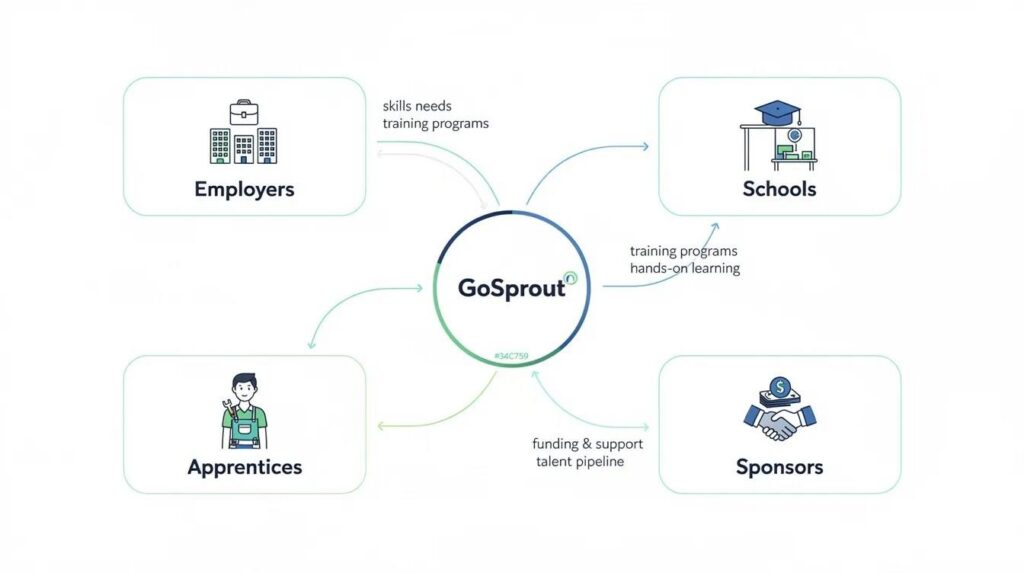
GoSprout serves a multi-sided ecosystem. Here’s how each stakeholder benefits:
Apprenticeship and program sponsors use GoSprout to oversee all training programs, cohorts, and employers from one dashboard. They can track OJT/RTI hours, monitor compliance status, and generate the RAPIDS/WIPS/PIRL data they need-without chasing individual employers for updates.
Employers and HR teams monitor employee training, skills, and certifications to verify readiness for roles and support workforce planning. Tracking compliance and employee performance with accurate employee training tracking data means fewer surprises and stronger talent pipelines.
Schools, colleges, and RTI providers align course offerings with apprenticeship standards, track class attendance and grades, and share RTI completion data back to sponsors and employers. This closes the loop between classroom instruction and on-the-job application.
Mentors and supervisors use mobile and web tools for logging daily or weekly OJT activity, rating competencies, and giving structured feedback tied directly to the training program. Training delivery becomes documented, not anecdotal.
Apprentices, interns, and trainees get a clear view of what’s required, how many hours they’ve logged, which competencies they’ve mastered, and what’s next on their personalized learning paths. This transparency drives engagement and helps learners take ownership of their own training portal experience.

FAQs About Employee Training Tracking Software and Apprenticeships
What’s the difference between an LMS and employee training tracking software?
A learning management system primarily delivers online training content-courses, quizzes, videos. Employee training tracking software manages the records, completions, hours, and compliance reporting that prove training actually happened. GoSprout integrates with existing LMS tools so you can deliver training content and track compliance in one workflow.
Can GoSprout track both online training and on-the-job training for apprentices?
Yes. RTI courses and OJT tasks are logged separately but rolled up into a single learner profile. This means you can track an apprentice’s classroom instruction alongside their on-site work hours, competency evaluations, and mentor sign-offs-all connected to their employee’s training status and training schedules.
How does training tracking software support RAPIDS, WIPS, and PIRL reporting?
GoSprout’s data architecture maps directly to the required fields for federal Registered Apprenticeship reporting systems. Automated data capture and export formats align with these systems, flagging incomplete data before deadlines. This is how you avoid the manual reformatting and data errors that cause compliance risks during regulatory submissions.
Is employee training tracking software only for large enterprises?
Not at all. GoSprout is used by school districts, regional sponsors, and mid-sized employers as well as larger organizations. It scales from small pilot programs to multi-state initiatives. For context on the broader market, ProProfs Training Maker offers a free plan for small teams, Connecteam is free for small businesses and starts at $29/month, TalentLMS starts at $59/month for training tracking solutions, 360Learning starts at $8/user/month for collaborative learning, and iSpring Learn starts at $3.66/user/month for mobile learning. GoSprout differentiates by focusing specifically on apprenticeship and work-based learning compliance-not just generic course delivery.
How long does it take to implement a training tracking system like GoSprout?
For a single program, expect a few weeks from setup to go-live. Complex, multi-entity rollouts involving multiple employers, schools, and sponsors may take a few months. Key factors include the volume of existing training records to migrate, the number of stakeholder groups to train, and the complexity of your mandatory training and compliance requirements.
Can mentors and apprentices use GoSprout from their phones?
Yes. GoSprout’s mobile app lets apprentices and mentors log OJT hours, view training plans, upload evidence, and complete select online training directly from their phones. This is critical for industries where learners and supervisors aren’t sitting at desks.
How secure is our employee training data?
GoSprout uses modern security practices including encryption in transit and at rest, role-based access controls, and comprehensive audit logs. The platform supports data privacy requirements for both education and employment contexts, so sensitive information like PII, wage data, and demographic records is protected.
Why Choose GoSprout for Employee Training Tracking and Work-Based Learning
GoSprout exists for a specific purpose: helping organizations launch, track, and scale Registered Apprenticeship Programs, pre-apprenticeships, and internships with confidence. This isn’t a generic corporate e-learning tool adapted for apprenticeships as an afterthought. It’s a platform built from the ground up for the complexities of work-based learning-OJT logging, RTI tracking, competency management, wage progression, and multi-stakeholder compliance.
What makes GoSprout different is how it handles the multi-stakeholder reality. Employers, schools, workforce boards, and regulatory agencies all access accurate, shared data through purpose-built portals. Built-in OJT/RTI hour tracking, automated RAPIDS/WIPS/PIRL support, a mobile app for apprentices, and configurable dashboards by program or sponsor mean you’re not stitching together five different tools to manage one program.
The results are measurable. Sponsors using GoSprout have reported reducing manual reporting time by up to 60% and increasing on-time training completion for apprentices by 25% within a single year. When you assess training effectiveness with real data instead of guesswork, you make better decisions about course management, training materials, and mentor assignments. GoSprout is a dedicated SaaS platform for work-based learning, continuously updated to reflect evolving apprenticeship and workforce regulations-so your compliance management stays current as rules change.
Next Steps: See GoSprout’s Training Tracking Software in Action
If you’re managing apprenticeship or internship programs and spending more time on spreadsheets than on mentoring, it’s time to see what purpose-built training tracking software can do. Schedule a live demo where GoSprout’s team will walk through tracking employee training for your specific programs-whether that’s healthcare apprenticeships, IT internships, or manufacturing youth apprenticeships.
Bring your current spreadsheets or LMS reports. We’ll show you an apples-to-apples comparison of how GoSprout would centralize and automate your training management, so you can stop chasing data and start proving results.